
Payroll checklist: a complete checklist for every pay run
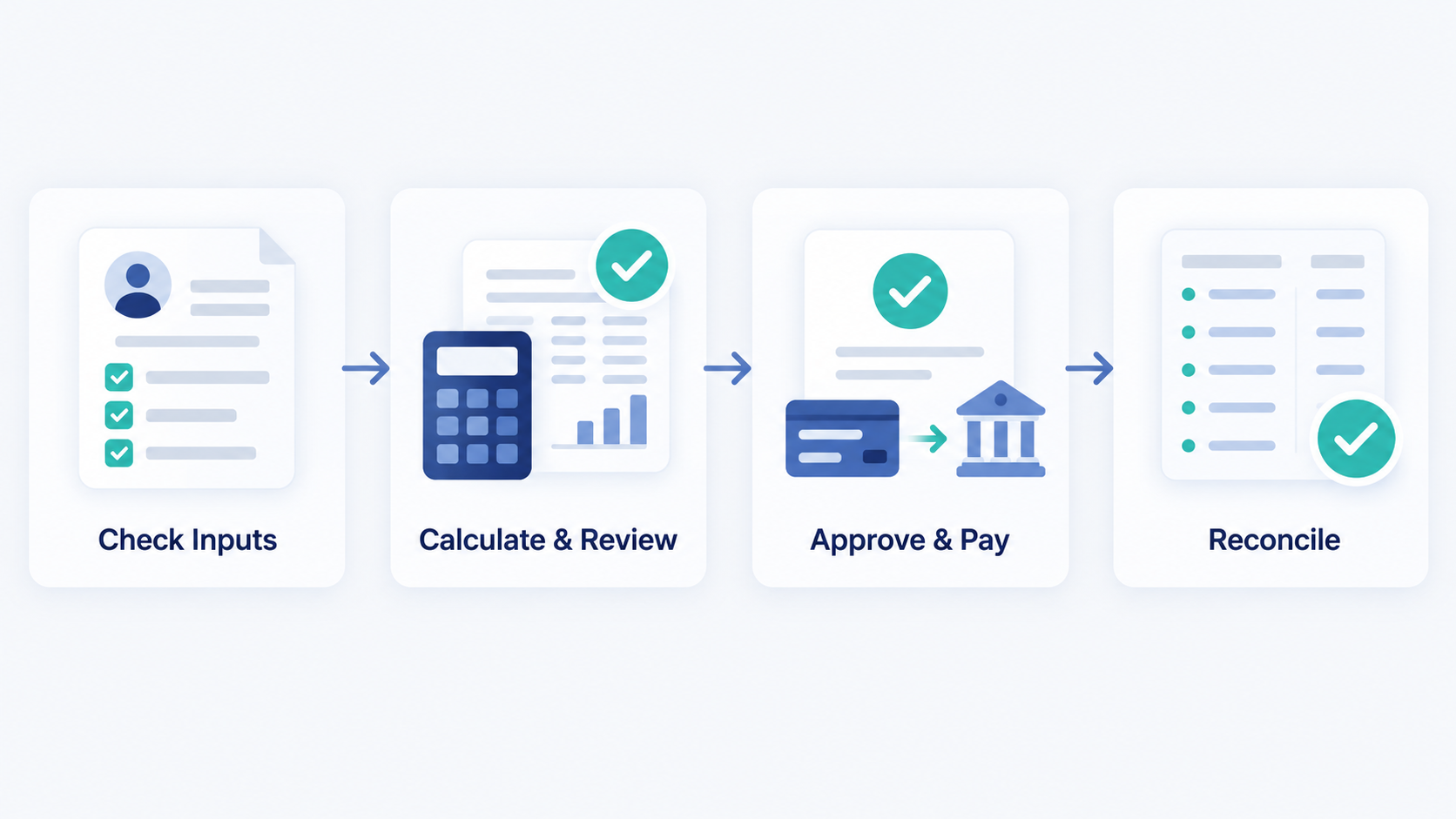
A payroll checklist is a repeatable control document for each pay run. It records what must happen, who owns it, and what evidence proves completion.
Use the checklist before calculation, before payment, and after payroll closes. Adapt every deadline and compliance task to each worker’s location.
Skip to the copyable payroll processing checklist if your pay run is already open.
What is a payroll checklist?
A payroll checklist puts routine controls in the correct order. It helps prevent missed inputs, unreviewed changes, payment failures, and incomplete records.
It is more than a general task list. Each item should name an owner, deadline, reviewer, status, required evidence, and exception route.
One-time payroll setup vs recurring payroll tasks
One-time setup creates the payroll structure. It covers employer registrations, worker records, pay rules, bank access, roles, and opening balances.
Recurring tasks apply that structure to a pay period. They cover inputs, calculations, review, approval, payment, reporting, reconciliation, and recordkeeping.
Use the separate guide to run payroll for the first time.
Payroll checklist cadences
One checklist cannot give every task the same deadline. Assign each control to the cadence that matches its purpose.
| Cadence | When it happens | Main purpose | Coverage |
| Every pay run | Before, during, and after each payroll | Calculate and release accurate pay | Inputs, calculations, approval, payment, reporting, and reconciliation |
| Month-end | After the final relevant run each month | Close payroll-related accounting records | Bank results, liabilities, journals, balances, exceptions, and management reports |
| Year-end | Before and after the local reporting year closes | Complete annual duties and prepare the new period | Year-to-date totals, annual reports, final filings, rule changes, and opening settings |
Build separate views for each cadence. Link them through one payroll calendar and name the owners. payroll cycle.
Payroll processing checklist: before you calculate pay
Incorrect inputs create incorrect payroll. Complete these checks before calculating gross or net pay.
Confirm the payroll calendar, cutoff, and ownership
- Confirm the pay period, payroll cutoff, funding deadline, submission deadline, and payday.
- Adjust the schedule for weekends, holidays, time zones, and bank lead times.
- Name the preparer, reviewer, approver, payment releaser, and reconciliation owner.
- Confirm backup cover and the access each role needs.
- Log late inputs instead of adding them without review.
Update employee and worker information
- Compare active payroll records with current HR records.
- Add approved starters with correct work locations and effective dates.
- Process leavers under applicable final-pay and reporting rules.
- Verify pay-rate, status, benefit, deduction, and location changes.
- Confirm bank changes through a trusted second channel.
- Remove access for people who no longer handle payroll.
Validate time, leave, expenses, and variable pay
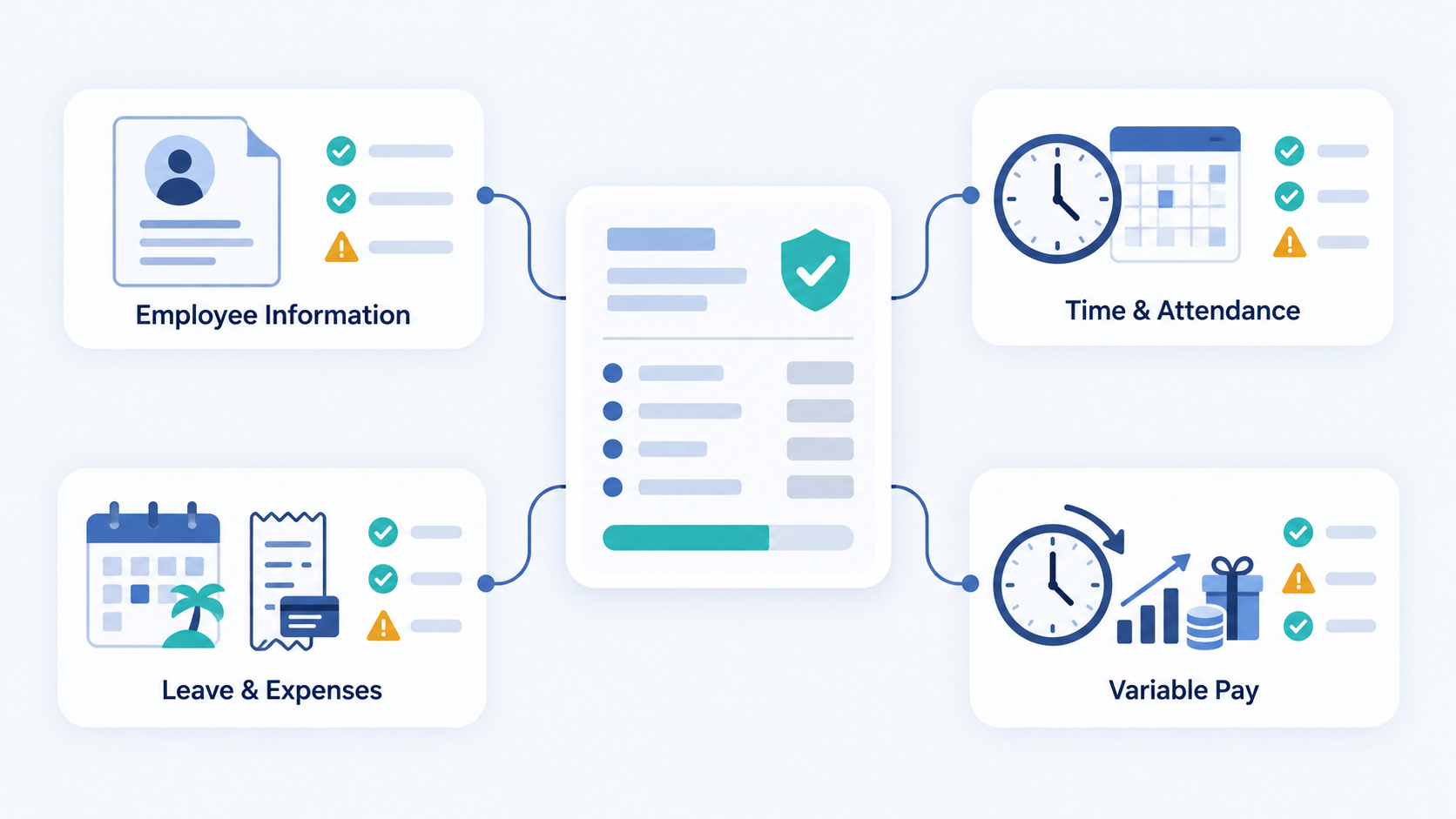
- Import approved time and attendance records for the correct period.
- Check overtime, leave, bonuses, commissions, expenses, and reimbursements.
- Look for missing records, duplicate entries, unusual totals, and wrong dates.
- Trace each variable item to an approved source.
- Assign unresolved items to an owner before calculation.
Stop if a material input lacks approval or a valid source. Record whether it will enter this run or an approved later correction.
Calculate and review payroll before approval
Calculation turns approved inputs into earnings, deductions, liabilities, employer costs, and net pay. Review the result before anyone releases funds.
Check gross pay, deductions, and net pay
- Confirm fixed pay matches the worker’s terms and pay frequency.
- Recalculate approved hourly pay, overtime, bonuses, commissions, and other earnings.
- Check taxable benefits and the order of applicable calculations.
- Review employee deductions, withholding, and statutory contributions.
- Keep employer contributions separate from employee deductions.
- Confirm reimbursements and other nonstandard items receive the correct treatment.
- Check that gross pay minus applicable deductions and withholding reaches expected net pay.
payroll components.
Use current official rules for each work location. A calculator can support an estimate, but it does not approve a live payment.
Review the payroll register and variances
The payroll register summarizes employee earnings, deductions, liabilities, and net pay. Compare it with the prior period and approved changes.
- Compare employee headcount, gross pay, deductions, employer costs, and net pay.
- Investigate zero pay, duplicate pay, negative pay, and unusually high payments.
- Check new starters, leavers, bonuses, retroactive pay, and bank changes.
- Explain every material difference in a variance report.
- Record the source, owner, decision, and correction for each exception.
See the full payroll processing steps for the wider operating workflow. Use a reviewed payroll calculator only for estimates.
Complete an independent payroll review
- Give the draft register, source records, and exception log to the reviewer.
- Confirm the reviewer did not prepare every item being checked.
- Recalculate selected unusual or high-risk entries.
- Verify sensitive changes through their original approval evidence.
- Record reviewer questions and their resolution.
- Obtain dated approval for the final version only.
Small teams may use an owner, accountant, or qualified external reviewer. The review must remain visible and documented.
Approve, fund, and pay employees
Approval should authorize one final payroll version. Later changes need a controlled correction and fresh approval.
Complete final sign-off and lock the pay run
- Confirm all material exceptions are resolved or formally deferred.
- Identify the final payroll register and payment file version.
- Record the approver, approval date, and any conditions.
- Prevent silent edits after sign-off.
- Confirm payroll funding and applicable bank limits.
Send payments and payslips securely
- Verify recipient totals against the approved payroll register.
- Release payments through authorized users and approved methods.
- Protect files containing bank, identity, tax, and pay data.
- Issue required payslips through a secure channel.
- Save submission receipts and payment status records.
Complete required payroll reporting and payments
- Submit required reports using current local rules and forms.
- Pay payroll taxes, social contributions, benefits, or other liabilities on time.
- Record submission references, payment proof, and reporting periods.
- Assign rejected or incomplete submissions to an owner.
The employer remains responsible for oversight when software or a provider performs these tasks.
Post-payroll checklist: reconcile and preserve evidence
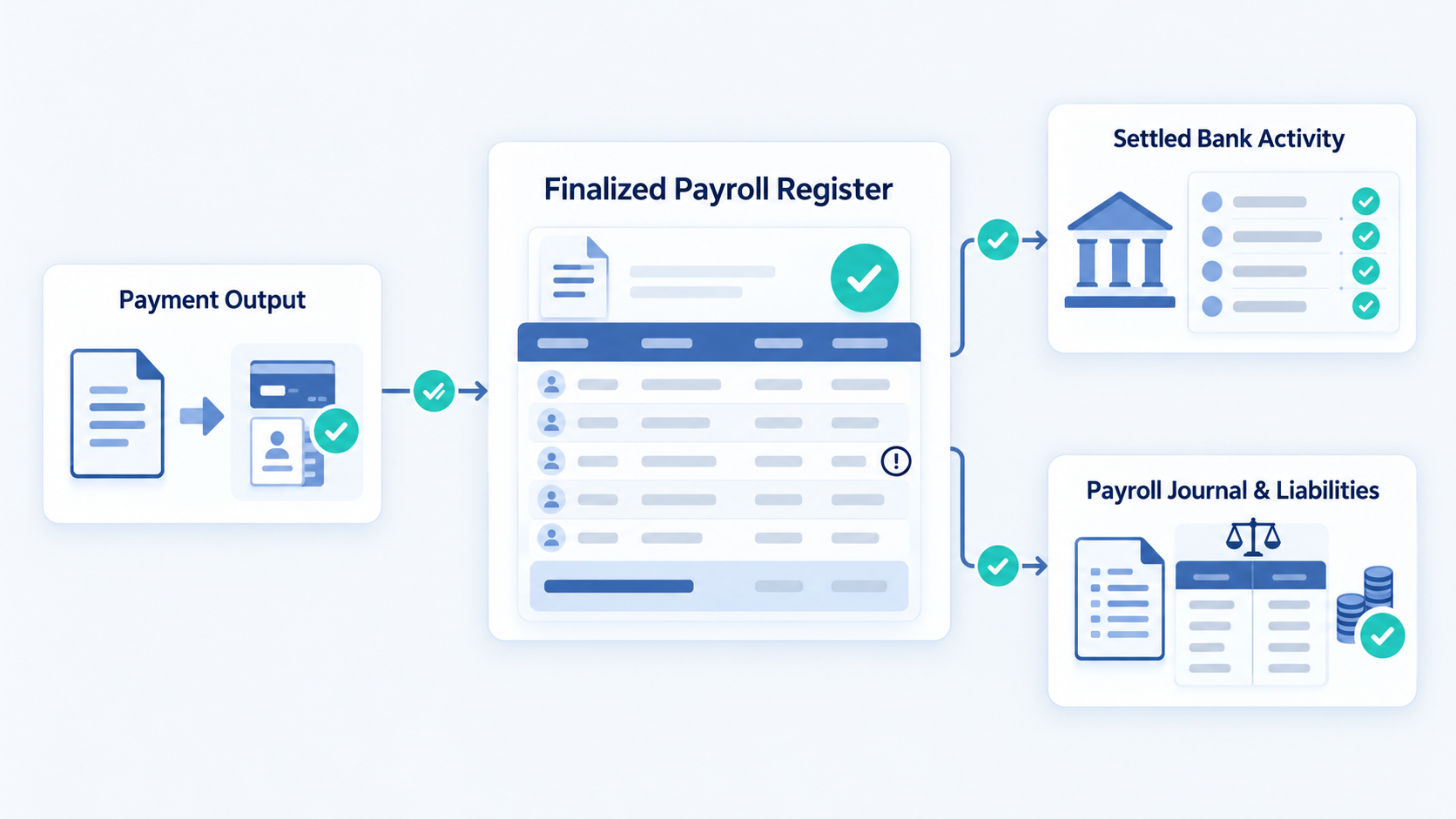
Payday is not the end of payroll. The post-payroll checklist confirms that approved figures became correct payments, liabilities, and accounting entries.
Complete the three-way payroll reconciliation
- Match the final payroll register to the approved payment output.
- Match the payment output to settled bank activity and investigate failures.
- Match payroll journals and liability accounts to the final payroll totals.
Record every timing difference, rejected payment, duplicate, or correction. Do not close the period with an unexplained difference.
Distribute reports and close the pay period
- Confirm employee and third-party payments completed.
- Resolve or assign failed payments and rejected reports.
- Post approved payroll journals to the general ledger.
- Update liability accounts when remittances settle.
- Store final registers, approvals, payment proof, reports, and reconciliation.
- Record who closed the run and when.
- Carry unresolved exceptions into the next action list.
Follow applicable privacy and record-retention rules. Limit payroll access to people with a valid business need.
How to handle payroll exceptions and corrections
An exception should never disappear inside an edited spreadsheet or replaced file. Preserve the original record and document the correction path.
Late or missing payroll inputs
- Identify the missing item, worker, period, owner, and approval status.
- Check the cutoff, payment urgency, and applicable local requirements.
- Decide whether to use this run, a later run, or an off-cycle run.
- Record the decision and notify affected people.
Never guess missing hours or delay a lawful payment for convenience.
Failed or rejected payments
- Confirm the rejection reason before changing payment details.
- Verify any new bank information through a trusted channel.
- Create a controlled replacement instruction.
- Obtain approval and keep both payment records.
- Confirm settlement and update the reconciliation.
Reversals, overpayments, and off-cycle payroll
- Confirm the error’s cause, amount, worker, period, and connected records.
- Preserve the original register, payment result, and reports.
- Check local rules before recovering an overpayment or making deductions.
- Correct underpayments within applicable deadlines.
- Update payroll, payment, filing, and accounting records.
- Add the root cause and prevention action to the correction register.
See common payroll errors and how to prevent them for a fuller correction process.
Monthly payroll checklist
Month-end payroll close is an accounting control. It is not always the same as the month’s final pay run.
- Reconcile payroll bank activity for the month.
- Reconcile tax, benefit, contribution, and other liability accounts.
- Confirm payroll journals reached the correct general-ledger period.
- Review outstanding advances, loans, reversals, and corrections.
- Explain material month-to-month differences.
- Distribute approved reports and close unresolved actions.
Create a separate month-end resource if your accounting close needs deeper steps.
Year-end payroll checklist
Year-end rules, dates, forms, and reporting periods vary by jurisdiction. Never use one universal deadline for a global workforce.
Before the final payroll of the applicable year
- Confirm the local year-end calendar and authority guidance.
- Verify employee details, work locations, and worker status.
- Review year-to-date earnings, deductions, contributions, and benefits.
- Resolve missing inputs and known corrections before the final cutoff.
- Confirm special year-end payments and benefit treatment.
After the final payroll
- Reconcile annual payroll totals with payments, liabilities, and the ledger.
- Complete required annual reports, statements, filings, and remittances.
- Resolve rejected submissions and document corrections.
- Retain approved annual records under local rules.
Before the first payroll of the new period
- Update thresholds, rates, calendars, forms, and system settings.
- Confirm carried balances and new year-to-date values.
- Test the first calculation before payment approval.
- Record the official source and date used for each rule update.
US employers can check IRS employment-tax guidance. UK employers can use current GOV.UK PAYE guidance.
How payroll software supports a stronger checklist
Software can reduce repeated entry and preserve evidence. It cannot decide whether an unusual result is lawful, fair, or properly approved.
Centralize approved payroll inputs
Connected employee, time, leave, and pay records can reduce duplicate entry. Use effective dates and consistent approval routes.
OryxBlue documents employee profiles, attendance, leave, salary structures, deductions, and payroll generation for selected periods.
Automate repetitive steps without removing review
Use automation for reminders, imports, calculations, validations, reports, and activity records. Keep human review for exceptions, sensitive changes, and final approval.
Preserve permissions, versions, and audit records
Restrict access by role. Keep approved versions, change history, exports, and evidence protected under applicable privacy rules.
Learn how to manage HR and payroll in one system before automating data handoffs.
Frequently asked questions about payroll checklists
What should a payroll checklist include?
It should cover inputs, calculations, variance review, approval, funding, payment, reporting, reconciliation, corrections, and records. Each task needs an owner and evidence.
Is a monthly payroll checklist the same as a payroll processing checklist?
No. A processing checklist controls each pay run.
A monthly checklist closes related bank, liability, and accounting records.
Who should prepare and approve payroll?
A trained payroll owner may prepare it. A different authorized person should review and approve the final version where practical.
How often should payroll be reconciled?
Reconcile every payroll run after payment results are available. Complete wider liability and general-ledger checks during the relevant accounting close.
Can payroll software automate the entire checklist?
No. Software can automate repeatable tasks, but people must manage exceptions, approvals, local rules, funding, and final accountability.
How long should payroll records be kept?
Retention periods differ by country and record type. Follow current tax, labor, social-security, accounting, and data-protection requirements.
Make every payroll run repeatable and reviewable
Use the same payroll checklist for each run, but update local rules and deadlines when they change. Record owners, approvals, evidence, and exceptions.
Download the editable payroll checklist, then adapt it to your jurisdictions and approval structure.
Review OryxBlue’s documented payroll capabilities against your checklist and local requirements.