
How to run payroll: a step-by-step guide for your first payroll
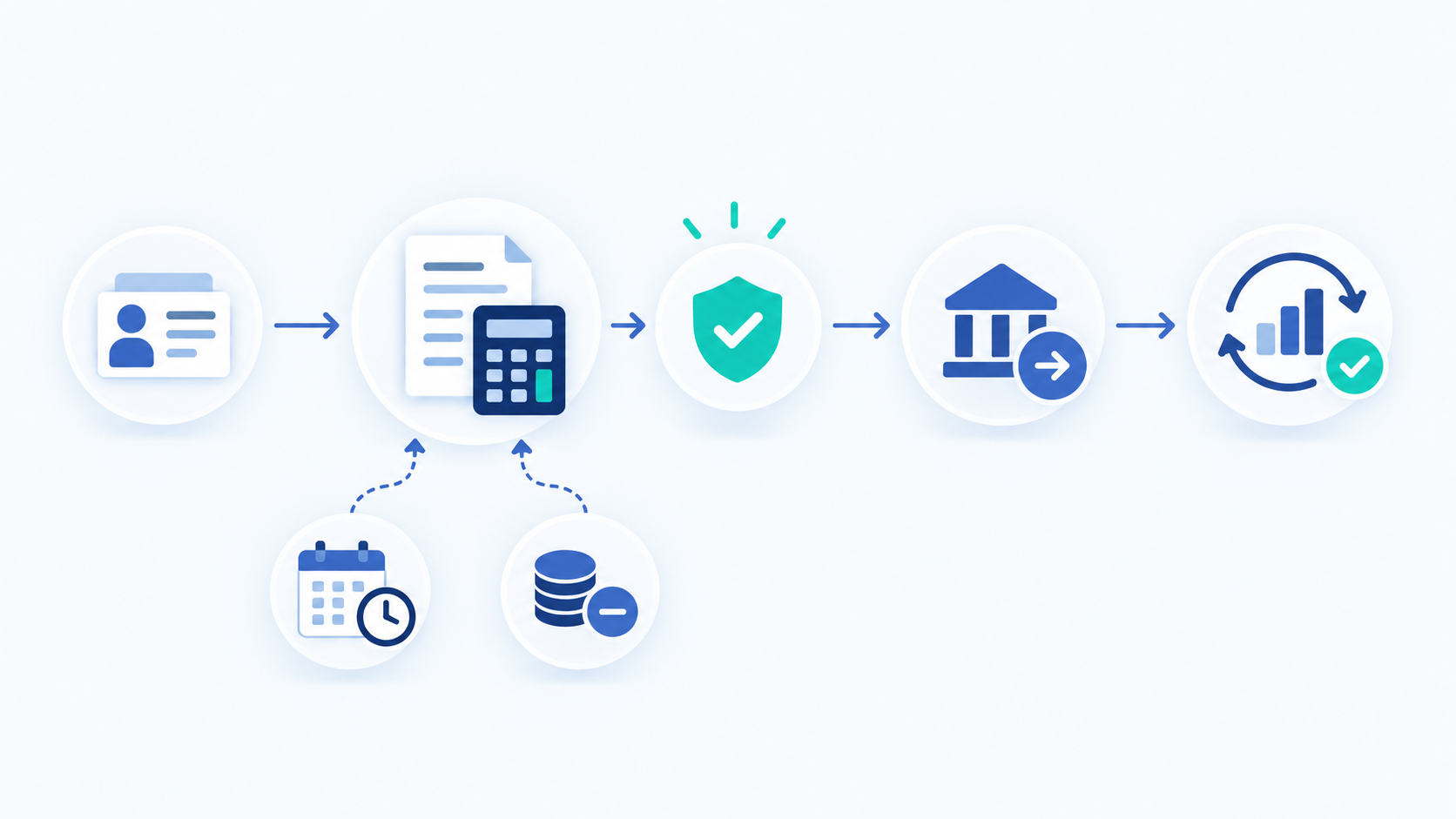
To run payroll, collect approved pay data and calculate earnings and deductions. Then review the register, approve payments, and reconcile the results.
Your first payroll run also needs one-time employer, employee, banking, and system setup.
Payroll rules depend on each employee’s work location. Confirm local wage, tax, contribution, filing, payment, payslip, and recordkeeping requirements before you begin.
Payroll setup and a payroll run are not the same
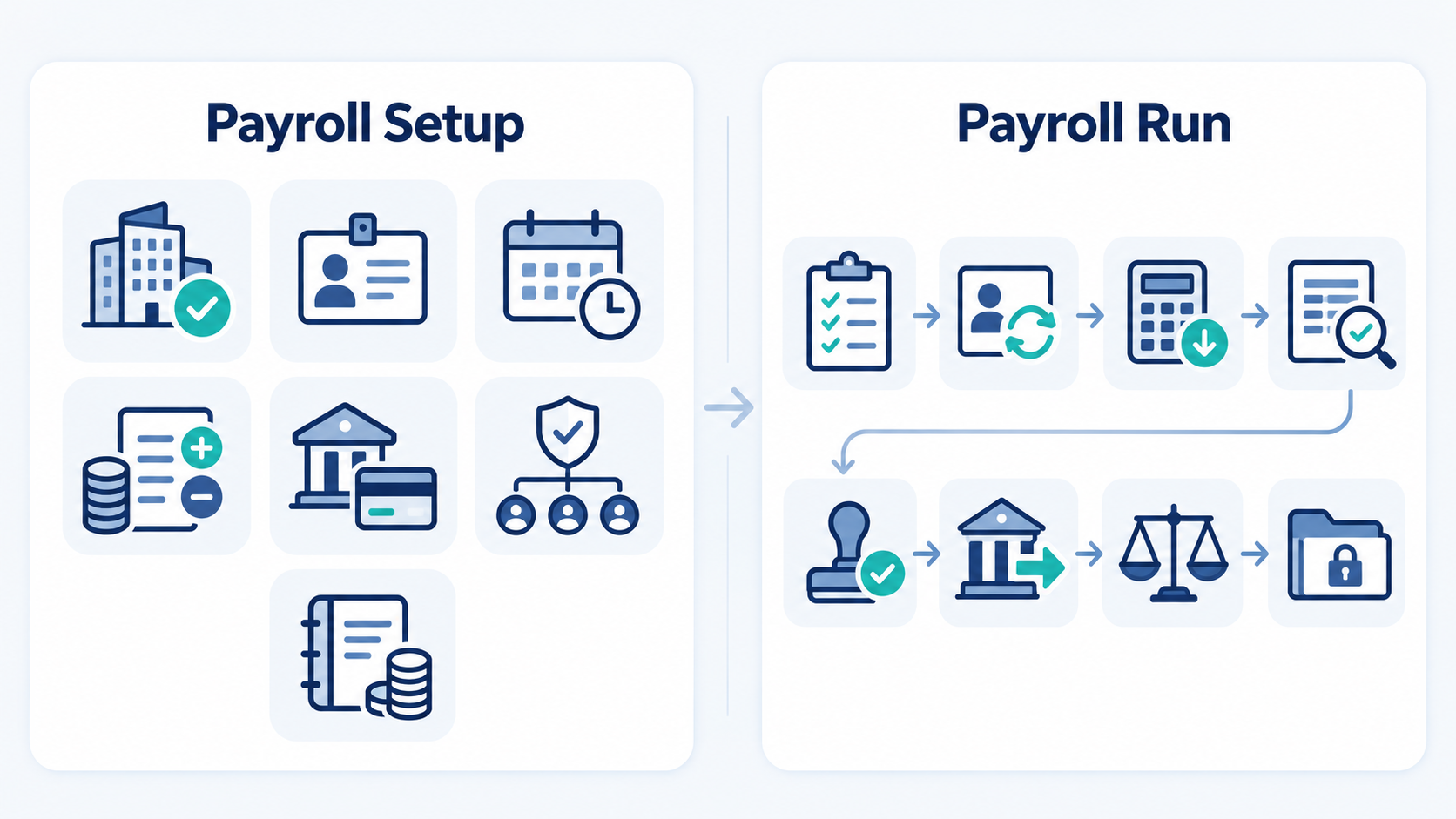
Payroll setup creates the rules and records used to pay people. A payroll run applies them to one pay period.
Set up once, then update when details change:
- Employer registrations, payroll accounts, and worker records
- Pay schedules, earning rules, deductions, and contributions
- Payment methods, access rights, approvals, and backup cover
Repeat during every pay period:
- Approve pay inputs and employee changes
- Calculate and review gross-to-net pay
- Approve, fund, submit, reconcile, and retain the run
See how the payroll process works for the full recurring operating model.
What to set up before running payroll for the first time
Finish these tasks early enough to test calculations and payment access.
Register as an employer where required
Complete required employer, tax, social-security, insurance, or pension registrations. Record account details, filing methods, payment instructions, and deadlines.
US employers can consult IRS employment-tax guidance. UK employers can use GOV.UK payroll guidance.
Confirm each worker’s status and required information
Classify each worker under applicable local rules. Collect and verify required identity, tax, payment, contract, work-location, and statutory details.
Choose a pay schedule, payday, and input cutoff
Choose a lawful pay frequency, pay date, and payroll cutoff. Allow time for reviews, funding, bank processing, weekends, and holidays.
Define approved payroll inputs
List every item that can change pay, including hours, leave, bonuses, expenses, benefits, and deductions. Assign its submitter and approver.
Assign preparation, review, approval, and backup roles
Name the preparer, reviewer, approver, payment releaser, reconciliation owner, and backup. Keep preparation and payment approval separate where practical.
Configure payment methods and payroll funding
Test payment access, files, bank limits, approval rights, and recipient details. Record the funding deadline and confirm cleared funds.
Validate opening and year-to-date information
When starting midyear or changing systems, load year-to-date earnings, deductions, contributions, and payments. Compare them with prior records.
First-run readiness check: registrations, worker data, rules, opening balances, roles, funding, and payment access are complete and approved.
How to run payroll in nine steps
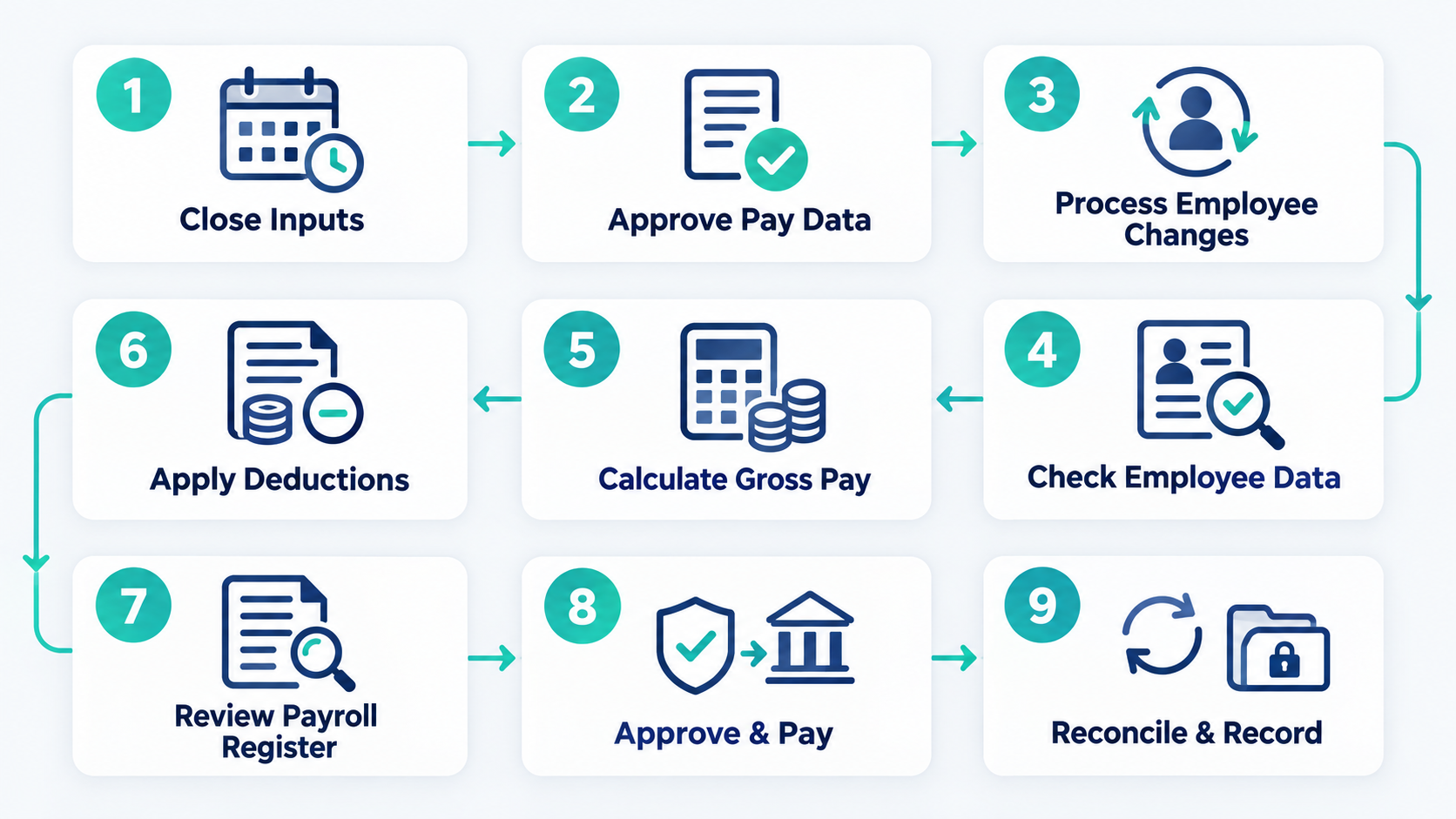
Follow the same sequence for each pay period. Do not skip controls when a deadline is close.
1. Close the payroll input period
Confirm the period, payday, cutoff, submission deadline, and funding deadline. Lock inputs and route late requests through the exception process.
2. Collect and approve hours, leave, and variable pay
Gather approved time and attendance, leave, expenses, bonuses, commissions, and other variable items. Check dates, totals, duplicates, and gaps.
3. Process employee changes
Enter approved worker and pay changes with correct effective dates. Verify bank and pay-rate changes through a trusted second channel.
4. Check payroll master data
Check names, locations, pay basis, rates, bank details, and statutory data. Compare the payroll list with current HR records.
5. Calculate gross pay
Gross pay is earnings before employee deductions and withholdings. Include approved fixed and variable earnings.
Suppose a worker earns 20 per hour for 40 approved hours. Regular gross pay is 800 in that currency.
40 approved hours x 20 hourly rate = 800 regular gross pay
6. Apply deductions, withholdings, and employer costs
Calculate taxable pay under local rules. Apply withholdings, contributions, benefits, and lawful deductions in the required order.
Gross pay – employee deductions – applicable withholding = net pay
Local thresholds, caps, benefits, reimbursements, and cumulative rules can change this simple framework.
7. Review the payroll register
Review earnings, deductions, liabilities, and net pay against prior results. Trace unusual values and material differences to approved evidence.
8. Approve, fund, and submit payroll
Obtain approval for the final register and exception record. Confirm cleared funds, the final file, and every submission deadline.
9. Complete post-run tasks
Confirm payments, issue required payslips, complete local reporting, and post accounting entries. Reconcile results and store the final evidence.
First payroll run control matrix
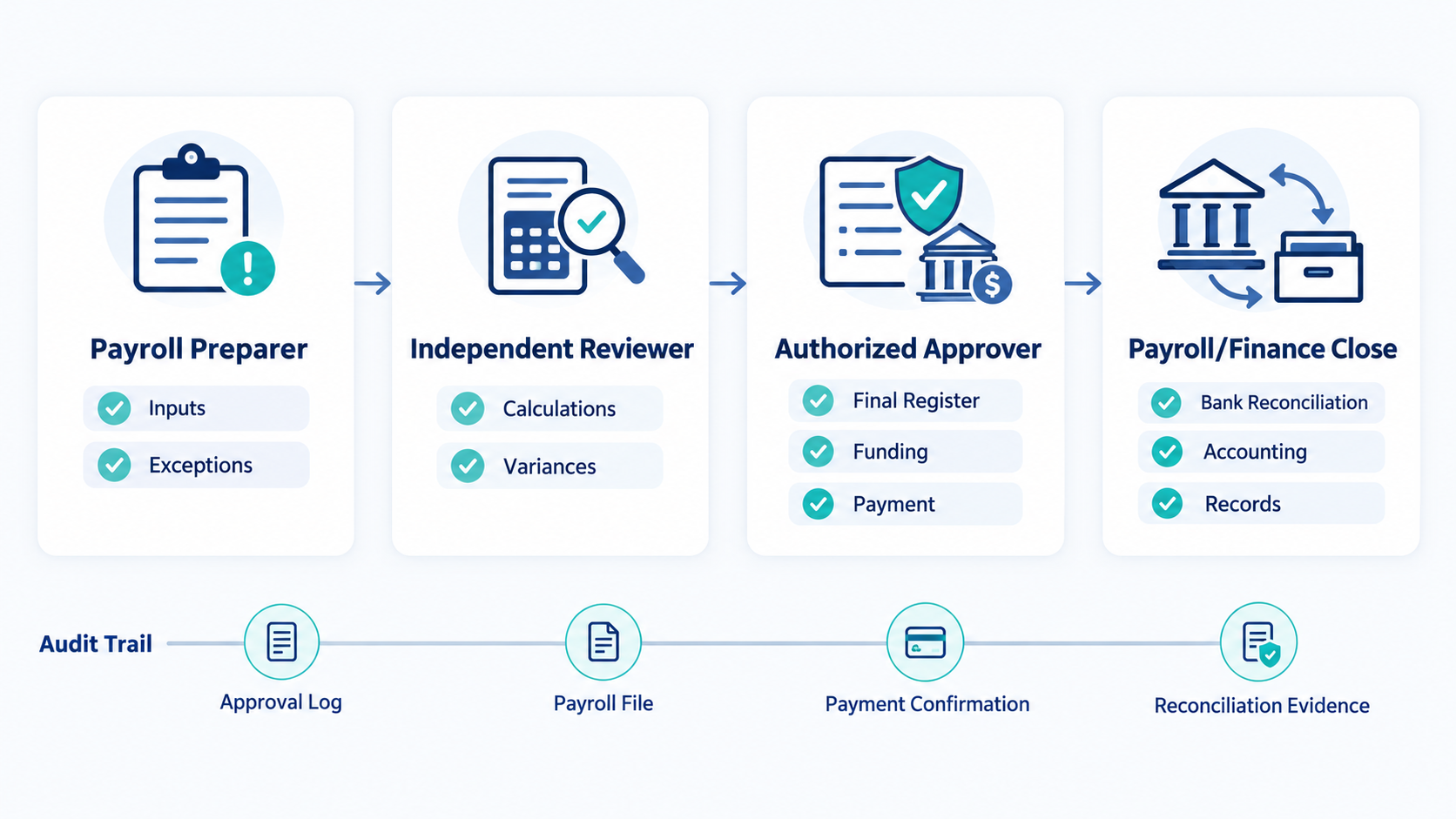
Adapt these role names to your team while preserving independent approval.
| Control point | Responsible person | What to verify | Evidence retained |
| Input closure | Payroll preparer | Period, cutoff, approved changes, and missing inputs | Locked input list and exception log |
| Calculation review | Independent reviewer | Register totals, employee changes, unusual values, and local settings | Reviewed register and variance notes |
| Payment release | Authorized approver | Final version, approval status, bank details, funding, and deadline | Approval record and payment confirmation |
| Payroll close | Payroll or finance owner | Bank results, liabilities, accounting entries, and corrections | Reconciliation and final payroll file |
If one person performs several tasks, add a documented second review before payment release.
An example payroll schedule counted back from payday
This five-working-day sequence is illustrative. Adapt it to local, bank, and provider deadlines.
- Payday minus five working days: close routine inputs and list missing approvals.
- Payday minus four: process employee changes and calculate the draft payroll.
- Payday minus three: review the register, variances, and exceptions.
- Payday minus two: obtain final approval, confirm funding, and submit payments.
- Payday minus one: monitor acceptance and prepare any permitted correction.
- Payday: confirm employee payments, then begin reconciliation and reporting.
Some payments need more lead time. Count backward from the earliest binding deadline.
Ready-to-submit payroll checklist
Use this payroll run checklist before release. Every applicable item must pass:
- The correct pay period, payday, cutoff, and final version are confirmed.
- Approved hours, leave, expenses, and variable earnings are complete.
- New hires, leavers, pay changes, and bank changes are verified.
- Employee master data and work locations are current.
- Gross pay, deductions, withholdings, employer costs, and net pay were reviewed.
- Payroll totals and employee-level variances have clear explanations.
- All exceptions are resolved, deferred, or assigned to an owner.
- An authorized reviewer approved the final payroll register.
- Funding, payment access, bank limits, and submission deadlines are confirmed.
- The final files, approvals, and reports are protected from silent changes.
Use the complete payroll checklist for recurring, monthly, and year-end controls.
What to do after submitting payroll
Close the run only after payments and records agree.
Confirm payments and resolve failures
Check whether payments were accepted, rejected, returned, or delayed. Retain the result, investigation, approval, and replacement proof.
Reconcile payroll records
Compare the final register with bank activity. Match payroll liabilities with reports, remittances, and accounting entries.
Save the audit trail
Store inputs, approvals, register versions, payment results, corrections, and reconciliation securely. Follow applicable retention and privacy rules.
How to correct a payroll error
Preserve the original record, then respond according to when you found the error.
If the error is found before submission
Correct the approved source, recalculate, review affected totals, and obtain fresh approval.
If the error is found after submission but before payday
Ask whether the payment can be stopped or replaced. Record each cancellation, new instruction, and approval.
If the employee has already been paid
Confirm the cause and correct amount. Correct underpayments under local rules, and explain the action to the employee.
Never recover an overpayment automatically. Check local rules, contracts, consent needs, and protected-wage limits first.
Should you run payroll manually, use software, or outsource it?
Choose a method based on complexity, locations, internal skill, controls, and review time. Every option needs an accountable owner.
Manual payroll
Manual payroll may suit a small, stable workforce with simple rules. It still needs secure records, version control, and independent review.
Doing payroll yourself becomes harder when locations, variable pay, or worker changes increase.
Payroll software
Software can support repeatable calculations, permissions, reports, and audit evidence. Your team still controls inputs, settings, approvals, and exceptions.
OryxBlue documents profiles, attendance, leave, salary structures, deductions, and payroll generation. Compare these capabilities with your local duties.
Outsourced payroll
A provider can reduce internal administration. Confirm its scope, deadlines, data duties, security, reports, and correction process.
Outsourcing does not remove accountability. Your team still supplies inputs, approves results, provides funds, and reviews the work.
See how to manage payroll without an HR team before choosing a model.
Common first-payroll mistakes to avoid
Watch for these first-run setup and release problems:
- Starting employer registration too late
- Classifying a worker without checking local rules
- Using incomplete employee or opening balance data
- Setting a cutoff that leaves no review time
- Accepting unapproved hours, leave, or pay changes
- Letting one person prepare and release payroll without review
- Ignoring unusual payroll-register values
- Missing funding, bank, filing, or payment deadlines
- Treating submission as completion and skipping reconciliation
The full guide to common payroll mistakes and how to avoid them explains prevention and correction controls.
How to make future payroll runs easier
Record delays, manual fixes, unclear ownership, repeated entry, and unanswered questions. Fix one issue before the next cutoff.
Track five measures against your own baseline:
- On-time payment rate
- Late-input count
- Payroll correction count
- Unresolved exception count at approval
- Time needed to close reconciliation
Learn how to manage HR and payroll in one system while keeping human approval.
Frequently asked questions about running payroll
What do I need before I run payroll for the first time?
You need registrations, worker records, pay rules, a calendar, payment access, named roles, and approved opening balances.
Can I run payroll myself?
Yes, if you understand local rules and maintain effective controls. Use qualified support when complexity exceeds your team’s skills.
How long does it take to run payroll?
Timing depends on workforce size, data quality, complexity, locations, and payment deadlines. Build the schedule backward from payday.
How early should I submit payroll before payday?
Follow the earliest bank, provider, or authority deadline. Allow time for review, corrections, weekends, and holidays.
Do I need payroll software for one employee?
Not always. Check whether local rules require approved software or electronic reporting before choosing a manual method.
What happens if an employee is paid incorrectly?
Confirm the error, correct it, inform the employee, and update connected records. Follow local repayment or recovery rules.
What is the difference between running payroll and the payroll process?
Running payroll completes one pay run. The payroll process covers the wider system, controls, outputs, exceptions, and records.
Build a reliable payroll routine
Your first payroll needs sound setup, correct calculations, approval, funding, payment, and reconciliation. Repeat that controlled sequence each pay period.
Review OryxBlue’s documented payroll capabilities and compare them with your workflow and local requirements.