
Cloud Payroll Software: How It Works, Benefits and Costs
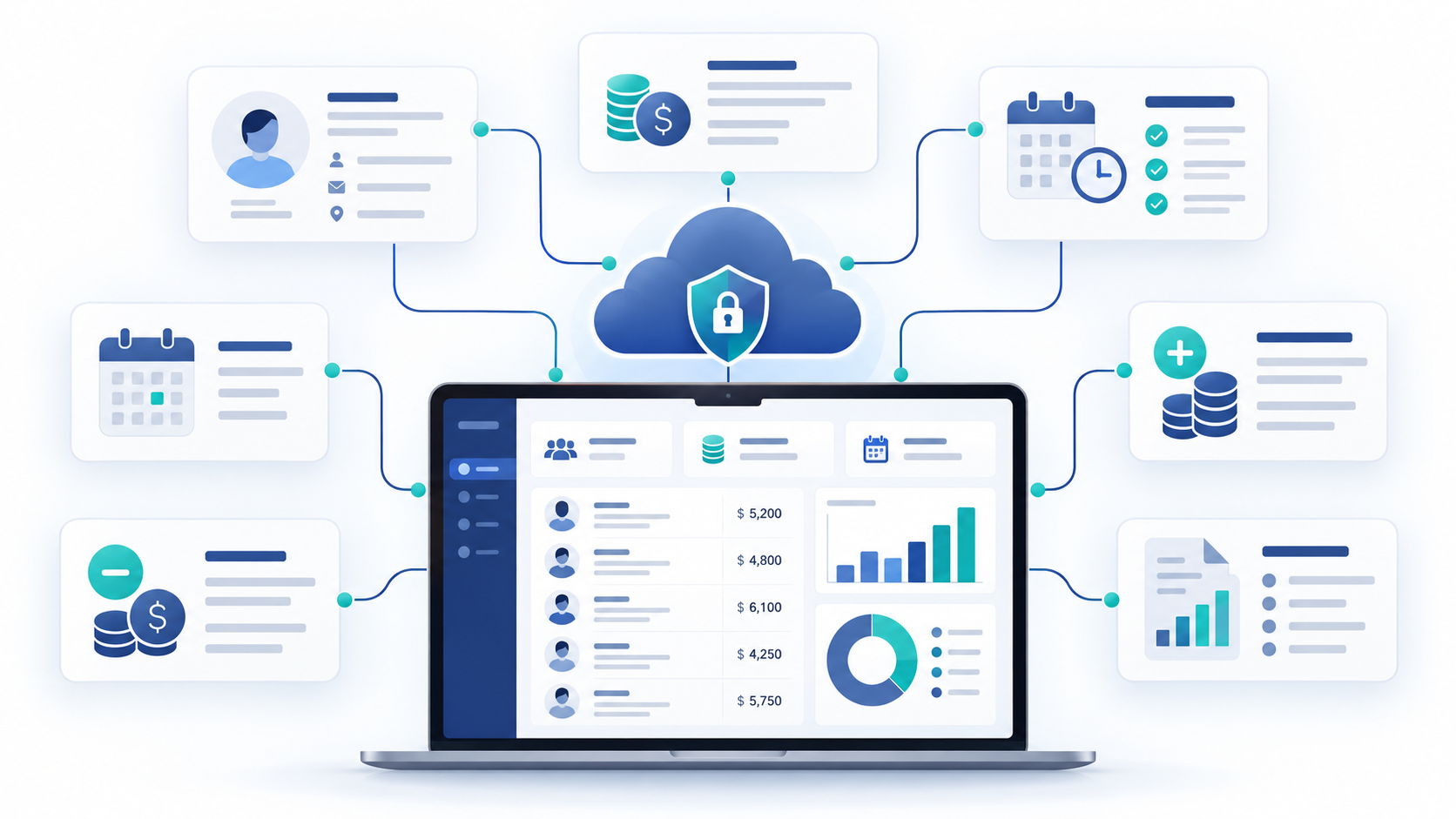
Managing payroll becomes more difficult as a business grows. Employee records change, salaries need to be updated, deductions have to be tracked, and payroll teams need reliable records for every pay period.
Cloud payroll software moves these payroll activities into an online system that can be accessed through the internet instead of relying on payroll files or software installed on a local computer.
For growing businesses, the main advantage is not simply being able to access payroll online. A cloud payroll system can bring employee information, salary structures, deductions, payroll processing, approvals, and payroll records into one centralized environment.
But how does cloud payroll actually work, what does it cost, and what should you look for before choosing one?
What Is Cloud Payroll Software?
Cloud payroll software is a payroll system hosted on cloud infrastructure and accessed over the internet. Instead of installing payroll software on individual computers or maintaining an internal payroll server, authorized users log into the system through a web or online interface.
The payroll data is stored centrally, allowing authorized HR, finance, and management users to work from the same system.
A typical cloud payroll system can help businesses manage:
- Employee salary information
- Salary structures
- Bonuses and deductions
- Payroll calculations and generation
- Advances and employee loans
- Payroll records
- Payroll reports
- Employee payslips or payroll documents
- User permissions and access controls
Cloud payroll is also commonly connected with other HR processes. For example, employee records, attendance, leave, and payroll information can work together so payroll teams do not have to maintain completely separate records.
OryxBlue follows this connected HR approach by bringing employee information, attendance, leave, and payroll into one HR platform.
How Does Cloud-Based Payroll Software Work?
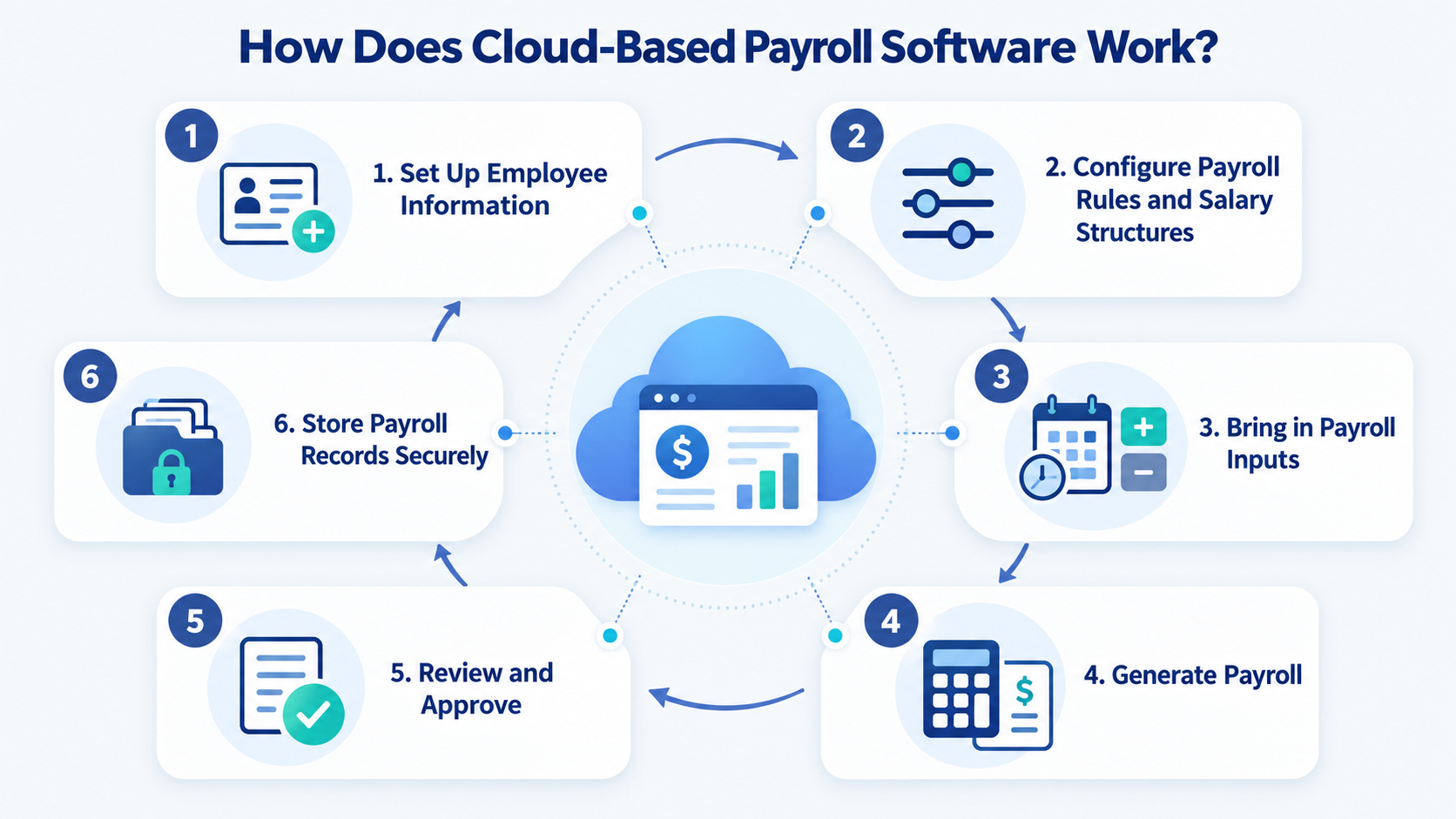
Cloud payroll software follows a relatively simple process, although the exact workflow depends on the platform.
1. Set Up Employee Information
The first step is creating employee records in the system.
This can include information such as:
- Employee name and profile
- Job role and department
- Salary structure
- Employment details
- Pay-related information
- Approved deductions
- Bonuses or other adjustments
Keeping these records centralized gives payroll teams one source of information to work from.
2. Configure Payroll Rules and Salary Structures
Next, the business configures how employees should be paid.
For example, different employees may have different salary structures, bonuses, deductions, advances, or loan arrangements.
A cloud payroll system stores these settings so payroll teams can use them during future payroll periods.
3. Bring in Payroll Inputs
Payroll needs accurate inputs before a pay run can be generated.
Depending on the system, these inputs may include:
- Employee salary changes
- Attendance information
- Approved leave
- Bonuses
- Deductions
- Advances
- Loans
- Other approved adjustments
Understanding payroll components can also help businesses identify the different elements that need to be considered when preparing employee pay.
When payroll is connected with HR information, changes can be easier to manage because teams are not constantly switching between disconnected spreadsheets and systems.
4. Generate Payroll
Once the required information has been reviewed, the payroll team runs payroll for the selected period.
The system uses the configured employee and payroll information to generate the payroll records.
This can make how to run payroll easier to manage by giving HR and finance teams a structured workflow instead of relying entirely on spreadsheets and manual calculations.
5. Review and Approve
Payroll should not simply be generated and accepted without review.
A good payroll workflow includes checking unusual salary changes, deductions, bonuses, employee changes, and other adjustments before finalizing the payroll.
Cloud software can make this review easier by keeping the relevant information in one place.
6. Store Payroll Records Securely
After payroll is generated, the resulting records can be retained digitally.
This reduces dependence on paper files and disconnected spreadsheets while making historical payroll information easier for authorized users to access.
For sensitive payroll information, security is particularly important.
Core Benefits of Cloud Payroll Software
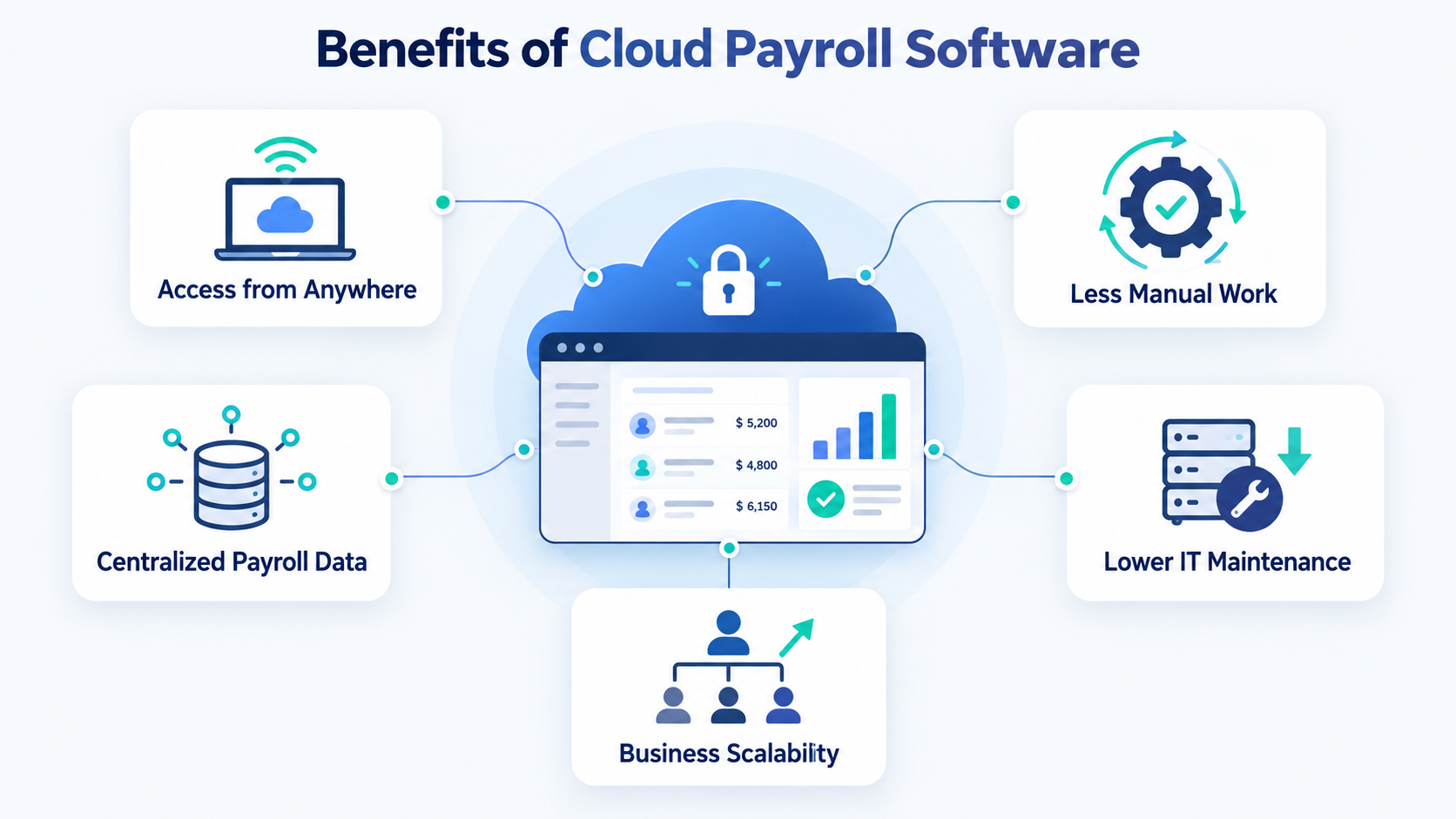
Cloud payroll software can provide several operational benefits, particularly for businesses moving away from manual payroll processes.
1. Access Payroll Data From Anywhere
Because cloud payroll software is accessed online, authorized users do not necessarily need to be physically present at the office to access payroll information.
This can be useful for businesses with remote HR teams, multiple departments, or managers working from different locations.
The important consideration is access control: payroll data should only be available to users who need it.
2. Reduce Manual Payroll Work
Manual payroll often requires employees to collect information from multiple spreadsheets, update salary records, calculate adjustments, and maintain separate payroll files.
Cloud payroll software can centralize many of these activities.
This does not eliminate the need for human review. Instead, it gives payroll teams a more structured process for preparing, reviewing, and maintaining payroll.
Businesses transitioning from spreadsheets can also review the benefits of payroll software to understand where automation and centralized payroll management can reduce administrative work.
3. Reduce Hardware and IT Maintenance
Traditional payroll software may require installation, local storage, updates, backups, or dedicated infrastructure.
With a cloud-based system, the software is hosted remotely, reducing the need for businesses to maintain payroll infrastructure themselves.
This can be particularly useful for small and growing businesses that do not have a dedicated IT team.
4. Keep Payroll Information Centralized
A centralized payroll system can keep employee salary information, deductions, bonuses, advances, loans, and payroll records together.
This makes it easier to find information and reduces the risk of different teams working from outdated versions of the same spreadsheet.
5. Support Business Growth
Payroll requirements usually become more complicated as a company adds employees, departments, locations, and different compensation arrangements.
A cloud system can provide a centralized environment that grows with the organization’s workforce.
For example, OryxBlue connects HR processes such as employee management, attendance, leave, and payroll management within one HR platform.
6. Improve Payroll Data Security
Payroll contains sensitive employee information, so security should be one of the first things businesses evaluate when choosing payroll software.
Look for features such as:
- Role-based permissions
- Data encryption
- Secure authentication
- Audit logs
- Tenant or organization data isolation
- Controlled access to payroll records
Businesses should also consider how the platform handles sensitive information such as payroll deductions, salary details, and employee records.
Best Cloud Payroll Software to Consider
There is no single cloud payroll platform that fits every organization. The right choice depends on workforce size, location, payroll complexity, HR requirements, integrations, and budget.
Some commonly considered options include:
| Software | Common fit | What to evaluate |
| OryxBlue | Startups and growing businesses | Connected HR, employee records, attendance, leave and payroll workflows |
| Gusto | Small U.S. businesses | Payroll, taxes, benefits, employee self-service and integrations |
| Rippling | Businesses wanting connected HR and payroll workflows | HR, payroll, IT and workflow automation |
| ADP | Businesses with broader payroll and compliance requirements | Payroll services, compliance support and scalability |
| Deel | International and distributed teams | Global payroll, contractors and international workforce management |
When comparing providers, do not choose based only on the number of features.
Check whether the platform supports your country, employee types, payroll requirements, integrations, security expectations, and reporting needs.
For example, OryxBlue’s payroll functionality works within its broader HR platform, allowing businesses to manage payroll alongside employee and workforce information.
How Much Does Cloud Payroll Cost?
Cloud payroll pricing varies considerably between providers.
Some platforms charge a monthly base fee plus a per-employee charge. Others use seat-based pricing, custom quotes, or package-based pricing.
The total cost may depend on:
- Number of employees
- Number of payroll administrators
- Payroll frequency
- Number of countries or regions
- Tax and compliance services
- Benefits administration
- Time tracking
- Employee self-service
- Integrations
- Reporting
- Support
- Implementation or migration services
OryxBlue uses seat-based SaaS pricing, with plans designed for different business sizes.
However, software price alone should not determine the cost of a payroll solution.
A cheaper system may require more manual work, while a more expensive platform may include additional HR, payroll, reporting, support, or compliance capabilities.
The better comparison is total cost of ownership: software fees plus implementation, administration, integrations, support, and the internal time required to run payroll.
Businesses comparing different pricing models can also review free vs. paid payroll software to understand what they should expect from each option.
What Should You Look for in Cloud Payroll Software?
Before selecting a cloud payroll system, evaluate these areas:
Payroll Management
Check whether the platform supports your required salary structures, bonuses, deductions, advances, loans, payroll periods, and payroll records.
Security
Ask how payroll information is encrypted, who can access it, how permissions work, and whether activity is logged.
HR Integration
Payroll works better when employee information, attendance, leave, and other workforce data can be connected rather than maintained separately.
A platform that can connect HR and payroll can reduce duplicate data entry and provide a more centralized employee management process.
Scalability
Consider whether the platform can support additional employees, departments, locations, and payroll complexity as your business grows.
Reporting
Look for payroll reports that help HR, finance, and management understand payroll costs and historical records.
Ease of Use
A payroll system should simplify recurring work rather than create another complicated process for HR and finance teams.
Pricing
Compare the complete cost, including employee or seat fees, add-ons, integrations, implementation, and support.
Cloud Payroll vs. Manual Payroll
The biggest difference between cloud payroll and manual payroll is how information is stored and processed.
Manual payroll commonly depends on spreadsheets, calculations, separate employee records, and repeated data entry.
Cloud payroll centralizes the information and provides a structured system for managing recurring payroll activities.
That does not mean cloud payroll removes human responsibility. Payroll teams still need to verify employee information, review changes, approve payroll, and ensure that the system is configured appropriately for their requirements.
For businesses considering the transition, comparing manual payroll vs. payroll software can help identify where automation can reduce administrative work.
Is Cloud Payroll Software Worth It?
Cloud payroll software can make sense when payroll is becoming difficult to manage through spreadsheets or locally installed tools.
It can provide centralized access, reduce repetitive administrative work, improve organization, support secure data management, and connect payroll with broader HR processes.
The right system depends on your business rather than simply choosing the platform with the longest feature list.
Before making a decision, evaluate your employee count, payroll complexity, locations, security requirements, existing HR processes, integrations, and total cost.
For growing businesses, a connected HR and payroll platform can also reduce the need to maintain separate systems for employee records, attendance, leave, and payroll.
Frequently Asked Questions
What is cloud payroll software?
Cloud payroll software is an online payroll system hosted on cloud infrastructure. Authorized users access it through the internet instead of relying on locally installed payroll software.
How does cloud-based payroll software work?
It typically works by storing employee and payroll information centrally, applying configured salary and payroll settings, processing the selected payroll period, generating payroll records, and securely storing the results.
Is cloud payroll secure?
It can be secure when the provider uses appropriate controls such as encryption, role-based access, authentication, tenant isolation, and audit logging. Businesses should evaluate the provider’s documented security architecture before selecting a system.
How much does cloud payroll software cost?
Pricing depends on the provider, employee count, payroll requirements, locations, features, integrations, and support. Common pricing models include monthly base fees, per-employee charges, seat-based pricing, and custom quotes.
Can small businesses use cloud payroll software?
Yes. Cloud payroll software can be useful for small businesses because it reduces the need for local infrastructure and can centralize payroll information as the workforce grows.
Can cloud payroll connect with HR software?
Yes. Many modern HR platforms connect payroll with employee records, attendance, leave, onboarding, and other workforce processes. This can reduce duplicate data entry and keep payroll inputs more consistent.
What is the difference between cloud payroll and traditional payroll software?
Cloud payroll is hosted remotely and accessed online, while traditional on-premise payroll software is generally installed and maintained on local computers or company infrastructure.
Final Thoughts
Cloud payroll software is more than a way to access payroll from a browser. It provides a centralized environment for managing employee pay information, payroll processes, records, and related HR data.
For growing businesses, the most important factors are not simply whether a platform is cloud-based. Look at the payroll features it actually provides, how securely it handles sensitive data, how well it connects with HR workflows, how it scales, and what the complete cost will be.
A well-chosen cloud payroll system can help HR and finance teams spend less time managing disconnected payroll information and more time managing the work that depends on it.