
How to connect HR and payroll in one place
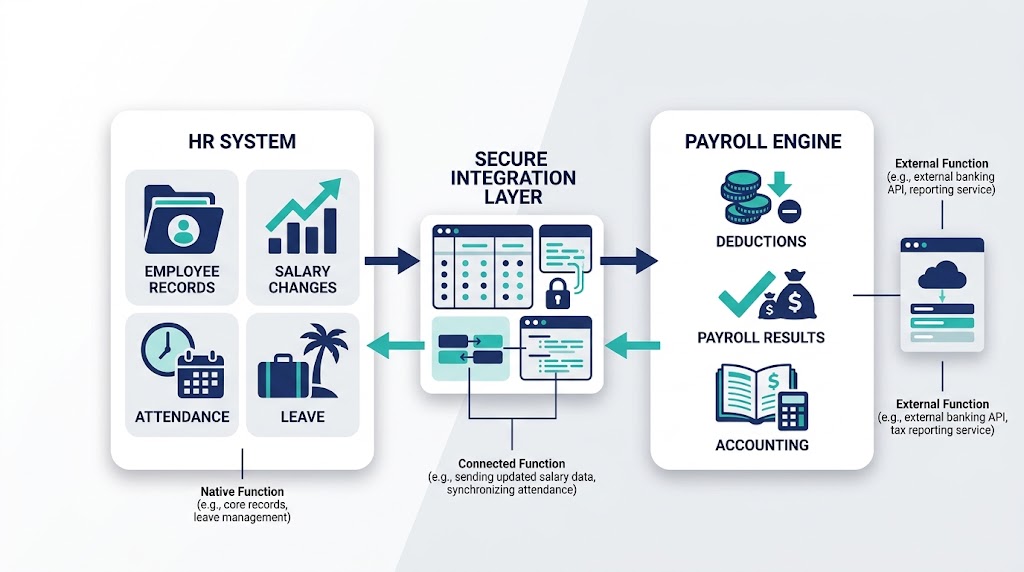
To connect HR and payroll in one place, assign an owner to each data field and choose a supported transfer method. Map every field, direction, effective date, and update schedule, then test the connection beside your current payroll before launch.
“One place” can mean one suite, database, vendor, or connected user experience. These designs have different boundaries, so clear labels prevent costly misunderstandings.
What a connected HR and payroll system does
HR software holds employee information and manages people processes. A payroll engine calculates pay using approved inputs and its configured rules.
An integration moves agreed data between HR and payroll systems. It can send hires, pay changes, hours, leave, and deductions, then return payroll results to accounting or an employee portal.
This guide covers the connection itself, while a unified operating guide explains who runs each pay-cycle task. The jobs are related, but they need different plans.
Use these three labels throughout your project:
- Native function: The task happens inside the main platform.
- Connected function: Another system completes the task and exchanges approved data.
- External function: A provider or adviser completes the task outside the platform.
These labels describe system boundaries, not service quality. For example, employee records may be native while statutory payroll stays external.
Review your full employee lifecycle before drawing the connection. Hiring, leave, pay changes, and offboarding can all affect payroll data.
Choose the right HRIS payroll integration method
The best connection method depends on your systems, payroll schedule, and supported vendor features. Confirm every method in current technical documents before making a choice.
Native integration
A native integration is built and supported directly by at least one vendor. Setup may be simpler because the vendor defines supported fields and workflows.
However, “native” does not prove one database or instant updates. Check data direction, field coverage, frequency, limits, and failure handling.
Payroll integration API
An application programming interface, or API, lets systems exchange data through defined requests. An API can support frequent updates when both vendors expose suitable functions.
APIs still need mapping, authentication, monitoring, and error rules. They do not remove the need for payroll checks.
Middleware or iPaaS
Middleware sits between systems and routes data across them. An integration platform as a service, or iPaaS, can manage several connections.
This choice can help when direct links are unavailable. It also adds another system, contract, and support path.
Secure file exchange
A scheduled file can carry approved data into payroll. Both systems must support its structure and transfer method.
File exchange suits batch processes, but it needs strict controls. Teams must protect transfers, reject bad rows, and track each file version.
Create a field-level source-of-truth map
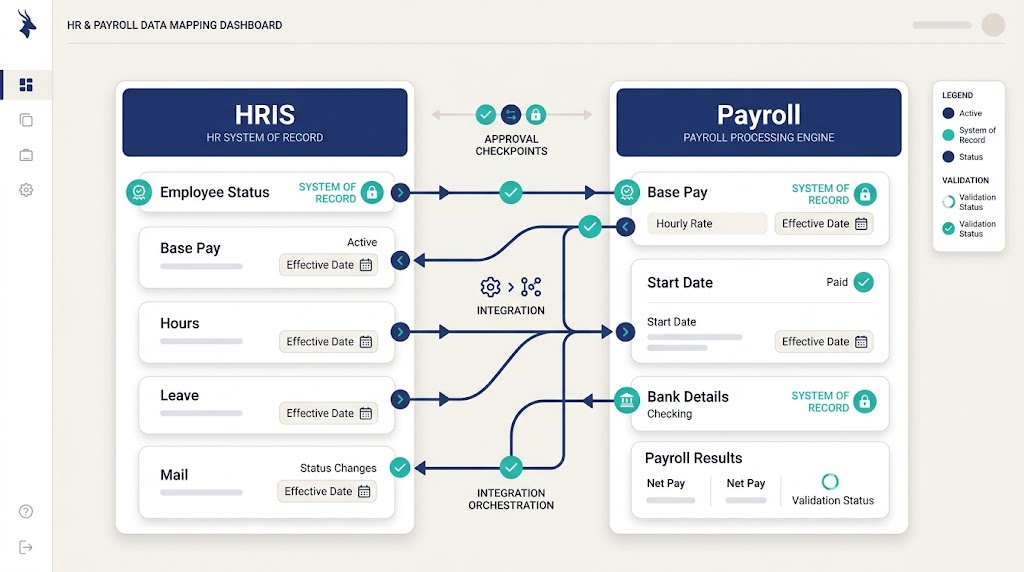
Most integration errors begin when two systems update the same field differently. The latest update can then overwrite the approved value.
A system of record is the approved owner for one data field, so choose it before mapping any connection. Do not declare one system the owner of everything by default.
The table below is an example, not a universal design. Payroll rules and vendor features vary by business and location.
| Data group | Possible system of record | Direction | Timing and control |
| Employee identity and status | HRIS | HRIS to payroll | Send after approval; reject missing identifiers |
| Base pay and effective date | Approved HR record | HRIS to payroll | Apply by effective date; require pay-change approval |
| Hours and overtime | Time system | Time system to payroll | Send after manager approval and before cutoff |
| Leave affecting pay | HRIS or leave system | HRIS to payroll | Map paid and unpaid leave separately |
| Bank and tax details | Payroll system or provider | Defined by policy | Restrict access; verify sensitive changes |
| Payroll results | Payroll engine | Payroll to HR or accounting | Send after payroll approval; reconcile totals |
Add the field name, format, allowed values, and owner to your map. Include the effective date, transfer schedule, and person who fixes rejected or late data.
Connect HR and payroll in eight steps
1. List every system and external provider
Start with HRIS, payroll, time, leave, benefits, recruitment, and accounting, plus spreadsheets and manual email handoffs. Hidden tools often contain data that payroll still needs.
Label every function as native, connected, or external. This step defines the real boundary of your planned “one place.”
2. Map every payroll-related event
List events that create or change payroll data. Examples include hiring, salary changes, overtime, leave, bonuses, deductions, and termination.
Map each event through approval, transfer, calculation, and reconciliation. The human resource management process can help identify related HR handoffs.
3. Assign data ownership and approval
Give each field one approved system of record. Then name the person who approves its change.
Sensitive changes may need separate preparation and approval. Document exceptions instead of handling them through private messages.
4. Clean and map the data
Remove duplicate worker records and resolve missing identifiers. Standardize names, dates, codes, and employment statuses before migration.
Next, map each HR field to its payroll destination. Include value conversions, required formats, and effective-date rules.
5. Set direction and update timing
A one-way integration sends data from its owner to another system. A two-way integration exchanges approved updates in both directions.
Use two-way movement only when both directions have clear owners. Otherwise, updates can loop or overwrite valid records.
Set timing around payroll cutoffs and approval windows. Define how the team handles late events after cutoff.
6. Set access and security controls
Use least-privilege access, which grants only the permissions each role needs. Segregation of duties keeps preparation, approval, and release with different people.
Rotate credentials, encrypt data in transit, and protect audit logs. Confirm each control because local privacy duties may add requirements.
7. Run parallel payroll tests
Run the new flow beside the current process before cutover. Compare inputs, calculated results, deductions, payments, and accounting totals.
Record every difference and its cause. Do not approve launch while required differences remain unexplained.
8. Plan cutover and rollback
Choose the final accepted data set and transfer time. Freeze conflicting changes during the agreed cutover window.
Create a rollback plan before launch. It should name the decision owner, fallback process, and communication path.
Test the connection before the first live payroll
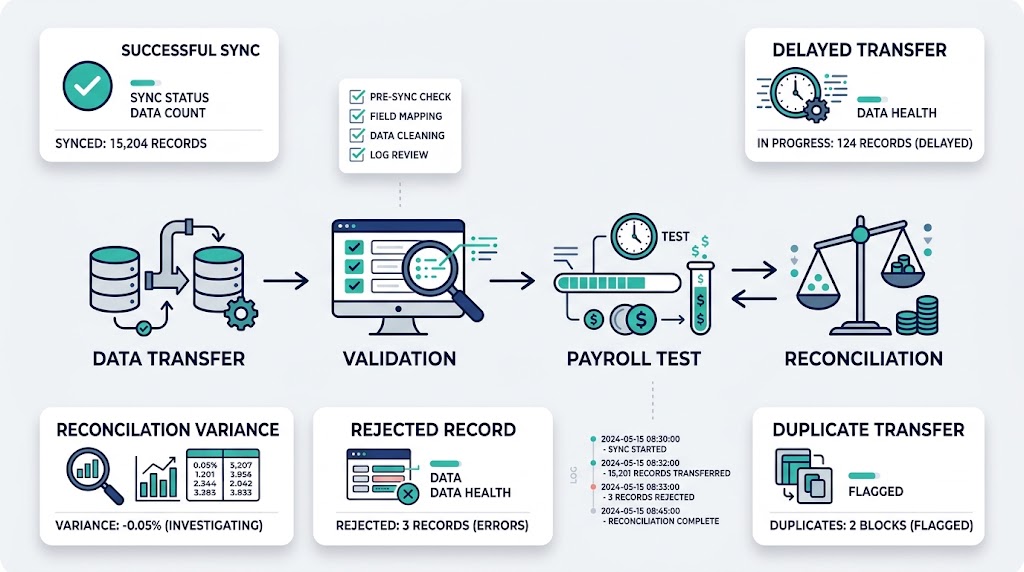
A successful login does not prove the payroll integration works. Test normal events, boundary dates, bad data, and system failures.
Your test library should include:
- A new hire with all required fields
- A salary change before and after cutoff
- Approved overtime and unpaid leave
- A rejected row with a missing identifier
- A corrected bank-detail change
- A duplicate record or repeated transfer
- A worker leaving during the pay period
- A delayed connection close to payroll approval
For each case, define the expected source, destination, value, timing, reviewer, and result. Retest every fix before approval.
Use a reconciliation checklist to compare HR inputs, payroll outputs, payment totals, and general ledger postings. Assign an owner and resolution to every difference.
Monitor synchronization and recover failed transfers
Monitoring should cover both technical delivery and payroll outcomes. A completed transfer can still contain missing or incorrect data.
Track completeness, delivery time, error rate, exceptions, manual adjustments, and reconciliation variance. Set an owner and response path for each alert.
If a sync fails before payday, use this error runbook:
- Pause automatic retries if they could create duplicates.
- Preserve logs, files, timestamps, and error messages.
- Identify affected workers, fields, and pay periods.
- Use the approved manual fallback when time requires it.
- Reconcile corrected results before releasing payroll.
- Fix the cause and add the case to testing.
Automation can route approvals and alerts, but people still own outcomes. Read more about that boundary in what HR automation means.
Avoid common payroll integration mistakes
Do not start with a connector before mapping ownership. A fast transfer spreads bad data faster when source rules remain unclear.
Avoid these common mistakes:
- Treating one login as proof of one data source
- Allowing both systems to own the same field
- Ignoring effective dates and payroll cutoffs
- Testing happy paths but skipping rejected records
- Retrying failed transfers without duplicate protection
- Launching without reconciliation or a manual fallback
- Assuming an integration provider handles legal payroll duties
Review statutory responsibilities with qualified local specialists. Software connections do not transfer accountability by themselves.
Where the product may fit
OryxBlue positions its service for startups and small businesses, with public documentation covering HR and payroll-related workflows. Exact integration methods still need current technical proof.
Before choosing the product, label each required function as native, connected, or external. Verify calculation, payment, filing, and country coverage before reviewing the product documentation as your next step.
FAQs
What is HR software integration?
HR software integration connects an HR system with another business system. It exchanges approved data through a supported connection method.
The method may use a native link, API, middleware, or file. Each option still needs ownership, mapping, testing, and monitoring.
How does HRIS payroll integration work?
The HRIS sends approved employee or work data to payroll. The payroll engine uses that data within its configured calculation process.
Approved results may return to HR or accounting. The exact flow depends on system support and field ownership.
Is one-way or two-way payroll integration better?
Neither direction is always better. One-way transfer is clearer when one system owns the data.
Two-way exchange can help when each system owns different fields. It needs strict rules to prevent overwrites and update loops.
How often should HR and payroll synchronize?
The schedule should match the event, risk, and payroll cutoff. A new hire may need different timing from approved monthly inputs.
Set a clear service target for each data group. Monitor late transfers and define a manual fallback.
What happens when the payroll sync fails?
The team should identify affected records and preserve the failure evidence. It should then use the approved fallback and reconcile results.
After payroll is safe, fix the cause and repeat the test. Never assume a successful retry corrected every record.
Conclusion
Connecting HR and payroll starts with ownership, not software. Define each field’s source, direction, effective date, approval, and transfer schedule.
Then choose a supported connection and test real payroll events. Monitor every run, reconcile results, and keep a manual recovery plan ready.