
HR automation: benefits, examples, workflows, and implementation
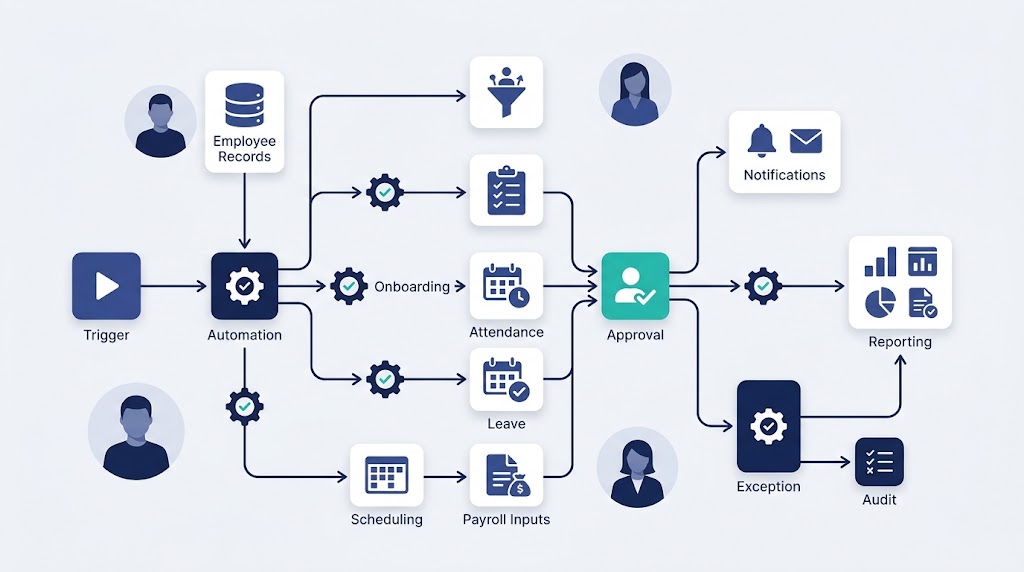
HR automation uses software to perform repeatable human resources tasks with less manual effort. It moves information, starts approvals, sends notices, and updates records when set conditions are met.
If you are asking what is HR automation, think of a repeatable digital workflow. Human resources automation and HR process automation often describe the same practice.
That workflow may use fixed rules, integrations, robotic process automation, or artificial intelligence (AI). It can also pause for human oversight whenever a person should decide.
Good automation removes avoidable admin without removing accountability. The aim is better HR work, not fewer human decisions.
How HR automation works
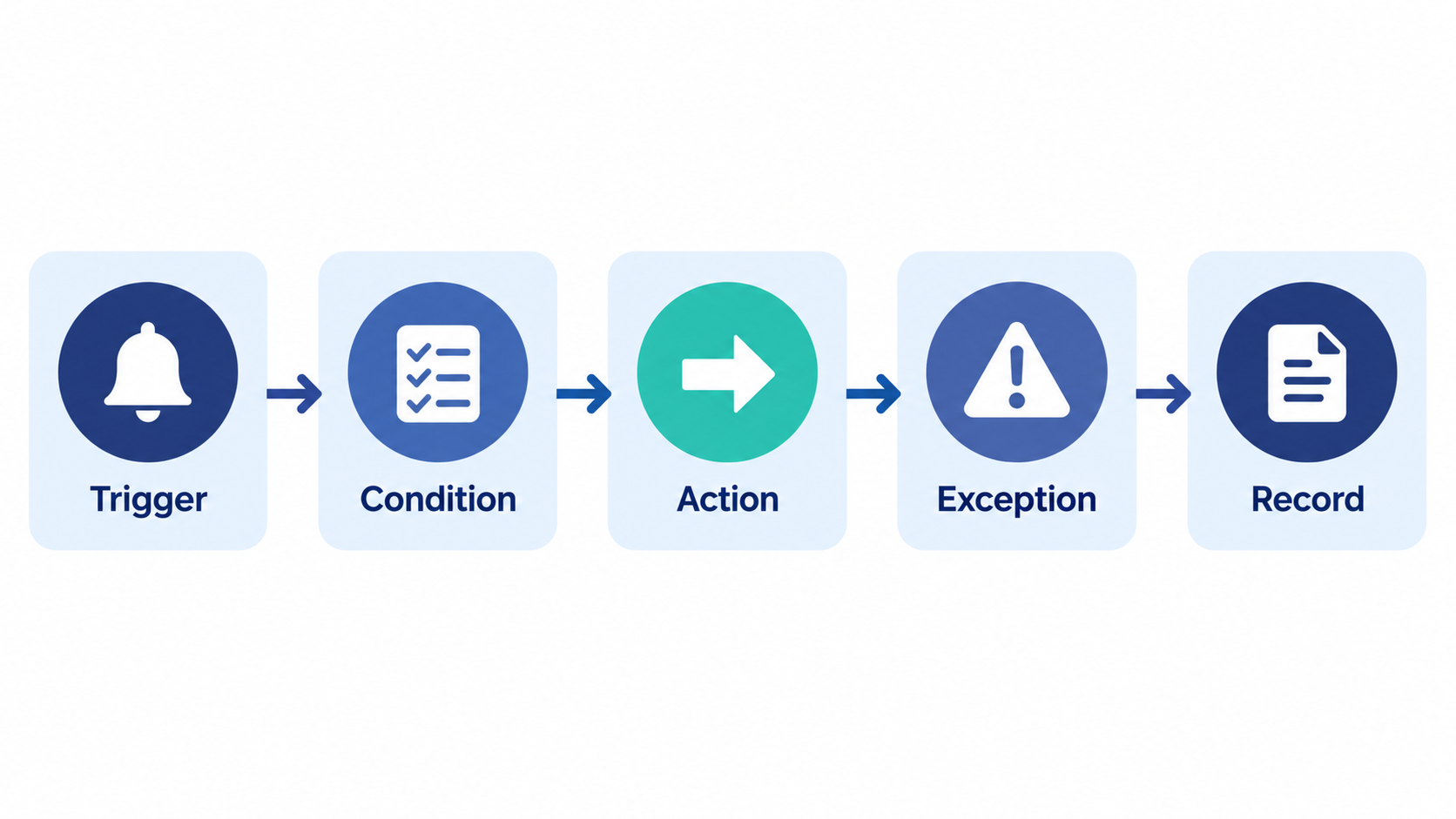
Most automated workflows begin with a trigger and continue with one or more actions. Microsoft Learn explains that an event can trigger the workflow.
An HR workflow often adds rules, exceptions, and a recorded outcome. A leave request might follow these five parts:
- Trigger. An employee submits a leave request, which starts the workflow.
- Condition. The system checks a rule, such as the available leave balance.
- Action. The request goes to the correct manager for review.
- Exception. Missing data or an unusual case sends the request to HR.
- Record. The system updates the balance and logs the decision.
This model answers the question, “How does HR automation work?” Software handles the predictable path, while people handle judgment and unusual cases.
HR workflow automation connects those steps and keeps their status visible.
Automation also has several technical forms. CIPD describes AI and robotic process automation, known as RPA, as forms of automation.
RPA can copy actions that a person performs across computer systems. AI can classify documents, generate suggestions, or help analyze unstructured information.
Neither technology should be treated as automatic authority. The workflow still needs an owner, clear limits, and an exception path.
HR automation vs digitization, HRIS, RPA and AI
These terms often appear together, but they describe different jobs. Understanding the difference prevents costly software mismatches.
- Digitization changes paper information into digital data, such as an online form.
- An HRIS stores and manages employee profiles, leave balances, and other records.
- Rule-based automation performs defined actions when set conditions are met.
- RPA repeats screen-based actions across systems, such as copying approved data.
- AI-enabled automation interprets content or suggests outputs, such as interview questions.
A human resources information system (HRIS) is usually the system of record. HR automation routes tasks within or across systems.
This explains HRIS vs HR automation: one stores data, while the other moves work.
AI is also optional. Many useful workflows need only a trigger, a simple rule, and an action.
For a deeper comparison, read our guide to AI in HR.
What HR processes can be automated?
The best candidates are frequent, repeatable, and guided by stable rules. They also use data that your team can access and verify.
SHRM lists routine, repeatable work as a common automation candidate.
The table below provides common HR automation examples across the employee lifecycle.
| HR process | Tasks suited to automation | Keep a person involved when |
| Recruitment automation | Posting notices, scheduling, status updates, CV parsing | Assessing fit or making a hiring decision |
| Onboarding automation | Collecting documents, assigning tasks, sending reminders | A new hire needs support or an exception |
| Employee records | Validating fields, routing updates, tracking versions | Records conflict or sensitive access changes |
| Time and attendance | Capturing entries, flagging gaps, routing approvals | A disputed entry affects pay or discipline |
| Leave management | Checking balances, routing requests, updating records | The request involves an accommodation or dispute |
| Payroll automation | Preparing inputs, applying set rules, producing payslips | Data is missing or an unusual payment appears |
| Benefits administration and performance management | Sending reminders and collecting review forms | Eligibility or performance decisions need review |
| Policy management | Sending updates, collecting acknowledgements, logging status | A policy question needs interpretation |
| Offboarding | Assigning tasks, collecting assets, recording completion | Access, final pay, or conduct issues need review |
Before automating these areas, map their owners and handoffs. This human resource management process guide offers a useful starting point.
Benefits of HR automation
The benefits of HR automation come from reducing repeated handling. Results still depend on process quality, data quality, and adoption.
- Less routine admin. Software can route forms, update status, and send standard reminders.
- Faster handoffs. Each completed action can start the next assigned task.
- More consistent processing. Defined rules reduce variation across routine cases.
- Fewer manual entry points. Connected records can reduce duplicate typing and rework.
- Better visibility. Status views show waiting work, while audit logs record past actions.
- A clearer employee experience. Employee self-service lets people submit requests and check progress.
- Better scalability. Repeatable workflows can absorb growth without matching each request with manual work.
- More time for people to work. HR teams can focus on coaching, planning, and complex cases.
Automation does not guarantee those outcomes.
What HR should not fully automate
Some HR work depends on context, empathy, or accountable judgment. Automation can support these tasks, but should not own the final outcome.
Use this matrix when deciding the right level of automation.
| Level | Suitable work | Required human role |
| Automate | Reminders, document routing, balance checks, routine notices | Monitor exceptions and workflow performance |
| Assist | CV parsing, question suggestions, anomaly flags, report summaries | Verify inputs, assess context, and decide |
| Keep human-led | Grievances, accommodations, discipline, termination, sensitive feedback | Listen, investigate, explain, and remain accountable |
Treat final hiring and promotion decisions as human-led. This is a risk-control choice, not a universal legal rule.
Software may organize evidence, but a responsible person should assess it.
In the United States, the Equal Employment Opportunity Commission says employment discrimination law still applies to automated tools. The US Department of Justice and EEOC also warn that assessment tools can screen out qualified disabled applicants.
In the UK, the Information Commissioner’s Office calls for safeguards in automated recruitment. These include bias monitoring, transparency, recourse, and access to human review.
Requirements differ across countries and regions. Check the laws that apply to your workers, candidates, and data.
Human review is not a decorative approval box. Reviewers need training, enough information, and authority to change the result.
HR automation challenges and safeguards
Common HR automation challenges include process design, data quality, access, and adoption. Automating a broken process produces faster broken outcomes.
- Unclear process. Software can copy delays and duplicate approvals. Simplify the process before selecting a tool.
- Poor data. Missing or outdated records can trigger wrong actions. Define required fields and validation rules.
- Integration gaps. Systems may display different employee information. Set a system of record and test data transfers.
- Weak access controls. Sensitive data may reach the wrong person. Use role-based access and review permissions.
- AI error or bias. A suggestion may unfairly affect someone. Test outputs and retain accountable human review.
- No exception. Unusual cases may stall or receive a default answer. Assign an owner and escalation route.
- Low adoption. People may bypass the workflow. Involve users early and provide simple training.
- No monitoring. Errors may continue after launch. Review logs, feedback, failures, and outcomes.
The voluntary NIST AI Risk Management Framework groups AI risk work into Govern, Map, Measure, and Manage. It also calls for defined oversight roles and ongoing review.
Privacy needs separate attention from security. Collect only necessary employee data, explain its use, and control access throughout its lifecycle.
Automation can support consistent records, but it does not guarantee compliance.
How to implement HR automation in six steps
Start with one process instead of automating the whole HR function. A narrow pilot makes errors easier to find and fix.
1. Define the problem and baseline
Name the result you want before discussing software. “Reduce onboarding delays” is clearer than “modernize HR.”
Record the current cycle time, handoffs, errors, and exceptions. These measures will show whether the new workflow helps.
2. Map and simplify the process
List each trigger, input, decision, owner, action, and record. Remove duplicate approvals and unused fields before building anything.
Ask frontline users where cases pause or return for correction. Their answers often reveal the real bottleneck.
3. Choose a safe first workflow
Score each candidate against the following questions. A good first pilot has clear rules and low decision risk.
Use this five-point check:
- Frequency. Prefer a task that happens often, not a rare event.
- Rules. Choose a process with a clear path and few judgment calls.
- Inputs. Confirm that required records are available and reliable.
- Risk. Avoid errors that could harm pay, access, or employment.
- Ownership. Choose a process with one clearly accountable owner.
Leave routing or onboarding reminders may suit a first pilot. Final hiring decisions and grievances do not.
4. Design human review and exceptions
Define where the workflow must stop for approval. Name the person responsible for each exception.
Document what reviewers can see and change. Set a manual fallback for outages or incomplete data.
5. Select the right system and controls
Match product capabilities to your process map. Check permissions, audit logs, data storage, integrations, support, and reporting.
OryxBlue is a cloud HR and recruitment platform for startups and smaller businesses. Its documented tools cover approvals, onboarding stages, payroll generation, notifications, policy acknowledgements, and audit logs.
Compare those functions with your actual workflow. Do not assume any HRMS includes a general rules engine unless its documentation confirms one.
You can also review the wider benefits of HR software before selecting a platform.
6. Pilot, measure, and improve
Test common cases, missing data, duplicate submissions, rejected requests, and access limits. Train users before the workflow becomes mandatory.
Compare results with your baseline after launch. Track cycle time, completion, errors, manual touches, exceptions, and user feedback.
Keep monitoring after the pilot. Processes, teams, laws, and software settings can change over time.
Frequently asked questions
Can HR be fully automated?
Some workflows can run from start to finish. Automating the whole HR function is rarely practical or advisable.
The correct boundary depends on the task, its risks, and local law. Automation can organize evidence and reminders without owning the outcome.
What is a simple example of HR automation?
Leave approval is a simple example. An employee submits a request, and software checks the leave balance.
The request then reaches the correct manager. After approval, the system updates the balance and records the decision.
Which HR processes should a small business automate first?
Start with frequent tasks that follow clear rules. Leave requests, onboarding checklists, attendance approvals, and routine notices are common starting points.
For a small business, choose one visible bottleneck. Avoid high-risk decisions until your controls and review process are mature.
Does HR automation always use AI?
No. Many workflows use fixed rules, forms, schedules, and system integrations.
AI in HR automation is useful when software must interpret text or make suggestions. Those outputs need testing and human review.
Is HR automation the same as an HRIS?
No. An HRIS stores and manages employee data, while automation moves work between people and systems.
One product may do both jobs. The distinction still helps you identify missing workflow features.
Use automation to support better HR work
Human resources automation works best when the process is clear and measurable. Start small, protect employee data, and keep people responsible for judgment.
Ready to replace routine HR admin with controlled workflows? Explore OryxBlue’s HR automation features.