
What Is Payroll? A Complete Guide to Process, Systems & Software
Payroll is the process and record used to calculate and pay employees. It covers regular earnings, extra pay, deductions, withholdings, employer costs, and final net pay.
Payroll can also mean the total compensation a business pays during a period. The intended meaning usually depends on the context.
Salary and payroll are related, but they are not the same. Salary is one form of employee compensation.
Payroll is the wider process that turns compensation data into an approved payment.
Payroll management is broader still. It includes calendars, responsibilities, data checks, calculations, approvals, payments, reporting, records, and compliance controls.
Responsibility varies by business. HR, finance, payroll specialists, owners, or outside providers may share the work.
Each task should still have a clear owner and approver.
What are the main components of payroll?
- Employee earnings: Salary, hourly wages, shift pay, and other regular compensation.
- Bonuses and commissions: Approved performance, sales, or incentive payments.
- Deductions: Authorized amounts removed from employee pay.
- Taxes and withholdings: Amounts required under the employee’s applicable rules.
- Benefits: Employer or employee benefit contributions and allowances.
- Net pay: The final amount paid to the employee.
- Employer contributions: Employer-paid costs that usually do not reduce employee net pay.
Quick definition test: Salary is an input. Payroll covers calculation and payment.
Payroll components control the full operation.
Why is payroll management important?
Ensures employees are paid accurately
Payroll management brings each pay input into one review process. This includes working hours, leave, overtime, bonuses, deductions, and employee changes.
A structured review helps teams find missing or unusual entries before payment. It also gives employees a clearer path for resolving pay questions.
Helps maintain payroll compliance
Payroll may be affected by wage, tax, benefit, reporting, and record-keeping rules. A documented process helps teams apply the required steps more consistently.
Rules vary by country and may also vary within a country. Each business must confirm the requirements for every work location.
Reduces payroll errors
Common errors include missed overtime, duplicate payments, and outdated salaries. Incorrect deductions and delayed employee changes can also affect net pay.
Standard data fields, calculation rules, checklists, and approvals can reduce these risks. Human review remains necessary, even when software performs the calculations.
Improves employee trust and satisfaction
Employees plan their lives around expected pay dates. Late or incorrect pay can create stress and weaken trust in the employer.
Reliable dates, clear pay records, and prompt corrections support a better employee experience.
Saves HR and finance time
Manual payroll often requires data from emails, spreadsheets, timesheets, and leave records. Teams then spend extra time checking which entry is current.
A connected process reduces repeated entry and follow-up. HR and finance can focus more time on review and exceptions.
Provides better payroll visibility
Payroll reports show salary costs, overtime, bonuses, deductions, and adjustments. Authorized leaders can use this information for budgets and workforce planning.
Visibility also helps teams compare one pay period with another. Unexpected changes become easier to investigate.
Payroll control check: Can your team trace every payment change to an approved source? If not, the process needs a stronger record or approval step.
What is the payroll process?
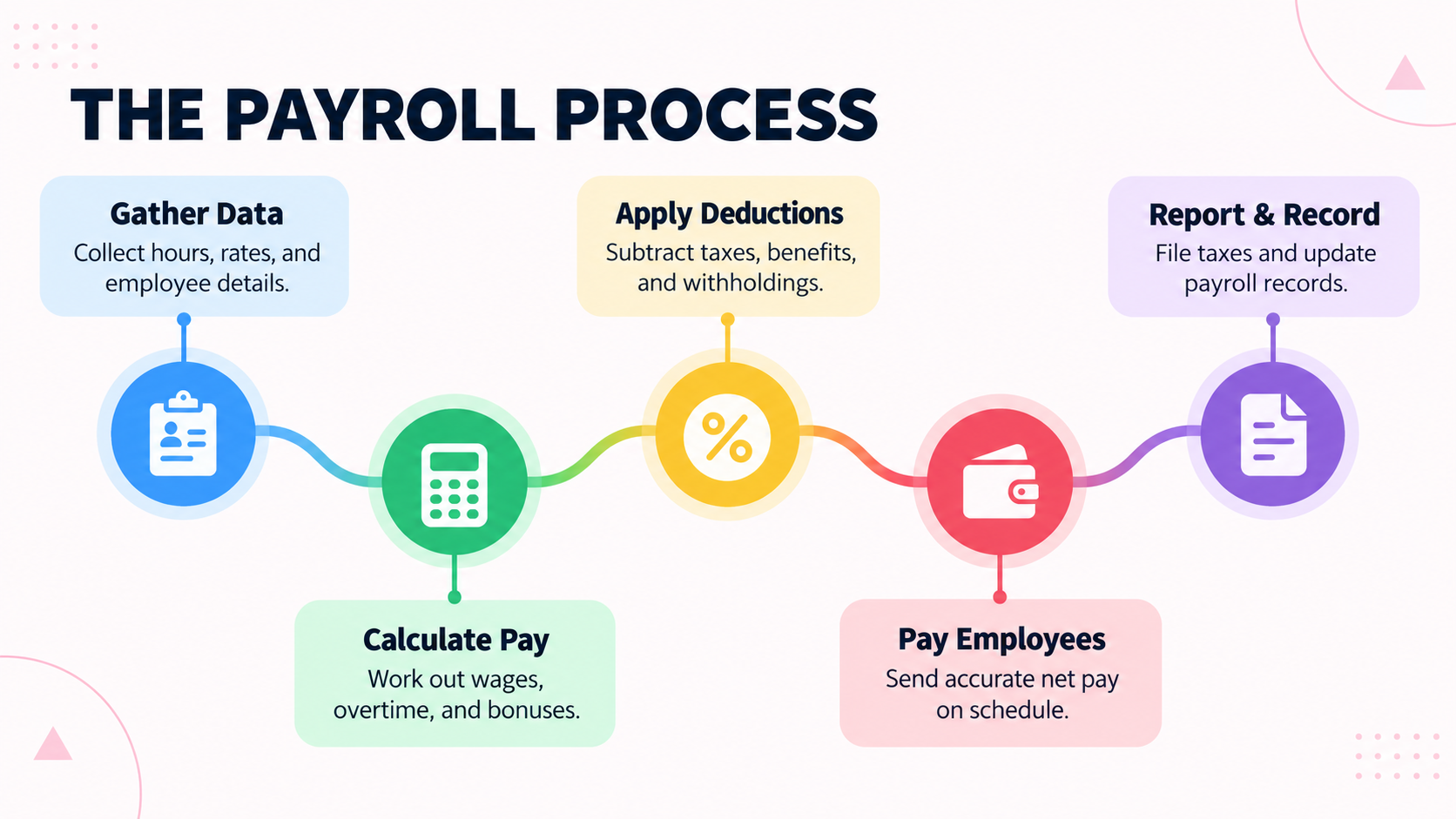
The payroll process is a repeating cycle. It begins with employee data and ends with payment, reporting, and secure records.
1. Collect employee and payroll data
Gather every approved change that can affect pay. This includes new hires, departures, salary changes, bonuses, commissions, deductions, and payment details.
Set a clear cutoff date for changes. Late submissions should follow a defined exception process.
2. Track attendance, leave, and working hours
Review attendance, timesheets, overtime, and other time records. Confirm that managers approved any exceptions.
Account for paid, unpaid, sick, or other leave types. Their payroll treatment depends on company policy and local rules.
3. Calculate gross pay
Gross pay is total earnings before employee deductions and withholdings. It may include salary, hourly wages, overtime, bonuses, commissions, and allowances.
Use only approved rates and records. Effective dates matter when compensation changes during a pay period.
4. Calculate deductions and withholdings
Apply required and authorized amounts in the correct order. Examples may include statutory withholdings, benefits, loan repayments, or unpaid leave adjustments.
Each deduction needs a clear basis. The record should show who approved it and when it applies.
5. Calculate net pay
Net pay is the amount due to the employee after applicable reductions. Some non-taxable reimbursements may be added separately.
Check unusual results before approval. Examples include negative pay, large variances, or unexpected deductions.
6. Review and approve payroll
Reconcile payroll totals with source records and the previous period. Review starters, departures, overtime, bonuses, deductions, and manual adjustments.
An authorized person should approve payroll before payment. Where practical, preparation and approval should be separate roles.
7. Submit payroll and make payments
Finalize the approved payroll and pay employees through permitted methods. Issue required pay records and schedule applicable filings or remittances.
Payment methods and reporting duties depend on local rules. Follow the deadlines that apply to each workforce.
8. Maintain payroll records and reports
Store payroll registers, approvals, payment evidence, adjustments, and required reports. Protect these records with suitable access controls.
Records support employee queries, audits, reconciliations, and future corrections. Retention periods vary by jurisdiction.
Before approval, confirm these controls:
- A cutoff date applies to all source data.
- A manager approved attendance, leave, and overtime.
- Calculations use current rates, rules, and effective dates.
- Payroll totals match source data and expected changes.
- A named, authorized person approved the payroll.
- Payment instructions match the final approved payroll.
- Required reports and records are complete and secure.
What information is required for payroll?
Payroll needs accurate employee, compensation, time, and payment data. The exact fields depend on the worker and jurisdiction.
- Employee name and identifying details
- Employment status, start date, and end date
- Department, location, and job role
- Salary, hourly rate, or other compensation basis
- Pay frequency and standard working hours
- Attendance, timesheets, and approved overtime
- Paid and unpaid leave records
- Bonuses, commissions, allowances, and reimbursements
- Benefits and applicable employer contributions
- Tax or statutory information
- Authorized deductions and adjustments
- Bank or other permitted payment information
- Promotions, transfers, salary changes, and departures
Sensitive fields should only be visible to authorized people. Changes to salary or payment details should require verification and a clear record.
Input check: No payroll change should rely only on an informal message. Use an approved request, effective date, and named owner.
How is payroll calculated?
Payroll starts with approved earnings. The team then applies relevant adjustments, deductions, and withholdings to reach net pay.
The exact order can vary by jurisdiction. Local rules decide which amounts affect taxable pay and when.
Gross pay
Gross pay is total employee earnings before employee deductions and withholdings. It may include fixed salary, hourly wages, or both.
For a basic hourly calculation:
Approved hours x hourly rate = regular earnings
Overtime and additional earnings
Add approved overtime, bonuses, commissions, shift pay, and allowances. Apply the rates or terms stated in policy, contract, or local law.
Reimbursements may need separate treatment from taxable earnings. Confirm their treatment for the relevant location.
Pre-tax deductions
Eligible pre-tax deductions may reduce taxable wages before certain taxes are calculated. Their eligibility and order depend on local rules.
Do not assume a deduction has the same treatment everywhere. Verify each deduction type before configuring payroll.
Taxes and withholdings
Calculate employee taxes or statutory withholdings using current, applicable rules. The result may depend on earnings, classification, status, and location.
Use current official guidance or qualified advice for local calculations. Avoid relying on an old spreadsheet rule.
Post-tax deductions
Post-tax deductions are applied after the relevant tax calculation. These may include authorized repayments or voluntary deductions.
Keep employee deductions separate from employer-paid contributions. Employer contributions are usually an added business cost.
Net pay
Net pay is the final amount owed to the employee.
Gross pay – employee deductions – taxes or statutory withholdings = net pay
This is a simplified formula. Non-taxable reimbursements or special adjustments may change the final payment.
Before finalizing the calculation, confirm:
- All rates, hours, and extra earnings are approved.
- Eligible pre-tax items received the correct treatment.
- Withholdings follow current local rules.
- Every deduction is authorized and correctly ordered.
- Employer contributions are recorded separately.
- Net pay passes variance and exception checks.
What are the different payroll cycles?
A payroll cycle describes the full recurring process. Payroll frequency describes how often employees are paid.
The common frequencies are weekly, biweekly, semi-monthly, and monthly.
Weekly payroll
Employees are paid once each week, usually across 52 pay periods. This can suit hourly, temporary, or shift-based workforces.
Weekly payroll gives employees frequent pay. It also requires more frequent data collection, review, approval, and payment work.
Biweekly payroll
Employees are paid every two weeks. A year normally has 26 biweekly pay periods, though some calendar years have 27.
Biweekly payroll aligns well with two-week work patterns. Annual amounts may need care when an extra pay period occurs.
Semi-monthly payroll
Employees are paid twice each month on set dates. This creates 24 pay periods each year.
Semi-monthly periods can contain different numbers of working days. That can add complexity for hourly pay and overtime.
Monthly payroll
Employees are paid once each month, creating 12 pay periods. This can reduce the number of payroll runs.
Monthly pay creates a longer gap between payments. Employees need clear and reliable payment dates.
How do you choose the right payroll frequency?
Start with legal pay-frequency rules. Then consider workforce type, overtime, cash flow, employee needs, and processing capacity.
Once selected, publish a payroll calendar. Include cutoffs, review dates, approval deadlines, and payment dates.
| Frequency | Typical pay periods | Main trade-off |
| Weekly | 52 | Frequent pay with more processing cycles |
| Biweekly | Usually 26 | Regular two-week rhythm, with occasional extra period |
| Semi-monthly | 24 | Fixed monthly dates, but uneven working days |
| Monthly | 12 | Fewer runs, but longer gaps between payments |
Common payroll management challenges
Payroll problems often begin before calculation. Missing, late, or conflicting inputs can create extra correction work.
- Manual entry risk. Re-entered data can introduce typing and formula errors.
- Calculation risk. Old rates or rules can produce incorrect pay.
- Time-data risk. Missing clock-ins or unapproved overtime can distort earnings.
- Deadline risk. Late inputs and approvals can delay the whole payroll run.
- Deduction risk. Incorrect rules can affect taxable wages or net pay.
- Compliance risk. Outdated processes can create filing or record gaps.
- Disconnected-data risk. HR changes may not reach payroll in time.
- Record risk. Old salary, role, or payment details may remain active.
- Change risk. Promotions, transfers, leave, and departures may hit the wrong period.
- Visibility risk. Fragmented records can hide unusual costs or repeated corrections.
Risk check: Track every correction by cause. Repeated causes show where the process needs a stronger control.
Manual payroll vs payroll software
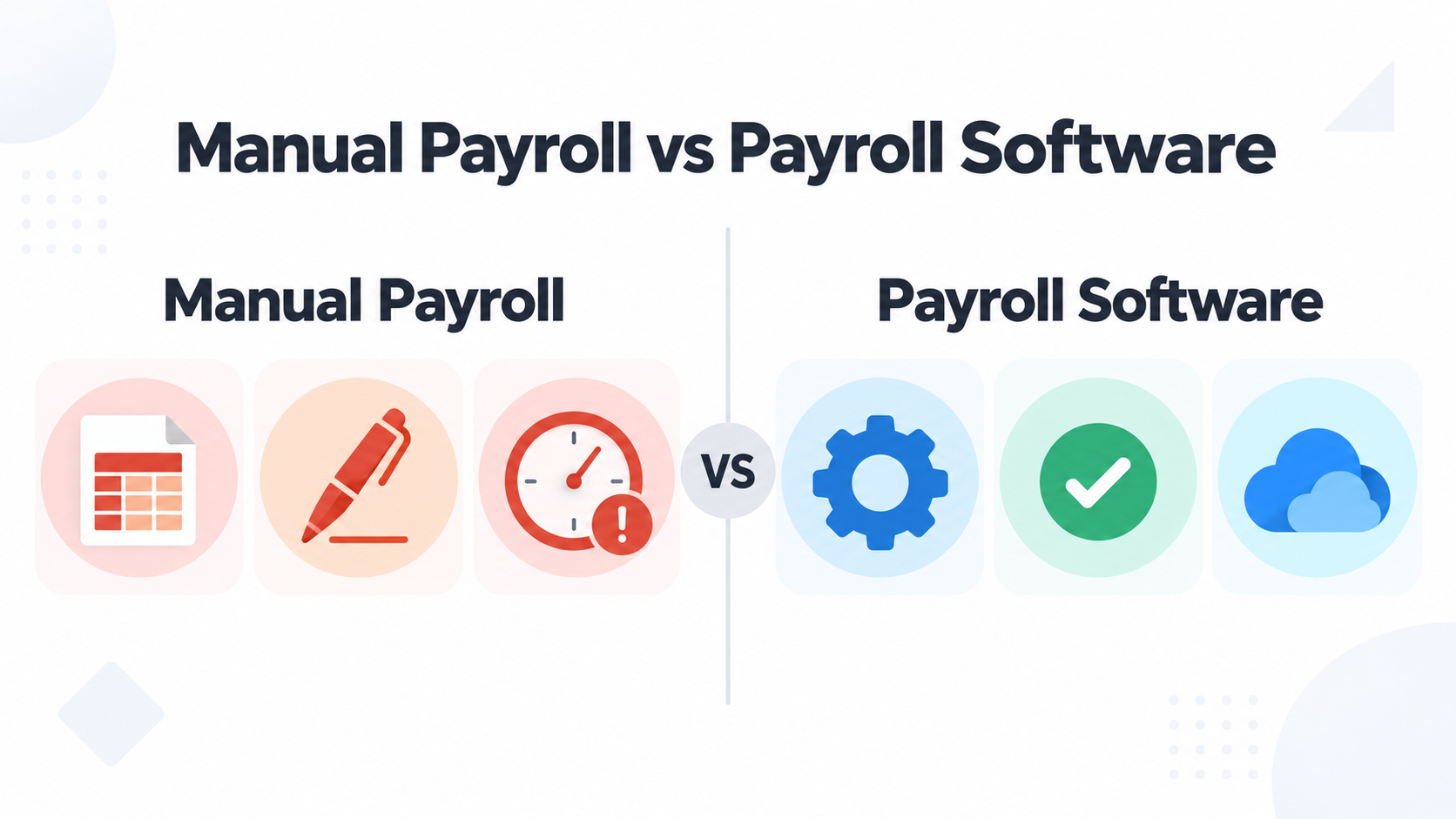
Manual payroll may work for a small team with simple pay rules. Its limits appear as employee numbers, exceptions, and approvals increase.
| Manual payroll | Payroll software |
| Spreadsheet-based calculations | Configured and automated calculations |
| More manual entry and formula risk | More consistent repeat calculations |
| Data gathered from separate sources | Centralized employee and payroll data |
| Repeated processing work | Faster recurring workflows |
| Reports built by hand | Centralized payroll reporting |
| Limited process visibility | Clearer workflow and status visibility |
| Approvals may happen through email | Structured review and approval routes |
| Changes may be hard to trace | Change records may be easier to maintain |
Software still needs accurate data, correct settings, and human review. It supports payroll controls but does not replace accountability.
Decision rule: Consider software when spreadsheets hide changes, reviews take too long, or payroll depends on one person.
What is a payroll system?
A payroll system is the full operating setup used to manage employee pay. It includes people, policies, calendars, data, controls, records, and technology.
The system collects payroll inputs and applies defined pay rules. It then supports review, approval, payment, reporting, and record keeping.
Core components may include:
- Employee and compensation records
- Attendance, timesheets, and leave data
- Earnings, deduction, and withholding rules
- Payroll calendars and cutoff dates
- Review and approval workflows
- Payment instructions and pay records
- Payroll reports and reconciliations
- Access controls and activity records
- Retention and correction procedures
Payroll software is one part of this wider system. Software provides tools, while the payroll system defines how people use them.
A business may need a structured system when manual work becomes hard to control. Warning signs include missed changes, slow approvals, and limited reporting.
System test: If one person’s absence can stop payroll, the process needs better documentation and backup ownership.
Key features of modern payroll software
Employee payroll records
Central records keep personal, job, compensation, and payment details together. This can reduce duplicate files and outdated information.
Salary and compensation management
The software should organize salary, hourly rates, allowances, bonuses, and commissions. Effective dates help apply changes to the correct period.
Attendance and leave integration
Connected time and leave data can reduce manual entry. Only approved hours, overtime, absences, and leave should reach payroll.
Payroll calculations
Calculation tools apply configured earnings, deduction, and withholding rules. Teams still need to review exceptions and verify current settings.
Deductions and withholdings
Software can organize deduction types and apply them to eligible employees. Configuration must follow the rules for each jurisdiction.
Payroll approvals
Approval workflows define who prepares, reviews, and authorizes payroll. They also create a record of key decisions.
Payroll reporting
Reports may show payroll totals, overtime, bonuses, deductions, and period changes. Filters can support departmental or location-based review.
Employee self-service
Self-service may let employees view pay records or submit permitted changes. Available functions depend on the selected software.
Role-based access
Role-based access limits data according to job duties. Managers may review time, while payroll staff handle compensation and payment data.
Payroll data security
Payroll contains identity, compensation, tax, and payment information. Buyers should examine access controls, authentication, backups, logs, retention, and data location.
During a software demo, verify:
- Employee records support effective dates and change history.
- Time and leave data shows approval status and exceptions.
- Calculations support your rules, adjustments, and reviews.
- Approval routes support roles, delegation, and activity records.
- Reports offer the filters and exports your team needs.
- Self-service protects private fields and controls requests.
- Security controls cover authentication, permissions, logs, backups, and retention.
How payroll software simplifies payroll management
The connected workflow is:
Employee Data -> Attendance & Leave -> Payroll Calculation -> Review -> Approval -> Payment -> Reporting
Software connects stages that teams often manage through separate files. It can reduce duplicate entry and keep approved information in one workflow.
Configured rules also reduce repetitive calculation work. Reviewers can focus on exceptions, changes, and unusual results.
Consistency depends on current data and correct settings. Automation repeats what the system has been told, including a wrong rule.
Workflow check: Every automated result needs an owner, a source record, and a review point.
How to manage payroll effectively
Standardize payroll processes
Document each step, owner, cutoff, review, approval, payment, and record. A written process reduces dependence on memory.
Keep employee data updated
Update records when someone joins, changes role, receives new pay, or leaves. Use effective dates for every change.
Connect HR and payroll data
Employee, attendance, leave, and compensation records often affect payroll. Connected information reduces duplicate entry and missed changes.
Use payroll checklists
Use a checklist for every payroll run. It helps several contributors follow the same review standard.
Review payroll before submission
Compare totals with approved source records and the previous period. Investigate large changes and unusual results.
Maintain payroll records
Keep payroll reports, approvals, payment records, and supporting documents. Follow local retention and privacy requirements.
Monitor payroll reports
Review overtime, adjustments, deductions, employee counts, and departmental costs. Look for patterns that need action.
Restrict access to sensitive payroll data
Give each user only the access their role requires. Review access after transfers, departures, or responsibility changes.
Monthly control check: Confirm data, calculations, approvals, payment evidence, reports, access, and records.
Payroll best practices
- Keep employee information accurate. Control changes to employment, compensation, tax, and payment data.
- Establish a consistent payroll calendar. Set cutoff, review, approval, and payment dates.
- Automate repetitive payroll tasks. Use configured calculations and workflows where they fit.
- Reconcile payroll before payment. Compare totals, employee counts, and major changes with source records.
- Maintain proper documentation. Keep evidence for earnings, deductions, adjustments, and approvals.
- Review deductions and adjustments. Confirm authorization, value, timing, and treatment.
- Protect sensitive payroll information. Use access controls and secure data handling.
- Monitor payroll reports regularly. Investigate unusual changes and repeated corrections.
- Define approval responsibilities. Separate preparation and authorization where practical.
- Keep payroll processes compliant. Review rules and update settings when requirements change.
Best-practice rule: A payroll control is useful only when someone owns it and records its completion.
Payroll compliance: what businesses need to consider
Payroll compliance means following the rules that apply to employee pay. It also covers deductions, records, reports, filings, and employer obligations.
Review these areas for every jurisdiction:
- Payroll taxes and statutory withholdings
- Employee and contractor classification
- Minimum pay and overtime rules
- Required and permitted deductions
- Employer taxes or contributions
- Pay frequency and payment deadlines
- Payslip or pay-statement requirements
- Filing and remittance deadlines
- Payroll reporting requirements
- Payroll record-retention periods
- Final pay when employment ends
- Employee data privacy and security
Requirements may vary by country, state, province, or municipality. They may also depend on worker type, industry, and work location.
Payroll software can support a consistent process. The employer remains responsible for correct settings, calculations, filings, and records.
Important: This guide gives general payroll information. It is not legal, tax, or accounting advice. Confirm current requirements with official authorities or qualified advisers in each jurisdiction.
Compliance check: Record who verifies each requirement, which source they use, and when the rule was last reviewed.
Payroll management for HR teams
The role of HR in payroll
HR manages much of the data that payroll needs. This includes contracts, compensation, roles, working arrangements, leave, and employment changes.
HR may not calculate or release payments. It still helps ensure payroll inputs are complete, current, and approved.
HR data that affects payroll
Start dates, employment status, salary, department, location, and benefits can affect pay. Update the source record before sending a change to payroll.
Attendance and leave
HR may review attendance exceptions, overtime requests, paid leave, and unpaid absences. Payroll should use approved records only.
Employee changes
Promotions, transfers, pay changes, and departures need an effective date. The date tells payroll which period should include the change.
Approvals and requests
Employee requests may cover leave, advances, reimbursements, or payment detail changes. Defined approvals help stop unverified changes from reaching payroll.
Payroll visibility and reporting
HR needs enough visibility to answer employee questions and support planning. Access must still match each person’s role.
HR should check the payroll impact of each event:
- New hire: Start date, pay basis, benefits, and payment details.
- Attendance exception: Paid hours, unpaid time, or overtime.
- Leave: Paid or unpaid treatment and effective dates.
- Promotion or transfer: Pay, department, location, and approval changes.
- Benefit change: Employee deductions or employer contributions.
- Departure: Final pay, deductions, benefits, and access removal.
Payroll management for small businesses
Spreadsheets can work for a small team with simple pay arrangements. Problems grow when employee changes and pay exceptions become frequent.
Small teams often face missing time records, old salaries, broken formulas, and weak reporting. Payroll may also depend too heavily on one person.
Central employee and payroll information can reduce these gaps. The process should remain simple enough for the team to maintain.
Manual payroll may remain practical when:
- The team is small and stable.
- Pay rules are simple.
- Changes are rare and easy to trace.
- A reviewer can check each calculation.
- Backup ownership is documented.
Consider software when employee numbers, pay rules, or approvals grow. Slow reviews, missed changes, and weak backup ownership are also warning signs.
Payroll management for growing businesses
Managing more employees
More employees bring more records, calculations, changes, and questions. Standard data fields help teams keep information consistent.
Handling multiple departments
Departments may use different schedules, allowances, or approval routes. Common controls should still apply across the business.
Managing employee changes
Growth creates more hires, transfers, promotions, and departures. Effective dates and approval records keep changes tied to the correct period.
Maintaining consistent processes
Shared procedures stop departments or locations from handling the same change differently. Local exceptions should be documented.
Improving payroll visibility
Central reports can show approved costs by department, location, group, or period. Access must remain limited to authorized roles.
Scaling HR and payroll workflows
Scalable workflows reduce dependence on messages and separate spreadsheets. The business can add roles and approvals as complexity grows.
Scale check: Add controls when complexity appears, not only after an error exposes the gap.
How to choose payroll software
Define your payroll requirements
List employee types, locations, pay frequencies, earnings, deductions, approvals, and reports. Identify the slowest or least reliable tasks.
Check HR and payroll integration
Test how employee, attendance, leave, compensation, and departure data moves. Check how the system handles duplicate or conflicting records.
Evaluate automation features
Focus on automation that supports your actual payroll process. Examples include recurring rules, effective dates, reminders, approvals, and reports.
Check reporting capabilities
Review standard reports, filters, exports, and access limits. Reports should support review, reconciliation, budgeting, and local obligations.
Review security and access controls
Ask about authentication, permissions, encryption, backups, logs, retention, and data location. Verify each claim in the provider’s documentation.
Consider scalability
Check support for more employees, departments, locations, pay structures, and approval levels. Ask how pricing changes as usage grows.
Compare ease of use
Test daily tasks with the people who will use the software. A feature list cannot show whether a workflow feels clear.
Calculate total cost
Include subscription, setup, migration, integration, training, support, and internal project time. Consider future growth as well.
Request a demo or trial
Test real scenarios during a demo. Include a new hire, pay change, overtime entry, unpaid leave, approval, report, and departure.
Ask each provider to show:
- A live walkthrough using your payroll rules.
- Field mapping between HR and payroll data.
- Variance reports and change records for reviewers.
- Role and permission setup for sensitive data.
- Product limits, pricing tiers, and the upgrade path.
- A full breakdown of setup and recurring costs.
How OryxBlue supports better payroll management
OryxBlue connects employee records and payroll-related workforce information within one HR platform. It can help teams reduce reliance on disconnected records.
Centralized employee information
Teams can maintain core employee and employment data in one place. This gives HR and payroll-related work a more consistent source record.
Workforce profiles
Workforce profiles organize each employee’s role, department, work details, and related records. Authorized users can review the information they need.
Attendance and availability
Attendance and approved leave records help teams understand workforce availability. Teams can check approved data before payroll preparation.
Leave and employee requests
Leave and employee requests can follow defined workflows. HR and managers gain clearer visibility before approved changes affect payroll inputs.
Roles and access management
Customizable roles help control who can view or manage sensitive workforce information. Access can match each user’s responsibilities.
Payroll visibility
Centralized workforce data helps authorized teams review payroll inputs and employee changes. It can reduce reliance on separate files and messages.
Reporting and workforce insights
Connected reporting can support payroll review, headcount analysis, and departmental planning. Leaders can work with clearer workforce information.
OryxBlue supports payroll-related workflows but does not remove employer responsibility. Teams must still verify calculations and meet local requirements.
See how OryxBlue can help centralize HR and payroll-related workforce information.
Payroll management checklist
Use this checklist before completing each payroll cycle:
- Employee data is up to date
- Attendance has been reviewed
- Leave has been accounted for
- Overtime has been verified
- Bonuses and adjustments have been checked
- Deductions have been reviewed
- Payroll calculations have been checked
- Payroll has been approved
- Payments have been processed
- Payroll records have been stored securely
Adapt the checklist to your approval process, payroll calendar, and local rules.
Frequently asked questions about payroll
What is payroll?
Payroll is the process and record used to calculate and pay employees. It covers earnings, deductions, withholdings, employer costs, net pay, reports, and records.
What is payroll management?
Payroll management coordinates payroll data, calculations, reviews, approvals, payments, reports, and records. It also defines the controls and responsibilities behind those tasks.
What is a payroll system?
A payroll system combines people, policies, processes, data, controls, calendars, records, and technology. Payroll software is one part of that wider system.
How does the payroll process work?
Teams collect employee data, review time records, and calculate gross pay. They then apply deductions, calculate net pay, approve payment, and store reports.
How is payroll calculated?
Payroll begins with approved gross earnings. Employee deductions and applicable withholdings are then removed to calculate net pay.
What information is needed for payroll?
Payroll usually needs employee compensation, attendance, leave, overtime, benefit, tax, deduction, and payment information. Exact requirements vary by jurisdiction.
What are the different payroll cycles?
Common payroll frequencies include weekly, biweekly, semi-monthly, and monthly. The right choice depends on legal, workforce, financial, and operational needs.
What are the benefits of payroll software?
Payroll software can reduce repeated entry, standardize calculations, support approvals, and centralize reports. It still needs accurate data and human review.
What is the difference between payroll and HR?
Payroll manages employee pay and its records. HR manages wider workforce activities, including recruitment, records, attendance, leave, performance, and employee changes.
When should a business use payroll software?
Consider software when spreadsheets become difficult to control. Other warning signs include repeated errors, slow approvals, poor reporting, and disconnected data.
How can businesses reduce payroll errors?
Keep employee data current and set clear cutoff dates. Connect approved time data, document adjustments, reconcile totals, and require review before payment.
What are the best practices for payroll management?
Use accurate records, a clear calendar, defined responsibilities, documented approvals, and secure access. Review deductions, reconcile payroll, monitor reports, and verify local requirements.