
How to Choose HR Software: A Practical 7-Step Guide
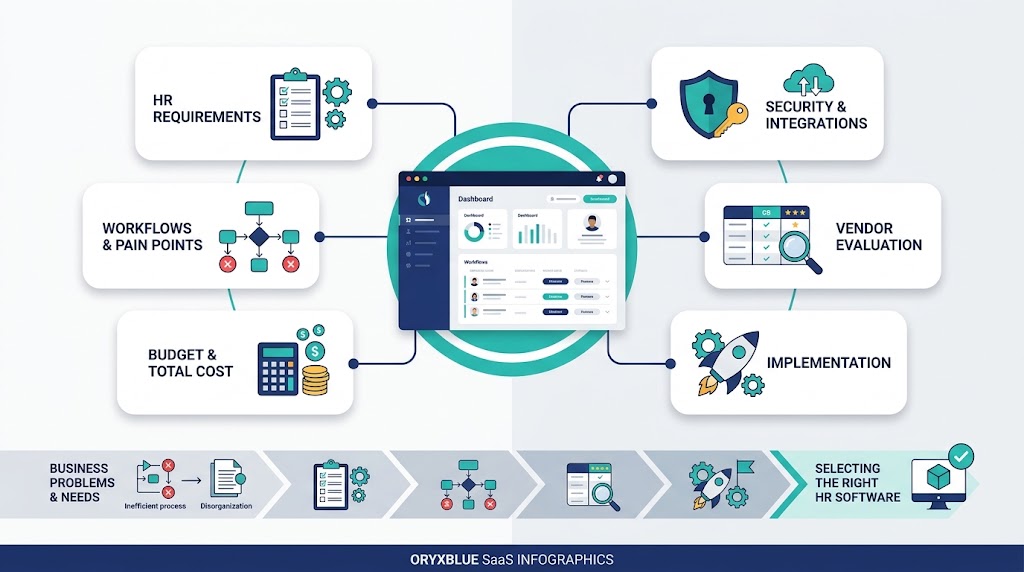
To choose HR software, start with your real workflows, risks, budget, and growth plans. Then require each vendor to prove its claims.
The best system is not the one with the longest feature list. It is the one that handles your work reliably.
This guide gives you a seven-step selection process. It also includes practical checks for cost, security, implementation, and data ownership.
1. Define the HR problems the software must solve
Do not start by browsing vendor lists. First, document the HR problems that cost time, create errors, or frustrate employees.
A clear HR software requirements document keeps the selection focused. It also stops attractive extras from controlling the decision.
Use this one-page requirements brief:
- Business problem and affected workflow
- People affected, including employees, managers, HR, and finance
- Current tools, handoffs, delays, and correction steps
- Required outcome and current baseline
- Must-have controls, reports, integrations, and access rules
- Countries, locations, worker types, and languages involved
- Budget range, preferred launch window, and internal owner
Map the current HR workflows and pain points
Map each process from its first trigger to its final record. Include approvals, reminders, handoffs, exceptions, corrections, and reports.
For example, map a leave request beyond the approval button. Check balances, manager coverage, payroll inputs, notifications, and record changes.
Mark every manual entry and duplicate step. These points reveal where automation or integration may help.
Set measurable outcomes and record a baseline
Define what better performance means before viewing software. A useful outcome links one workflow to a clear measure.
Possible measures include completion time, correction volume, approval delays, missing documents, and support requests. Record your current result for comparison.
Avoid unsupported savings targets. Let your baseline and pilot results show whether the new system improves the process.
Form a selection team across HR, finance, IT, managers, and employees
HR understands policy and daily administration. Finance checks costs, contracts, payroll handoffs, and budget effects.
IT reviews identity, integrations, security, and data movement. Managers and employees test whether common tasks are easy to complete.
Give one person decision ownership. Give each reviewer a defined area, deadline, and scoring role.
2. Choose the right system type: HRIS, HRMS, or HCM
HR software labels often overlap. Focus on the scope your business needs, not the vendor’s preferred category name.
| System type | Main purpose | Often suits | Check before choosing |
| HRIS | Maintains core employee information and records | Teams replacing files or separate employee lists | Workflow depth, self-service, reporting, and available modules |
| HRMS | Connects employee records with operational HR workflows | Teams managing leave, attendance, onboarding, payroll inputs, or recruitment | Native modules, integrations, approval rules, and country limits |
| HCM | Supports wider talent and workforce planning | Larger or more complex organizations | Implementation effort, configuration needs, reporting depth, and ownership cost |
These definitions describe common market use. Vendors may apply HRIS, HRMS, and HCM labels differently.
Use an HRIS for core employee information
A human resources information system, or HRIS, centers on employee data. It can replace scattered files with controlled records.
Check profiles, documents, organizational structures, reporting, permissions, and change history. Confirm whether other workflows require separate modules.
Use an HRMS for connected operational workflows
A human resource management system, or HRMS, usually connects records with daily HR work. That work may include leave or onboarding.
Do not accept the category label as proof. Test each required workflow, including approvals, exceptions, and corrections.
Consider HCM for broader talent and workforce planning
Human capital management, or HCM, often covers broader talent needs. These may include performance, learning, succession, and workforce planning.
Extra scope can add setup work and cost. Choose it when those capabilities solve current or planned business needs.
Compare an all-in-one suite with specialist tools
An all-in-one suite keeps more data and workflows together. It may reduce duplicate entry and simplify administration.
Specialist tools can provide deeper support for one function. They may also create more integrations, contracts, and data ownership questions.
Compare both options using the same workflows. Count every system, integration, handoff, and support responsibility.
3. Separate must-have features from optional modules
Long wish lists weaken HR software selection. They make a rarely used feature appear equal to a high-risk daily workflow.
Sort every requirement into three groups:
- Must have: The system cannot launch safely without it.
- Useful now: The feature adds value but has a workable alternative.
- Consider later: The module may matter after growth or process changes.
Start with the workflows that create the most risk or manual work
Prioritize processes with frequent entry, sensitive data, repeated corrections, or strict deadlines. Also consider tasks that affect many employees.
Do not call every common module essential. Let your operational problems decide the priority.
Define needs by user role, location, and employee type
A feature may work differently for employees, managers, HR administrators, and finance users. Write the required action for each role.
Check office staff, deskless workers, contractors, and remote teams separately. Their devices, access, language, and approval needs may differ.
Global teams should define requirements by country and legal entity. Never assume one workflow or payroll connection works everywhere.
Link to the HR software features guide for the full capability taxonomy
Use the related HR software features guide to review core records, workforce operations, talent, analytics, self-service, and platform controls.
Then bring only relevant capabilities into your selection checklist. This keeps feature research separate from the buying process.
4. Calculate the full cost of HR software
The subscription price rarely tells the whole cost. Calculate first-year and three-year ownership using the same scope for every vendor.
Build a worksheet with these lines:
- Base subscription and billing frequency
- Employee, user, administrator, or legal-entity charges
- Required modules and country-specific services
- Implementation, configuration, and data migration
- Integrations, API access, and specialist support
- Training, internal project time, and change management
- Storage, hardware, or time-clock costs
- Renewal changes, minimum commitments, and exit support
Include subscriptions, employee or administrator charges, and modules
Ask what creates the billable unit. It could be active employees, users, administrators, locations, or another measure.
Confirm which modules are included in the quoted plan. Price every required add-on using your expected headcount and locations.
Add implementation, migration, integrations, training, and support
Setup costs can include configuration, record cleaning, imports, testing, and custom reports. Internal staff time also belongs in the estimate.
Ask whether standard support covers your working hours. Check the cost of training, premium support, and future integration changes.
Check renewal increases, contract minimums, and exit costs
Review renewal terms before signing. Ask how price changes work and whether the contract has minimum seats or service periods.
Include data export and transition help in your exit review. Low entry pricing offers little value when leaving becomes difficult.
For a deeper budget model, use the related HR software cost guide after its publication.
5. Verify security, integrations, and global fit
HR systems hold sensitive employee information. Your review should cover access, movement, retention, recovery, and deletion of that data.
Do not treat one badge or policy page as a complete security review. Request evidence that matches your risks and legal obligations.
Test payroll, finance, identity, and recruitment integrations
List each system that sends or receives HR data. Define the record owner, data fields, direction, frequency, and failure process.
An application programming interface, or API, can connect systems. However, API access does not prove that a working integration exists.
Test duplicate records, failed updates, delayed synchronization, and corrected data. Confirm who monitors and resolves errors.
Review permissions, audit trails, encryption, retention, and access
Role-based access control limits actions by a person’s job or responsibility. Test what employees, managers, administrators, and support staff can see.
Review single sign-on, multi-factor authentication, encryption, retention, and audit logs. Ask how emergency access and former accounts are handled.
A current SOC 2 report can support due diligence. It documents a CPA’s examination of relevant service-organization controls.
Review its scope, examination period, auditor’s opinion, exceptions, and complementary user controls. Privacy duties, including GDPR obligations, still depend on your operating context.
Confirm supported countries, currencies, languages, and local service
Ask vendors to name supported countries and features. Confirm languages, currencies, data residency choices, and local support hours.
Separate software availability from payroll or legal coverage. A global login does not make every module suitable in every country.
Check full data export before choosing a vendor
Request a sample export with employee records, attachments, history, and identifiers. Confirm the file formats and any API limits.
Ask how the vendor deletes retained copies after termination. Put export support, timing, cost, and deletion duties in the contract.
6. Shortlist vendors and require proof for every claim
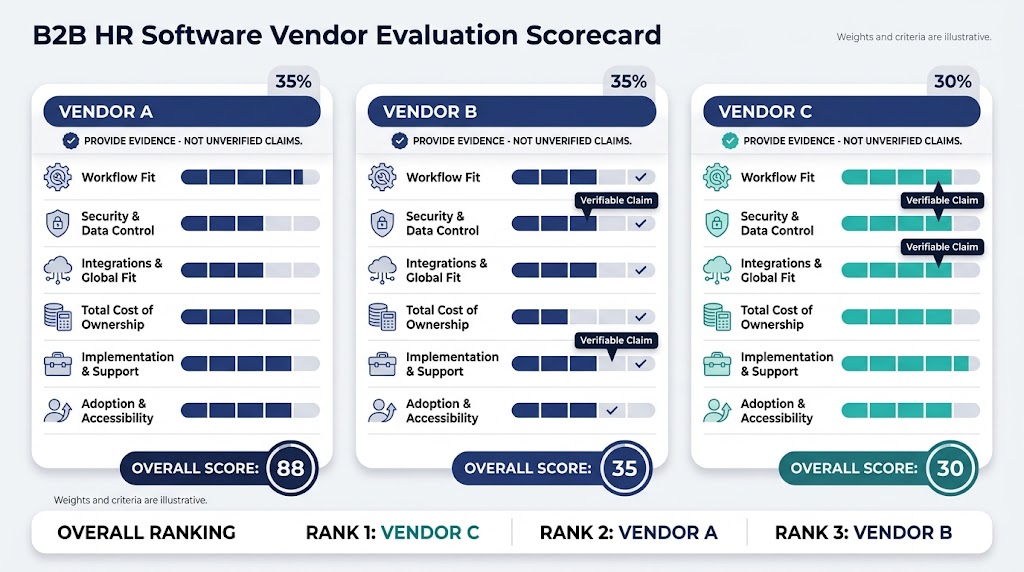
Limit your shortlist to vendors that meet the must-have requirements. Then match each claim to evidence you can review.
Use this example scorecard. Adjust the weights before vendors present their systems.
| Evaluation area | Example weight | Proof to require | Vendor score |
| Real workflow fit | 30% | Live normal, exception, and correction tests | 0 to 5 |
| Security and data control | 20% | Documents, settings, logs, and contract terms | 0 to 5 |
| Integrations and global fit | 15% | Working tests, supported-country list, and ownership details | 0 to 5 |
| Total cost of ownership | 15% | Complete quote, assumptions, renewals, and exit charges | 0 to 5 |
| Implementation and support | 10% | Project plan, named owners, service levels, and training | 0 to 5 |
| Adoption and accessibility | 10% | Employee and manager task tests across required devices | 0 to 5 |
Calculate each result as vendor score divided by 5, multiplied by the weight. Keep notes beside every score.
Use demos, documentation, references, and contracts as evidence
A live demo proves visible workflow behavior. Documentation explains configuration, while a customer reference shows use in a similar setting.
The executed agreement and incorporated documents capture the purchased scope and commitments. These may include the order form, service-level agreement, and data-processing agreement.
Record which evidence supports each requirement.
Compare support hours, service levels, implementation ownership, and training
Ask who leads configuration, migration, testing, and launch. Define your responsibilities and the vendor’s responsibilities.
Review support channels, hours, response commitments, and escalation routes. A service-level agreement should state measurable commitments.
Distinguish built-in features from add-ons and integrations
A built-in feature, paid add-on, and third-party integration may share one label. Their costs and support paths can differ.
Mark each capability as native, add-on, integrated, region-limited, or unverified. Make the vendor confirm every label.
7. Run three HR software demo tests before signing
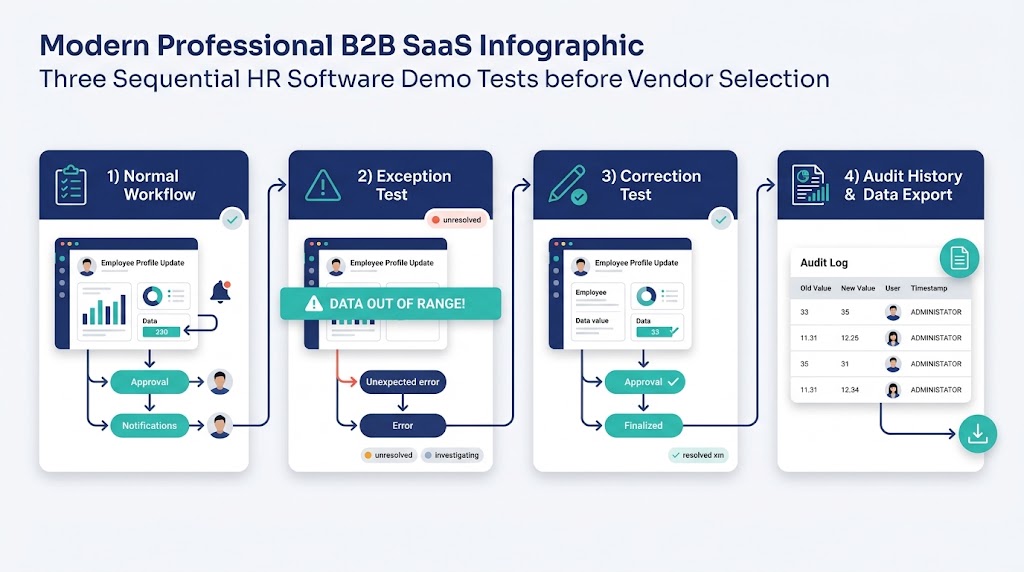
Prepared demo scripts reveal more than a polished product tour. Give every shortlisted vendor the same sample roles, data, and scenarios.
The three workflow tests cover a normal path, an exception, and a correction. Run a separate reversibility check afterward.
Test the normal workflow from start to finish
Choose one high-priority process, such as onboarding or leave. Start with the trigger and finish with the final record or report.
Watch every user role complete its part. Note manual work, duplicate entry, notifications, and system changes.
Test an exception, such as a rejected request or missing data
Introduce a realistic problem. Reject a request, remove required data, change an approver, or miss a deadline.
The system should show who receives the issue and how work resumes. Hidden manual fixes create future support work.
Test a correction and inspect the audit history
Correct an approved request or employee record. Check whether dependent systems receive the update.
Open the audit history. It should identify the action, user, time, old value, and new value where applicable.
Add a separate reversibility check for exports, attachments, history, and API limits
Ask the vendor to export the tested records. Include attachments, approval history, audit data, and stable identifiers.
Review API limits, deletion steps, costs, and transition support. This test measures how safely you can change systems later.
Plan implementation and adoption before the contract starts
Selection does not end with a preferred vendor. A good product can still fail through weak data, unclear ownership, or poor training.
Use this implementation-readiness checklist:
- Named project owner and decision route
- Confirmed scope, milestones, responsibilities, and launch criteria
- Clean source data and agreed field mapping
- Configuration and integration test plan
- Employee, manager, HR, finance, and IT training
- Communication plan for affected users
- Support and escalation process after launch
- Adoption and workflow measures with named owners
Name the implementation owner and migration team
The implementation owner coordinates decisions and removes blockers. The migration team should include HR, IT, and each relevant data owner.
Assign final approval for fields, permissions, integrations, and imported totals. Unclear ownership delays testing and increases correction work.
Plan configuration, testing, training, and communication
Configure approved workflows before importing final data. Test roles, rules, integrations, reports, and exception paths in a safe environment.
Train people on tasks they perform, not every menu. Tell users what changes, when it changes, and where support lives.
Define adoption and workflow-success measures
Measure successful task completion, support requests, correction rates, and approval time. Compare these results with the recorded baseline.
Review poor results by user group and workflow. Fix configuration, training, access, or process design before adding more modules.
Frequently asked questions about choosing HR software
What should I look for in an HR system?
Look for proven workflow fit, sensible ownership cost, usable access, strong data controls, and dependable support. Check implementation and exit terms too.
Who should be involved in choosing HR software?
Include HR, finance, IT, managers, and representative employees. Add procurement, legal, security, or regional experts when the scope requires them.
What questions should I ask an HR software vendor?
Ask what is included, what costs extra, and which countries are supported. Also ask about integrations, security, implementation, support, and exports.
Require three workflow tests: a normal path, an exception, and a correction. Then require a separate data-export check.
Document every answer that affects your decision.
How can I compare two HR platforms fairly?
Give both vendors the same requirements, data, users, demo scenarios, and scoring weights. Compare total costs over the same period.
Score only demonstrated or documented capabilities. Mark unsupported claims as unverified instead of giving them partial credit.
Can I export all employee data when I change systems?
That depends on the vendor, contract, plan, and data type. Verify records, attachments, history, formats, timing, costs, and API restrictions.
Test a sample export before signing. Add transition support and deletion duties to the contract.
Choose the HR system that proves it fits
Make a good decision only when the preferred system proves every must-have workflow. Costs, controls, support, and exit terms must also be clear.
Use three final outcomes:
- Go: Required evidence exists, contract terms match it, and implementation is ready.
- Clarify: Important evidence or contract wording remains incomplete.
- Reject: A must-have need fails, creates unmanaged risk, or depends on an unsupported promise.
Use this guide to create your scorecard before contacting vendors. Then ask OryxBlue to demonstrate your three most important workflows using the same evidence rules.