
Benefits of HR software: business outcomes and proof

HR software can reduce repeated administration, improve workforce data, speed routine service, support controls, and strengthen reporting. These benefits depend on good processes, reliable data, adoption, ownership, and careful configuration.
Buying a platform does not create value by itself. A benefit appears only when daily work changes and a measured result follows.
This guide explains the main benefits of HR software and how to prove them. It also shows where common value claims become unsafe.
The wider HR Management Software guide explains how these systems work. Software supports Human Resource Management, but it does not replace the management discipline.
The Importance of Human Resource Management guide covers the value created by strong people management. This page focuses only on software-enabled outcomes.
Benefits of HR software at a glance
HR software may improve several parts of workforce administration. The actual result depends on the problem being solved and the evidence collected.
The most common potential benefits include:
- Less repeated administration. Approved information can move through connected steps without constant re-entry.
- More reliable workforce data. Validation, history, and correction controls can support cleaner records.
- Better employee and manager service. Users can access approved information, submit requests, and see assigned work.
- More consistent control. Defined workflows can support common steps while preserving approvals and change history.
- Faster repeatable reporting. Approved sources can support recurring workforce views and exception review.
- Growth and continuity readiness. Clear structures, ownership, exports, and recovery plans can support organizational change.
These are possible outcomes, not guaranteed results. A product must first provide the required capability.
The HR Software Features guide explains how to test those capabilities. Product labels alone do not prove value.
The HRIS vs HRMS vs HCM comparison explains why category names overlap. Buyers should compare real workflows and evidence instead.
Why use an HR system instead of disconnected tools?
Many teams combine spreadsheets, email, chat, folders, payroll tools, and manager memory. Each tool may work alone, while handoffs remain hard to control.
An HR system can become the approved source for selected workforce fields. It can also coordinate actions around those records.
That connection can make ownership and progress easier to see. Weak governance can still spread errors or expose sensitive data.
Employee record changes
Without a governed system, one employee update may appear in several files. HR may then correct the same detail more than once.
A connected record can feed approved fields into selected processes. Field ownership, validation, permissions, and history remain essential.
Before claiming improvement, measure repeated updates, re-entry, record conflicts, correction time, and unresolved ownership.
Requests and approvals
Email threads can hide status, ownership, and decision history. A request may wait because nobody knows who should act.
A governed workflow can hold the request, owner, state, decision, and next step. It also needs routing, delegation, exceptions, and closure rules.
Check whether the new process reduces unassigned requests, status questions, overdue approvals, manual reminders, and lost decision evidence.
Pair each speed measure with an error measure. Faster approval has little value when wrong decisions increase.
Onboarding and departure handoffs
Onboarding and offboarding often involve HR, managers, payroll, IT, and operations. Separate checklists can hide incomplete work.
Assigned tasks may make open actions more visible. The system still needs evidence that external work was completed.
An offboarding record does not prove that an account was removed. It also does not prove that physical equipment was returned.
How HR software creates measurable business value
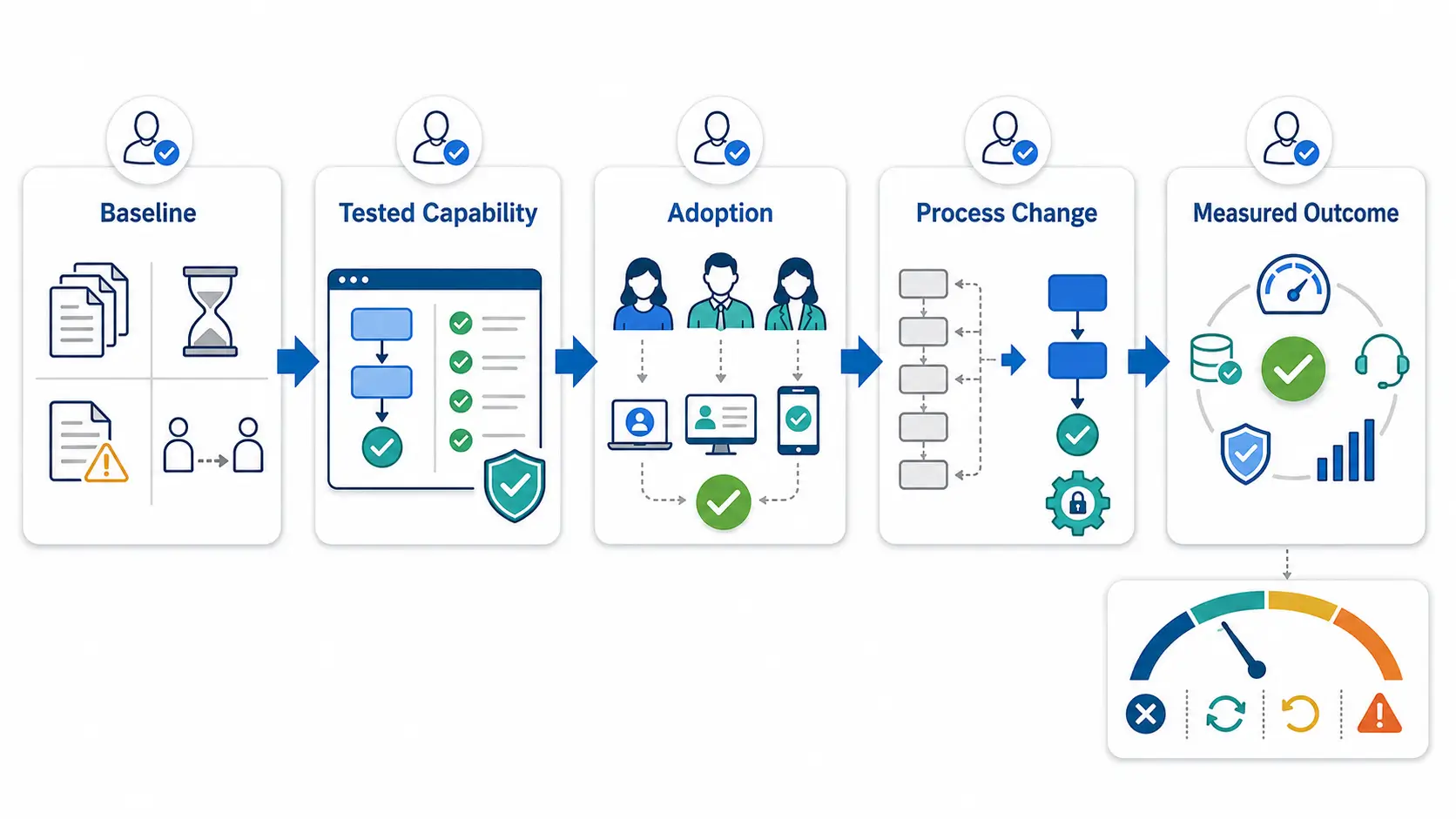
A feature creates the possibility of value. People must use it, and the operating process must change.
Use this evidence chain:
Baseline → tested capability → adoption → process change → measured outcome
The chain begins before software selection. Define the current problem and the expected result first.
Step 1: Record the baseline
Describe how the process works today. Record the people, tools, handoffs, delays, corrections, exceptions, and costs involved.
Use a stable measurement method. A vague memory of the old process will not support a later comparison.
Step 2: Test the required capability
Confirm that the purchased edition supports the real workflow. Test normal cases, rejected actions, corrections, delegation, failures, reports, and exports.
A feature name is not enough. The capability must work for the intended roles and data.
Step 3: Measure adoption through completed work
Logins and screen views do not prove adoption. Track completed transactions through the intended process.
Also record work that continues through email, chat, or spreadsheets. Hidden work can make adoption appear stronger than reality.
Step 4: Confirm that the process changed
Identify the old step that was removed, replaced, controlled, or reassigned. Usage without operating change may create little value.
This check separates activity from improvement. It also reveals work shifted to employees or managers.
Step 5: Compare the outcome
Use the same definition before and after launch. Normalize results when workforce size or transaction volume changes.
The outcome may cover time, quality, service, control, reporting, or cost. Choose one primary measure for each benefit claim.
Step 6: Review a counter-metric
A counter-metric exposes false improvement. For example, faster approvals may arrive with more corrections or unauthorized decisions.
Useful counter-metrics include errors, reopens, exceptions, support questions, access failures, and unresolved work.
Step 7: State attribution limits
Software rarely acts alone. Staffing, policy, training, seasonality, leadership, and workload can also change results.
Record these influences before approving a wider claim. Give software only the credit supported by evidence.
Every benefit record needs an owner, review date, source, comparison period, workforce group, and outside-change notes.
Ask three questions before approving a feature:
- Which operating step should change?
- Which outcome measure should move?
- Which counter-metric would expose a false improvement?
Use a benefit claim ladder
Benefit claims should become stronger only as evidence improves. Each level requires the evidence from every earlier level.
- Expected. The approved business case defines the problem and planned measure.
- Capable. The purchased system passes the required workflow test.
- Adopted. Eligible users or transactions complete real work through the system.
- Changed. The operating process changes in a defined way.
- Measured. A direct operational, control, or decision-support outcome improves against a valid baseline and stable counter-metric.
- Supported contribution. The mechanism, timing, and attribution review connect the change with a wider outcome.
- Financial return. Validated financial value exceeds complete ownership cost.
Do not move from feature availability directly to a savings or return claim.
Use “potential benefit” while the chain remains incomplete. Reserve “supported contribution” for Level 5 evidence.
Financial return needs Level 6 evidence. A presentation or product demonstration cannot establish sustained business value.
Administrative efficiency and fewer manual handoffs
Administrative efficiency is one of the most direct HRMS benefits. Useful evidence covers staff time, waiting time, manual touches, corrections, and unresolved work.
Reduce repeated data entry
Approved employee data can populate selected forms, workflows, and reports. This may reduce retyping and conflicting copies.
The benefit depends on clear field ownership. A bad source can spread an error across several connected processes.
Before approval, check field movement, source ownership, duplicate handling, correction history, and integration reconciliation.
Route routine work to the right owner
A defined workflow can move a request through review, decision, and closure. It can also show overdue or failed work.
The HR Automation guide covers triggers, rules, exceptions, monitoring, and fallback steps. Automation should never hide a failed action.
Measure the whole workflow, not one screen. Include waiting time, rework, escalation, and work completed outside the system.
Create capacity without overstating savings
Less manual work may create staff capacity. That capacity becomes cash savings only when actual spending changes.
Teams may redirect saved time toward employee support, data review, or workforce planning. Record the new use before assigning financial value.
Measure active staff time, manual touches, total cycle time, queue age, corrections, reopens, and report preparation.
Also capture work completed outside the approved process. Hidden work can distort the result.
Pair every speed measure with a quality measure. Faster work is not better when errors, confusion, or unauthorized actions increase.
More reliable employee and workforce data
HR software can become the approved source for defined workforce fields. The organization must still decide which system owns each value.
Improve completeness and consistency
Required fields, controlled lists, validation, and duplicate handling can support cleaner records. Effective dates show when a change applies.
Validation only proves that a value matches a rule. It does not prove that the value reflects reality.
Review missing fields, duplicate identities, corrections, effective dates, freshness, source differences, and unresolved exceptions.
Preserve history and correction evidence
Good history shows who changed a value, when it changed, and what existed before. A correction should not erase approved history.
User-interface history may tell only part of the story. Imports, integrations, bulk changes, and support actions need the same review.
Evidence should identify the actor, role, action, record, source, timestamp, reason, result, and relevant values.
It should also preserve failed and reversed actions.
Sensitive values need suitable access, masking, retention, and export controls. An audit record should not create a new privacy problem.
Make reports easier to trust
Repeatable reports can reduce manual assembly. Trust still depends on sources, definitions, dates, filters, permissions, and reconciliation.
The People Analytics guide covers metric design and responsible interpretation. A dashboard alone does not prove a better decision.
Before using a report, confirm its purpose, owner, definitions, scope, sources, update time, reconciliation, and access rules.
Faster employee and manager service
Employee service improves when people can complete routine work with clear access and status. Access alone does not prove a usable service.
Give employees controlled self-service
Workers may update permitted fields, retrieve documents, submit requests, or view decisions. Clear instructions can reduce avoidable support questions.
Deskless workers may need mobile, kiosk, language, or accessibility support. Test the actual workplace, device, and user group.
Self-service can shift work to employees. Measure completion, abandonment, corrections, and support demand together.
Give managers actionable queues
Managers may receive approvals, schedule actions, onboarding tasks, or employee changes. A useful queue shows priority, age, authority, and exceptions.
Manager participation often determines workflow value. Delegation and training should match real absences, shifts, and operating conditions.
Connect service across lifecycle events
One employee change may affect HR, payroll, IT, operations, and the manager. Shared status can make handoffs easier to review.
The Employee Lifecycle guide explains these wider stages. Software does not complete every external action by itself.
Collect completion, abandonment, decision time, reopens, corrections, support questions, overdue actions, delegation failures, and unauthorized decisions.
Consistent approvals, access, and control evidence
HR software can support governance when controls are configured, tested, and reviewed. It does not transfer employer accountability to the vendor.
Apply approved workflows consistently
Required states and approvals can help teams follow an agreed process. Visible exceptions can support timely review.
Incorrect rules can standardize the wrong process. Qualified owners must interpret requirements and approve the setup.
Restrict records and actions
Role-based permissions can limit who views or changes selected employee information. Least privilege gives users only the access needed for assigned work.
Test employees, managers, HR staff, administrators, integrations, and support channels. Shared accounts and broad roles weaken accountability.
Preserve complete decision history
Approval history can show the actor, decision, time, reason, and outcome. Denied, delegated, corrected, and reopened work should remain visible.
Check whether integrations and bulk changes appear in the same history. Missing channels can make evidence look more complete than it is.
Support privacy and continuity procedures
Retention, deletion, restricted exports, backups, recovery, and exit controls may support defined procedures. Every control needs current evidence.
Centralization can increase the impact of poor access or an outage. Continuity plans should cover dependencies, restoration, fallback work, and exports.
Use this control review checklist:
- Test allowed and denied actions.
- Test delegation and temporary access.
- Review administrator and support access.
- Check imports, integrations, and bulk changes.
- Confirm sensitive values are masked where required.
- Test retention, deletion, exports, recovery, and exit procedures.
- Assign an owner for every exception.
The HR Compliance Checklist covers employer obligations and evidence. Software cannot guarantee legal compliance.
Workforce reporting and decision support
HR software may make repeatable workforce views easier to prepare. It can also make defined exceptions visible for human review.
Build repeatable workforce views
Approved records may support headcount, recruitment, attendance, leave, schedule, and payroll-related reporting. Every report needs a purpose and owner.
The scope should state included workers, statuses, dates, entities, locations, and departments. Similar report names can otherwise produce different totals.
Detect exceptions for human review
Queues may highlight overdue approvals, missing data, attendance exceptions, or unfinished tasks. Authorized people still decide what each item means.
Software can bring evidence closer to a decision. It cannot prove that the final choice was correct.
Support workforce discussions with current records
Roles, skills, locations, assignments, availability, and status can inform workforce reviews. Leaders still define demand, budgets, scenarios, and actions.
The Human Resource Planning guide covers demand, supply, gaps, and action plans. Current records do not create forecasts automatically.
Trust each report only after answering these questions:
- Which decision or control uses it?
- How is each measure defined?
- Which workers, dates, locations, and entities are included?
- Which records feed the result?
- When did each source update?
- Does the output match approved sources?
- Who can view or export it?
- What action follows an exception?
Support for growth and organizational change
Growing employers add workers, managers, departments, locations, policies, and connected systems. Manual methods become harder to coordinate as dependencies increase.
HR software can make structures and responsibilities clearer. Added scope also creates more configuration and administration work.
Common growth triggers include:
- A new location. Test calendars, roles, local workflows, permissions, and reporting.
- A new department. Preserve assignment dates, manager history, and approval ownership.
- More managers. Test delegation, queue coverage, and access reviews.
- More hourly workers. Test scheduling, attendance, leave, corrections, and payroll inputs together.
- A separate legal entity. Test administrative boundaries, consolidated reporting, and exports.
- A new integration. Test authentication, mappings, failures, retries, duplicates, reconciliation, and fallback work.
- Higher transaction volume. Test system performance and the added administration workload.
Standardization should not block valid local needs. Too much variation can fragment reporting, support, and control ownership.
HRMS benefits for employees, managers, and HR teams
Employees may gain easier access to approved information, requests, and status. Their evidence includes completion, abandonment, corrections, and support questions.
Managers may gain clearer queues, decision records, and workforce visibility. Their evidence includes queue age, delegation, overdue work, and exceptions.
HR teams may reduce repeated administration and gain clearer exception handling. Their evidence includes touch count, rework, backlog, and report preparation.
Leaders may receive more consistent workforce summaries. Payroll and finance teams may receive better-controlled workforce inputs.
IT and security teams may gain clearer identity, access, and integration ownership. Each group still needs its own success measure.
Prioritize benefits for small and mid-market employers
Small businesses often need fewer disconnected records and less owner dependence. They also need simple workflows and manageable implementation work.
Confirm vendor support, internal staff time, and the decision path before launch. Payroll or accounting handoffs may deserve early attention.
Mid-market employers often need consistency across teams, locations, and systems. Detailed permissions, delegated administration, and integration governance become more important.
Cross-entity reporting may also matter. Formal testing and change ownership help prevent local configurations from splitting the platform.
The HR Management for Small Business guide covers lean-team ownership and growth triggers. Use these four priority rules:
- High impact and high readiness: include early.
- High impact and low readiness: resolve dependencies first.
- Low impact and high readiness: include only when change stays small.
- Low impact and low readiness: defer.
Benefits of an HR management system depend on eight conditions
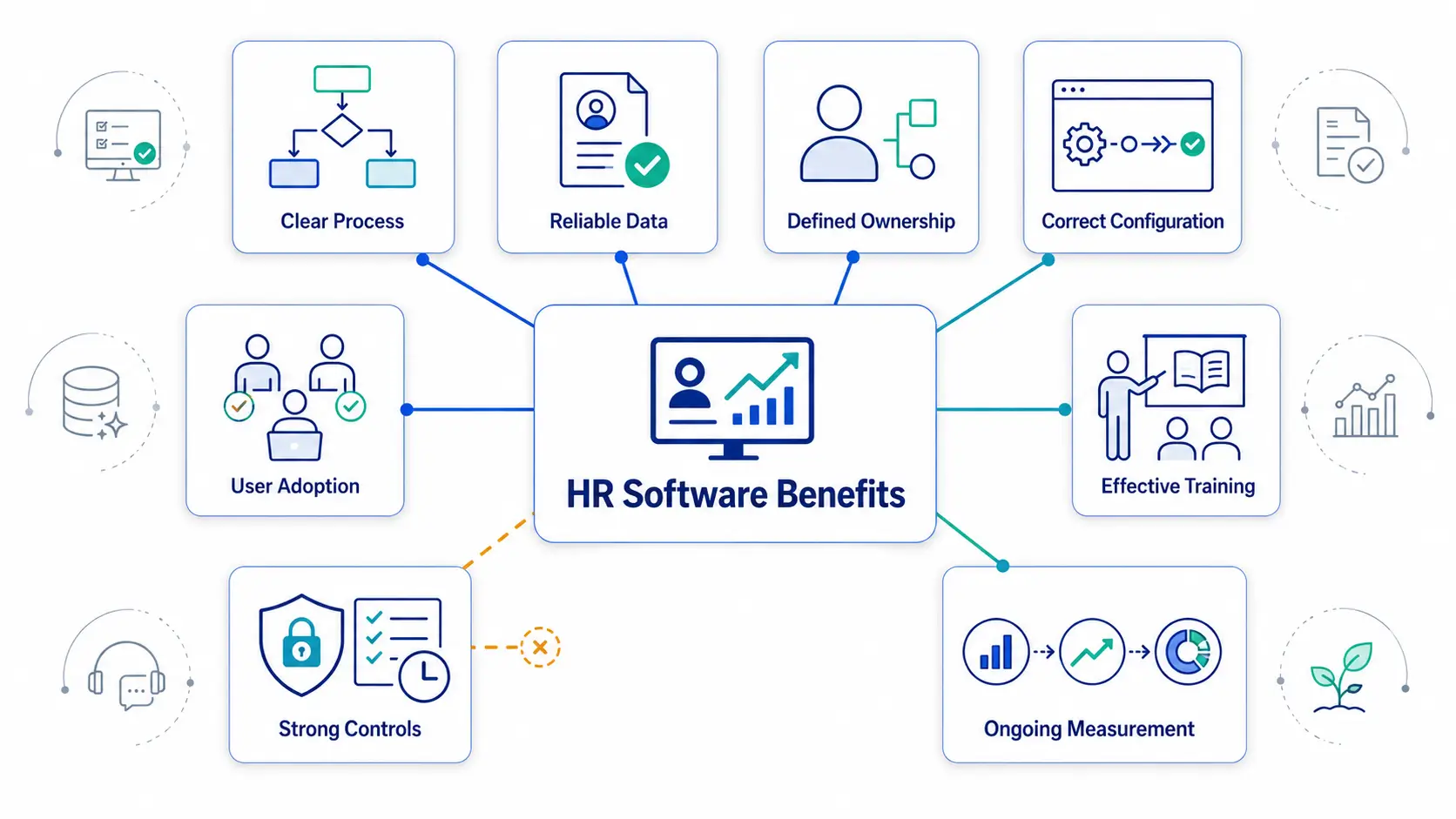
The benefits of an HR management system appear through operating change. Installation alone does not create them.
- Process fit. The system must support required normal and exception paths. Test the full workflow before relying on it.
- Data readiness. Required records need owners, validation, and reconciliation. Migration should not move unresolved errors silently.
- Clear ownership. Every field, rule, queue, exception, and report needs an owner. Escalation paths should also be clear.
- Implementation capacity. A sponsor, project owner, staff time, support, and timely decisions must be available.
- User adoption. Intended roles must complete real work through the system. Account access does not prove adoption.
- Reliable integrations. Connected data needs authentication, ownership, monitoring, reconciliation, and fallback work.
- Defined measures. Agree on baselines, outcomes, counter-metrics, sources, and review dates before launch.
- Governance. Review access, privacy, security, continuity, retention, exports, and exit responsibilities.
Why the advantages of HRMS may not appear
Expected advantages of HRMS can disappear when one condition fails. Watch for these warning signs and fixes:
- Wrong problem. Teams cannot name the operating gap. Define the workflow, users, risk, cost, and desired result.
- Poor process. Old delays continue inside the platform. Redesign authority, steps, ownership, and exceptions first.
- Assumed scope. The purchased plan lacks required depth. Test the selected edition with representative scenarios.
- Unreliable data. Reports conflict and corrections continue. Assign field owners and reconcile approved sources.
- Low adoption. Email and spreadsheets remain the real workflow. Fix access, usability, training, or expectations.
- Manager nonparticipation. Approval queues age without action. Clarify authority, delegation, reminders, and accountability.
- Silent integration failure. Updates arrive late, twice, or never. Add monitoring, error queues, and reconciliation.
- Broad permissions. Users see or change unnecessary records. Redesign roles and test least privilege.
- No baseline. Teams rely on opinion after launch. Label the value unproven until reliable evidence exists.
- Incomplete costs. The business case omits internal or transition work. Add implementation, assurance, operation, and exit costs.
- Broad attribution. Software receives sole credit for retention or productivity. Record other causes and narrow the claim.
Measure HR software ROI without overstating savings
HR software return on investment compares validated financial value with complete ownership costs. Every input needs a clear definition and evidence source.
Separate four types of value
- Cash value changes actual spending. Retired software fees or lower external service costs may qualify after verification.
- Capacity value releases paid time for other work. Keep it outside cash ROI until documented financial change follows.
- Control value may improve evidence or help reduce missed steps. Report it operationally without unsupported financial conversion.
- Strategic value may support planning or decisions. Do not monetize it without measured downstream impact.
Avoided hiring requires an approved and credible hiring baseline. Do not count avoided hiring and released capacity together.
Value reduced rework through observed time and transaction-volume changes. Monetize faster service only when evidence supports a financial mechanism.
Include complete ownership costs
Subscription price is only one cost. Include:
- Seats, modules, usage, environments, support, renewals, and expected price changes
- Discovery, configuration, testing, and vendor services
- Internal project and decision time
- Data cleaning, migration, reconciliation, and archiving
- Integration design, authentication, monitoring, and maintenance
- Training, communication, and temporary productivity loss
- Ongoing administration, access reviews, and data-quality work
- Security, privacy, legal, control, and vendor reviews
- Parallel processing, contract overlap, exports, and exit work
Use transparent formulas
Net time capacity per case =
validated HR time reduction per case
– added employee, manager, and administration time per case
Total net time capacity =
net time capacity per case
× completed in-scope case volume
Indicative capacity value =
total net time capacity
× approved loaded labor rate
Net value =
validated gross value
– complete ownership cost
ROI =
net value
÷ complete ownership cost
× 100
Recurring net cash benefit =
recurring cash benefit
– recurring cost
Payback period =
net initial investment
÷ validated recurring net cash benefit per period
Use the same period for benefits and costs. Apply the organization’s approved labor-cost method.
Payback has no useful result when recurring net cash benefit is zero or negative. Use cumulative cash flow when benefits change by period.
Do not count one improvement twice. Keep speculative risk reduction separate from dependable operating value.
Use conservative, expected, and upper scenarios for uncertain inputs. Replace estimates with observed results after launch.
How to document and prove an HR software benefit
Create one record for each expected benefit. Keep the supporting evidence beside the approved conclusion.
Copy and complete this template:
### Benefit proof record
Claimed outcome:
Workflow and scope:
Workforce group, department, and location:
Baseline period:
Comparison period:
Baseline measure and source:
Transaction volume:
Eligible population or transaction denominator:
Normalization method:
Supporting capability:
Capability test result:
Required user behavior:
Adoption measure:
Process change:
Outcome measure:
Counter-metric:
Evidence source:
Evidence owner:
Review date:
Value type: Cash / Capacity / Control / Strategic
Validated financial benefit:
One-time cost:
Recurring cost:
Attribution limits:
Seasonality or organizational changes:
Evidence conclusion: Expected / Capable / Adopted / Changed / Measured / Supported contribution / Financial return
Next decision:
Use the same collection method before and after launch. Normalize results when workforce size or transaction volume changes.
When full logs are unavailable, use a documented representative sample. Repeat the same method and label the conclusion as sampled evidence.
A leave-approval example
Assume the desired outcome is faster leave decisions without more incorrect results. HR first records decision time, reopens, corrections, and queue age.
The required capability includes balance display, configured rules, approval routing, and decision history. Adoption uses eligible requests completed through the workflow.
The process change replaces email and separate files with one controlled request. The primary outcome is median time to a final decision.
Counter-metrics include wrong decisions, reopens, exceptions, and employee questions. The HR operations manager owns the evidence review.
Evidence includes timestamps, state history, correction records, and the exception queue. The review date is set before launch.
Season, staffing, policy, training, request mix, and manager availability may affect the result. The initial benefit remains unproven.
Faster decisions alone do not prove improvement. Rising errors may show that speed came at a cost.
Low adoption limits conclusions about the system. Faster processing with stable counter-metrics may support a Level 4 claim.
Level 5 still requires a supported mechanism, correct timing, and attribution review.
Track benefits before and after launch
Use three review points:
- Before launch: Record the baseline, outcome, counter-metric, owner, cost, and comparison method.
- During early use: Review completed-work adoption, exceptions, corrections, and support demand.
- At the agreed review: Compare outcomes, total costs, counter-metrics, and attribution limits.
Keep definitions and collection methods stable. Record the reason when a method must change.
End each review with one decision: expand, fix, defer, or stop.
How OryxBlue could support HR software benefits
OryxBlue is the publisher’s multi-tenant HR and workforce management product. Its supplied scope covers workforce records, daily operations, workflows, permissions, dashboards, and reports.
It also covers payroll visibility, asset and access visibility, and seat-based usage tracking. This scope does not establish every workflow, integration, control, or report.
The following examples describe possible benefit mechanisms. They are not guaranteed results.
Workforce records and recruitment
OryxBlue includes employee profiles, departments, locations, and lifecycle status. Shared records may reduce duplicate searches and make current status easier to review.
Buyers should verify dates, history, corrections, permissions, and exports. They should also confirm the owner of every important field.
Recruitment processes and dashboard visibility may clarify candidate status and handoffs. Test stages, ownership, permissions, history, reports, and handoff into employee records.
Scheduling, attendance, and leave
Managed shifts and rotations may support schedule coordination and change visibility. Test conflicts, exceptions, notices, permissions, and historical records.
Attendance and leave records may clarify status, requests, and unresolved exceptions. Verify policy rules, routing, delegation, corrections, source data, and exports.
These functions do not prove payroll processing. Buyers should identify every payroll field, handoff, system owner, and manual responsibility.
Employee requests and lifecycle workflows
OryxBlue includes employee requests, approvals, onboarding, and offboarding coordination. Defined states may make ownership, delays, and unfinished work easier to trace.
Test delegation, rejection, reopening, authority, overdue work, and completion evidence. External actions still need separate verification.
Asset and access visibility may support departure follow-up. It does not prove automatic account removal or physical asset recovery.
Permissions, reporting, and administration
Assigned roles may restrict actions according to responsibility. Test employees, managers, HR users, administrators, and tenant boundaries.
Dashboards and reports may place workforce information near operational decisions. Verify definitions, filters, dates, sources, permissions, reconciliation, and exports.
Payroll visibility may support handoffs between HR and payroll owners. Buyers should verify fields, actions, connections, and the responsible payroll system.
Seat-based usage tracking may support account administration. Confirm activation, deactivation, counting rules, limits, and plan effects.
Claims that still need evidence
The supplied information does not establish quantified savings, compliance improvement, or compliance guarantees. It also does not establish payroll processing or tax filing.
AI capabilities, forecasting, and autonomous employment decisions are not established. Automatic access removal and physical asset recovery are also not established.
Before buying, verify current modules, integrations, migration, security, privacy, tenant isolation, hosting, retention, and incident response.
Also verify exports, exit support, training, responsibilities, and contractual scope. Apply the same evidence chain to every shortlisted product.
Editorial disclosure: OryxBlue is the publisher’s product. This overview uses supplied scope, not independent testing or measured customer outcomes.
Frequently asked questions about HR software benefits
What are the main benefits of HR software?
Potential benefits include less repeated work, clearer ownership, faster service, more reliable records, consistent workflows, and easier reporting. Each outcome needs measurement.
Why use an HR system instead of spreadsheets?
An HR system can connect defined records, permissions, workflows, history, and reports. Spreadsheets may still support controlled analysis or temporary work.
The choice depends on process risk, volume, ownership, collaboration, and control needs.
What are the benefits of an HR management system for small businesses?
A focused system may reduce owner dependence, repeated questions, scattered files, and manual handoffs. Small businesses should avoid unnecessary scope and administration.
What advantages does HRMS offer employees and managers?
Employees may receive easier requests, approved information, and clearer status. Managers may receive assigned queues, workforce views, and recorded decisions.
These outcomes depend on access, usability, permissions, delegation, and adoption.
Can HR software reduce operating costs?
It may reduce manual work, rework, external services, or duplicate systems. Cash savings exist only when actual spending changes.
Released time is capacity value until a supported financial change occurs.
Does HR software improve employment compliance?
Software can support approved workflows, permissions, records, and evidence. It cannot guarantee legal compliance or replace qualified interpretation.
Employers still own policies, configuration, reviews, decisions, filings, and current obligations.
How can HR software improve data accuracy?
Validation, field ownership, duplicate handling, effective dates, and correction history may improve data quality. Accurate sources and regular review remain necessary.
How should a company measure HRMS benefits?
Record a baseline, capability test, adoption measure, process change, outcome, counter-metric, owner, and review date. State other factors affecting results.
How long does it take to realize HR software benefits?
There is no universal period. Timing depends on scope, data, integrations, training, adoption, volume, and review cycles.
Measure operating changes first. Claim wider outcomes only after the required evidence becomes available.
Are HR software features and benefits the same?
No. A feature is a capability.
A benefit is a measured result after people adopt that capability and the workflow changes.
Can HR software improve employee experience?
It may make routine access, requests, status, and manager responses easier. Measure completion, support demand, reopens, access problems, and user feedback.
Can HR software improve retention or productivity?
It may contribute through better service, records, planning, and process support. Retention and productivity have many causes.
Sole attribution to software is unsafe.
Which OryxBlue capabilities could support these outcomes?
Its supplied scope covers recruitment, employee records, scheduling, attendance, leave, onboarding, offboarding, requests, approvals, permissions, dashboards, and reports.
Payroll, asset, access, and seat-usage visibility also need verification of current scope and results.
Continue your HR software evaluation
Choose one costly or risky workflow. Define its outcome, counter-metric, owner, evidence, and complete cost before selecting software.
Use the Best HR Software for Small Business guide when you need a vendor comparison method. Apply the same proof standard to every product.