
Best recruiting software for HR teams: compare the right ATS
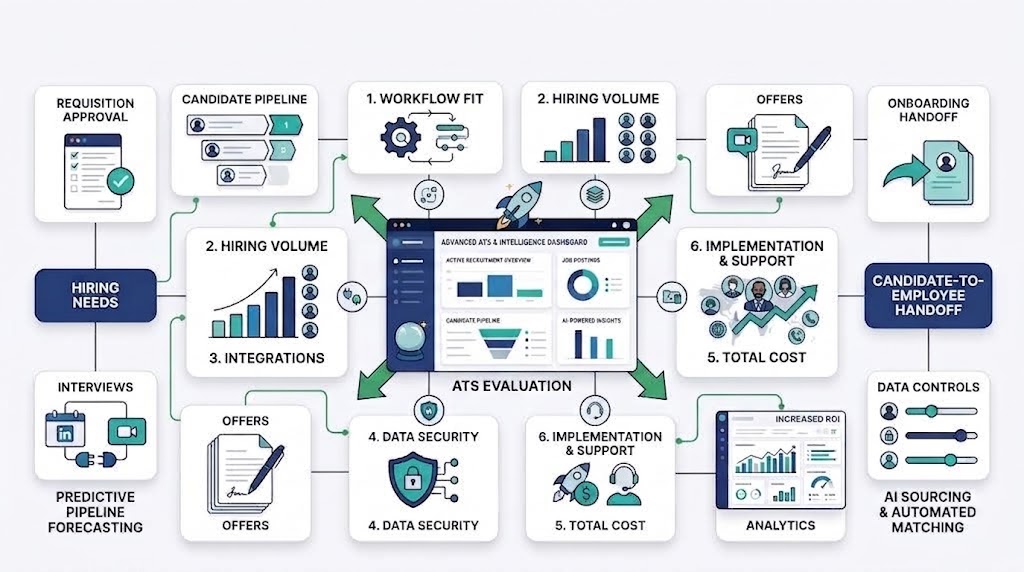
No recruiting platform is best for every HR team. The right choice depends on hiring volume, workflow depth, user roles, integrations, data controls, and full cost.
Start with the work your team must complete. Then test each system through one candidate-to-employee journey before signing.
This guide covers internal HR teams, not staffing agencies. It compares software categories, shortlisted platforms, costs, safeguards, and practical demo tests.
Best recruiting software at a glance
This shortlist is not a ranking. It identifies seven platforms worth checking against the same internal hiring process.
The publisher has a commercial interest in the first platform. No product received a higher position because of that relationship.
| Platform | Possible fit to verify | Category | Pricing approach | Key limitation to check | Evidence date |
| OryxBlue | Startups and SMBs connecting recruitment with employee records | HR and recruitment platform | Check the current plan and included modules | Confirm every required ATS function and country boundary | 8 September 2026 |
| Greenhouse | Teams considering a broader talent acquisition suite | Talent acquisition software | Request current pricing | Check smaller-team fit, implementation work, and complete cost | 8 September 2026 |
| Workable | Internal teams seeking a recruiting platform | Recruiting software | Verify the current price model | Test plan limits, data controls, and onboarding handoff | 8 September 2026 |
| Zoho Recruit | Buyers comparing a dedicated recruitment system | Recruiting software | Verify plan, user, and job limits | Confirm required integrations and internal-team fit | 8 September 2026 |
| Recruitee | Teams evaluating a collaborative recruiting platform | Recruiting software | Request current plan details | Verify workflow depth, reporting, and export coverage | 8 September 2026 |
| BambooHR | Teams wanting recruiting near core HR records | HR suite with recruiting functions | Published HR pricing varies by company size | Confirm recruiting depth and country-specific add-ons | 8 September 2026 |
| Pin | Teams adding sourcing and outreach to an existing hiring stack | Sourcing, outreach, and recruiting CRM layer | Verify directly with the vendor | A separate ATS may still be needed for active applicants | 8 September 2026 |
Use the table to form a shortlist, not choose a winner. Current prices, features, limits, and availability need direct vendor confirmation.
How we compare recruiting platforms fairly
Our method starts with one buyer question: can the product complete your real hiring process with acceptable risk and cost?
Method box
- Include platforms relevant to internal HR or talent teams.
- Exclude job boards, background-check services, and single-purpose assessment tools.
- Compare workflow fit, ownership cost, adoption, data control, and implementation.
- Use the same test actions and evidence standard for every vendor.
- Record the evaluator, test date, product version, and failed steps.
- Disclose commercial relationships and correct dated information quickly.
We reviewed existing research and first-page evidence. We did not complete hands-on tests for these products.
Use the same evidence standard for every vendor
Ask every vendor to complete the same tasks. Keep screenshots, exports, quotes, and written answers from each session.
Do not award points for polished demonstrations alone. Score only work your team can reproduce in the product.
Separate product evidence from customer-review evidence
Product documentation proves what a vendor states. Customer reviews describe experiences within specific plans, teams, countries, and dates.
Do not treat one review as a market verdict. Record its source, date, company size, location, and stated product version.
Disclose OryxBlue’s publisher relationship
This site’s publisher sells the platform reviewed first. That commercial relationship should remain visible beside the comparison method.
Apply the same disqualifiers to every product. A failed requirement should outweigh the platform’s position in this article.
ATS vs recruiting CRM vs talent acquisition suite
Category confusion can create an expensive shortlist. A product may rank for recruiting software while solving only one part of hiring.
Use this decision path:
- Choose an ATS when you mainly manage active applicants.
- Add an internal recruiting CRM when you nurture prospects before application.
- Choose a talent suite when hiring needs wider planning, analytics, and governance.
- Use an agency CRM only for client, placement, and billing workflows.
- Add a point tool only when one specialist task needs deeper support.
Applicant tracking systems manage active applicants
An applicant tracking system, or ATS, moves applicants through defined hiring stages. Common stages include screening, interviews, decisions, offers, and handoff.
The ATS should show ownership, status, evidence, and next action for every active candidate.
Recruiting CRMs nurture people before they apply
An internal recruiting CRM manages prospective candidates and talent pools. It supports relationships before someone enters an active application process.
Not every HR team needs both systems. Buy both only when proactive talent nurturing is a real workflow.
Staffing-agency CRMs manage clients and placements
Agency recruiting software may manage client companies, submissions, placements, and billing. Those jobs differ from an employer’s internal hiring work.
Exclude agency-first products unless your team needs those commercial workflows.
Point tools solve sourcing, assessment, interview, or background-check tasks
Point tools focus on one hiring activity. Examples include sourcing, assessments, interview notes, and background checks.
They can deepen one step but add another system and data transfer. Confirm ownership before adding one.
Recruiting software reviews for internal HR teams
These reviews define what each buyer should verify. They do not claim first-hand testing or assign an unsupported winner.
Use one review card for every platform. Cover fit, workflow proof, price, limits, integrations, implementation, and disqualifiers.
OryxBlue
The platform belongs on a startup and SMB shortlist when recruitment must connect with employee records. Its public documentation supports both workflow areas.
Verify job publishing, application handling, scheduling, scorecards, offers, exports, integrations, security controls, and country availability. Any missing required step is a disqualifier.
Greenhouse
Greenhouse appears in the research as a talent acquisition software entity. Its own 2026 comparison discusses wider talent acquisition tools.
Ask Greenhouse to prove your complete workflow, price basis, implementation effort, permissions, retention controls, and data export. Smaller teams should test administrative effort carefully.
Workable
Workable is a recognized recruiting software entity in the reviewed search results. That visibility does not prove fit for your team.
Request evidence for every required workflow and plan limit. Reject it if candidate data or hiring records cannot leave in usable form.
Zoho Recruit
Zoho Recruit appears through its official recruiting software page. Teams should verify whether its current edition fits internal hiring or agency work.
Check user, job, candidate, automation, integration, and support limits. Price each required module on the same basis as other finalists.
Recruitee
Recruitee is another established recruiting platform entity in this search category. Its exact fit still depends on your hiring process.
Test approvals, pipeline changes, interviewer work, reporting, onboarding handoff, and full export. Record any step needing manual duplication.
BambooHR
BambooHR links hiring and onboarding within a wider HR suite. That approach may suit teams wanting fewer handoffs between recruiting and employee records.
Its published HR pricing changes by company size. Confirm which recruiting functions, add-ons, and country services appear in your final quote.
Pin
Pin is a sourcing, outreach, and recruiting CRM layer that can integrate with applicant tracking systems.
It is not a complete ATS, so some teams may need a separate applicant tracking system.
Test prospect discovery, outreach, talent-pool management, integrations, consent records, and data exports. Also verify which active-applicant workflows stay inside a connected ATS.
Which recruiting system fits your HR team’s work?
Different stakeholders experience the same platform differently. A recruiter may like it while finance or IT finds a serious gap.
Build your shortlist around these role-specific needs.
Small HR teams need low admin effort and clear handoffs
Small teams cannot spend each week fixing workflows or moving records. They need clear stages, simple ownership, and fewer duplicate entries.
Test setup, daily administration, candidate communication, and onboarding transfer with the likely system owner.
Growing teams need repeatable approvals and structured interviews
Growth adds hiring managers, locations, and approval layers. Informal decisions become difficult to audit and repeat.
Check requisition approval, interview plans, structured scorecards, offer control, and reporting by role or department.
High-volume hiring needs capacity and automation controls
High applicant volume tests limits and exception handling. Confirm candidate caps, job limits, bulk actions, queues, notifications, and human review.
Automation should route routine work without hiding failed actions or unusual cases.
Finance teams need predictable total cost
Finance needs the full price basis. A low starting price may exclude jobs, recruiter seats, onboarding, support, or integrations.
Ask for a quote at current hiring volume and a higher expected volume.
IT teams need access, retention, integration, and export controls
IT should inspect role-based access, single sign-on, audit records, retention, deletion, integrations, and exports. Verify each item through current evidence.
Set a hard disqualifier for any control your security or privacy process requires.
Test the candidate-to-employee workflow during the demo
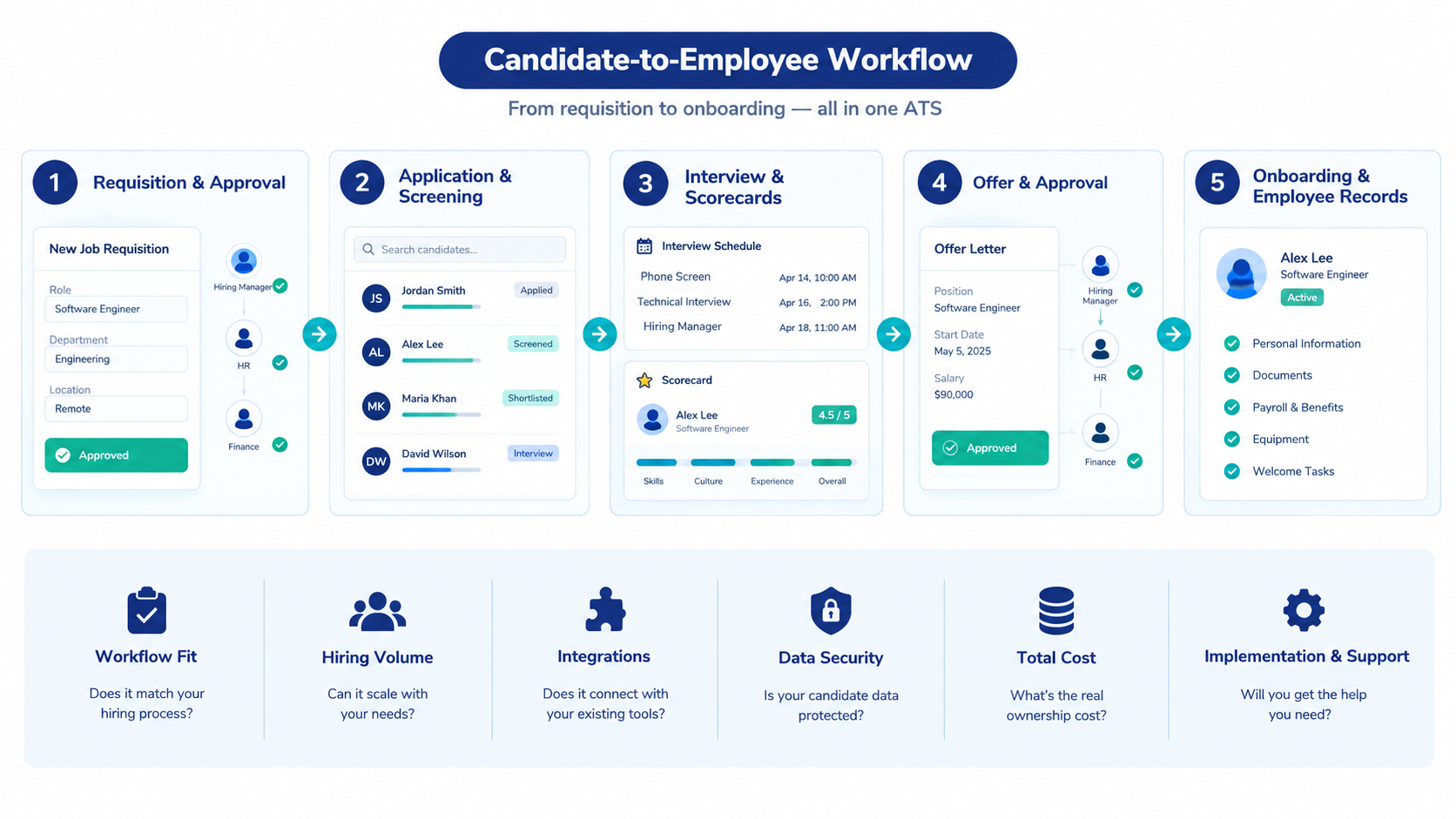
A vendor-led tour can hide awkward steps. Use your own role, approval path, candidate, interview panel, and onboarding fields.
| Workflow step | Test action | Expected result | Evidence to capture | Result |
| Requisition | Create and approve a real role | Budget, owner, and approval status remain clear | Approval history and screenshot | Pass / fail |
| Application | Submit and screen a candidate | Candidate enters the correct stage with required fields | Candidate record and activity log | Pass / fail |
| Interview | Schedule a panel and submit scorecards | Interviewers complete structured evidence with correct access | Calendar event and scorecard | Pass / fail |
| Offer | Approve and send an offer | Approval, version, recipient, and status remain traceable | Offer record and audit history | Pass / fail |
| Handoff | Accept the offer and start onboarding | Approved data enters onboarding and employee records once | New-hire record and field map | Pass / fail |
Approve a requisition and publish the job
Create a role that needs finance and department approval. Check permission boundaries, rejected changes, posting status, and approval history.
Record which job channels need manual work. Verify that every published version matches the approved requisition.
Submit, screen, and move a candidate
Apply through the same form a candidate would use. Test required fields, duplicate records, consent language, and pipeline movement.
Include one candidate who needs an exception. Confirm the system shows who resolved it.
Schedule interviews and complete scorecards
Schedule several interviewers and change one time. Check notifications, calendar updates, time zones, permissions, and completion tracking.
Ask interviewers to submit structured scorecards. Ensure one person’s notes cannot improperly influence another reviewer.
Approve and send an offer
Build an offer with a change in compensation or title. Test version control, approvals, recipient details, signature status, and withdrawal.
The final record should show which version was approved and sent.
Move the accepted candidate into onboarding and employee records
Accept the offer and transfer the person into onboarding. Required fields should move once without manual retyping.
Check documents, ownership, access, payroll inputs, and the original recruitment history.
Compare recruiting software pricing and total cost
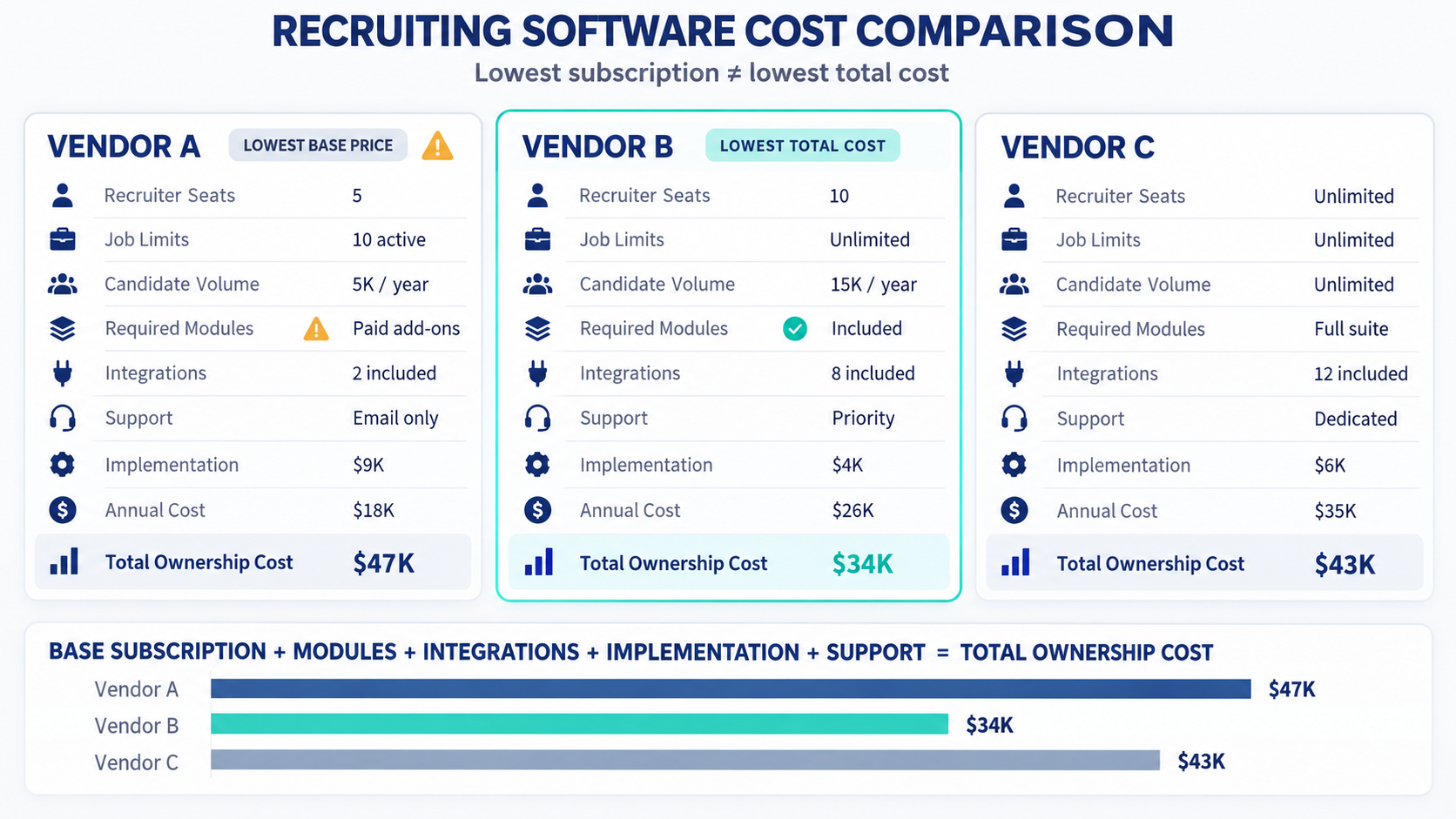
Recruiting software may charge by recruiters, jobs, candidates, employees, or modules. Different models can reverse the cheapest option as hiring changes.
Use this formula:
Annual ownership cost = base subscription + users + jobs + candidate volume + modules + setup + support + integrations + renewal changes + exit work
Build one scenario for today’s hiring. Build another for your next expected stage.
Check whether pricing follows recruiters, jobs, candidates, or employees
A per-recruiter price suits some teams but becomes costly as hiring ownership spreads. Job or candidate limits behave differently during hiring bursts.
Ask each vendor to state the chargeable unit in writing.
Find plan limits and paid add-ons before the demo ends
List every required function beside its plan or add-on. Include onboarding, scheduling, reporting, integrations, support, security, and API access.
Do not compare a complete quote with another vendor’s entry price.
Include migration, support, renewal, and data-exit costs
Headline prices may exclude internal cleanup, configuration, training, migration, support, and integration costs.
Ask how renewal and cancellation work. Price a usable data export before you need one.
Protect candidate data and keep hiring decisions human-led
Candidate records can include employment history, contact details, interview notes, and assessment results. Define who can access each data type.
Keep people accountable for final hiring decisions. Software can support judgment, but it should not hide the decision path.
Set access, retention, deletion, and audit responsibilities
Give users only the access their role requires. Name an owner for retention schedules, deletion requests, exports, and audit review.
Local privacy and employment rules vary. Ask qualified counsel to review requirements in every hiring location.
Require reviewable AI recommendations
AI-supported screening may rank, summarize, or suggest candidates. Require clear inputs, review options, correction routes, and documented human oversight.
Reject claims such as “bias-free” unless the vendor supplies relevant, current evidence.
Keep final hiring judgment accountable to people
Managers should explain hiring decisions through job-related evidence. Structured scorecards can support consistency without replacing human responsibility.
Set escalation routes for disputes, accommodation needs, and unusual candidate cases.
How to choose the best recruiting software for your HR team
Selection works best as a controlled project. Give each finalist the same requirements, data, tasks, and decision rules.
Define hiring volume and process complexity
Record annual hires, open roles, applicant volume, countries, departments, interview panels, approvals, and recruiter capacity. Note seasonal peaks separately.
Choose the correct software category
Decide whether you need an ATS, internal recruiting CRM, wider talent suite, or specialist point tool. Remove mismatched categories early.
Set hard requirements and disqualifiers
Separate required functions from preferences. Common disqualifiers include missing country support, weak permissions, incomplete exports, or unaffordable plan limits.
Compare complete costs on the same basis
Request quotes for the same users, jobs, volume, modules, term, support, and implementation. Record excluded items beside every quote.
Run the end-to-end workflow test
Use the candidate-to-employee script in this guide. Record passes, failures, workarounds, and evidence instead of demo impressions.
Check implementation, support, and adoption
Name owners for configuration, migration, testing, training, and support escalation. Include hiring managers and interviewers in acceptance testing.
Test full data export before signing
Request exports for candidate profiles, attachments, activity, scorecards, consent, offers, reports, and audit history. Check format and field completeness.
Frequently asked questions about recruiting software
What is the difference between recruiting software and an ATS?
An ATS manages active applicants through defined hiring stages. Recruiting software may also include sourcing, CRM, offers, analytics, and onboarding connections.
Does an HR team need a recruiting CRM as well as an ATS?
Not always. Add a recruiting CRM when your team actively nurtures prospects before they apply.
How much does recruiting software cost?
Prices may follow users, jobs, candidates, employees, or modules. Compare complete ownership costs, not starting prices.
Which plan limits matter most?
Check recruiter seats, open jobs, candidates, postings, storage, automations, integrations, reports, API access, and support. Your hiring pattern determines priority.
Can recruiting software move a candidate into onboarding?
Some platforms support this handoff directly or through integrations. Test field mapping, documents, permissions, duplicate handling, and audit history.
Which recruiting tasks should remain human-led?
People should own final hiring decisions, accommodations, disputes, and unusual cases. AI recommendations need reviewable evidence and accountable oversight.
Choose recruiting software that fits the complete hiring process
Ask three final questions. Can the system complete your workflow, protect candidate data, and remain affordable when hiring changes?
Reject any platform that fails a hard requirement. Treat workarounds as costs, not small inconveniences.
Review the documented recruitment and employee-management workflows.