
AI in HR: use cases, benefits, risks, and controls
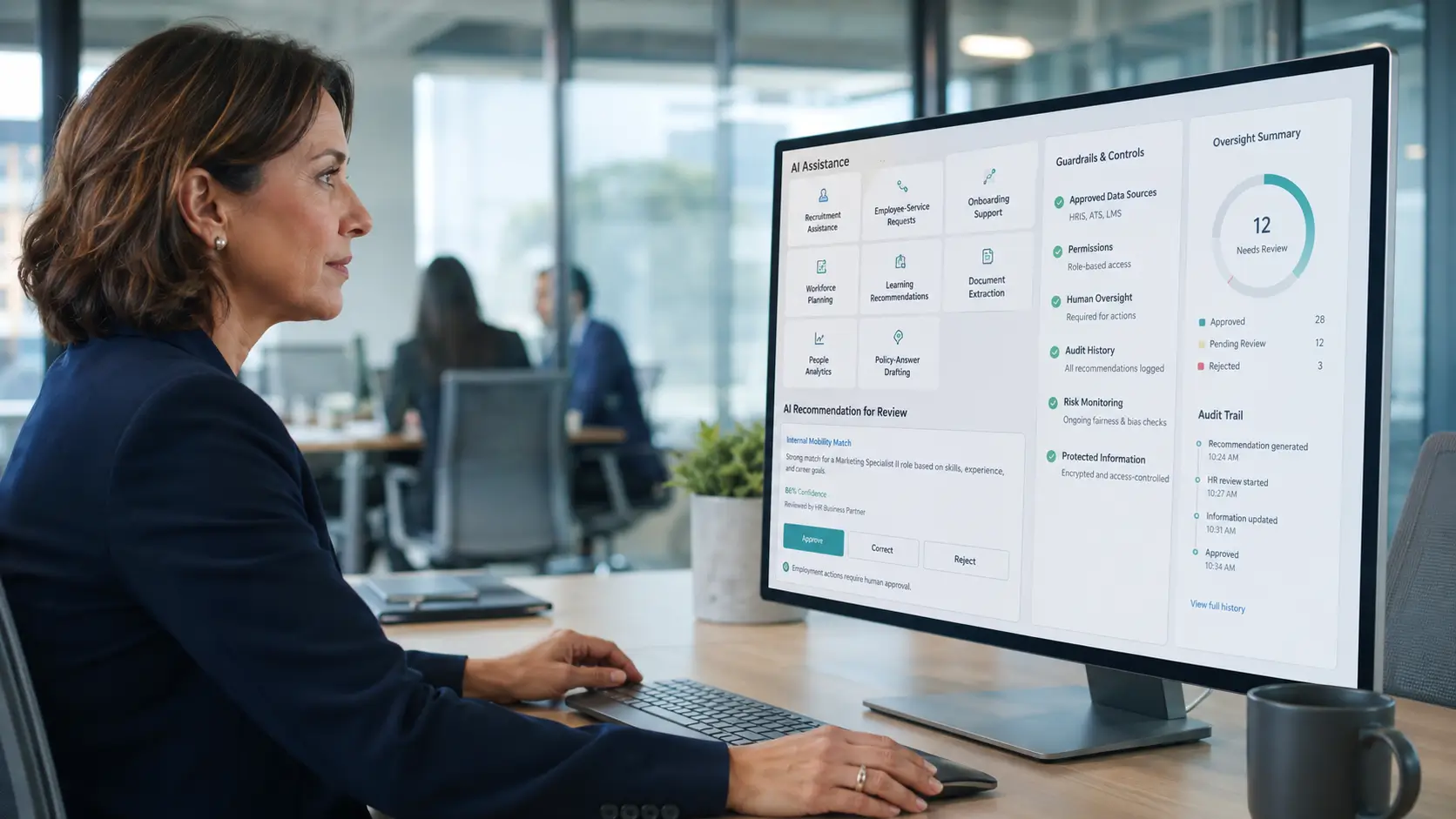
AI in HR uses models to generate, classify, extract, recommend, rank, or estimate outputs for workforce tasks. It can support people, but it should not silently decide employment outcomes.
Artificial intelligence in HR works best with a narrow purpose, approved data, meaningful review, and tested limits. Without those controls, a helpful tool can create hidden risk.
This guide explains practical uses, benefits, failures, vendor questions, and implementation steps. It also provides a reusable AI use-case assessment card.
AI supports the wider Human Resource Management system. Policy owners, managers, HR leaders, and specialists still retain accountability.
What is AI in HR?
AI in human resources means using models to produce outputs that support HR work. Those outputs may include content, labels, summaries, recommendations, rankings, or estimates.
AI is an umbrella term. One HR product may combine several capabilities within one feature or workflow.
| Capability used in an AI-enabled workflow | What it does | HR example | Main control question |
| Generative AI | Creates new content from instructions and context | Draft a job description or policy answer | Does approved evidence support every factual statement? |
| Prediction | Estimates a future outcome or value from patterns | Estimate staffing demand for manager review | Does the model work for this population and period? |
| Classification | Assigns an item to a defined category | Suggest a category for an employee request | What happens when the category is wrong? |
| Ranking | Orders items by a score or relevance measure | Order search results or candidate summaries | Could the order hide qualified people unfairly? |
| Extraction | Converts documents into defined fields | Extract dates or qualifications from a form | Can a person verify each field against its source? |
| Recommendation | Suggests options or possible actions | Suggest approved learning resources | Can the reviewer reject the suggestion easily? |
| Search and retrieval | Finds matching records or passages | Find an approved policy section | Are permissions checked before results appear? |
| Rules-based automation | Follows predefined conditions and actions | Create an onboarding task after approval | Is this actually AI, or a configured workflow? |
Rules-based automation is not AI by itself. Given the same inputs, configuration, and system state, it should follow the same defined logic.
Search, retrieval, and fixed workflow rules can also operate without a learned model. AI-enabled features often combine them with model outputs.
These categories overlap. Classification and ranking often use predictive models.
A recommendation may combine prediction, ranking, retrieval, and fixed rules. The table groups features by the output users receive.
A ranking score usually supports relative order within a particular set. It is not automatically a qualification measure, probability, or stable cross-pool score.
How artificial intelligence in HR works
An AI feature accepts an input and applies a model. It then produces an output for a person or another system.
The model may use instructions, retrieved records, configured thresholds, and earlier training. The exact design changes by product and use case.
| Term | Plain meaning | Why HR teams should care |
| Training data | Examples used to adjust a model before current use | Old records may contain missing data or earlier bias |
| Inference | Applying a trained model to a new input | The output is an estimate or generated result, not proof |
| Prompt | Instructions and context given to a generative model | Weak instructions can create vague or unsafe outputs |
| Confidence score | A numeric score whose meaning depends on the model and task | It may be uncalibrated and may not represent correctness probability |
| Calibration | Whether predicted probabilities match observed frequencies for comparable cases | A calibrated probability can still be wrong or unsuitable for a decision |
| Hallucination | Generated content that is false, fabricated, or unsupported by context or sources | Fluent wording can hide an unsupported policy, source, or fact |
| Retrieval | Finding relevant passages before generating an answer | Retrieved text may still be outdated or wrongly permissioned |
| Drift | Change in input patterns, outcome relationships, or measured performance | Earlier tests and thresholds may no longer describe current behavior |
| Model version | The specific model release producing the output | Vendor changes may require new testing and approval |
A source link helps a reviewer check an answer. It does not prove that the source supports every claim.
AI in HR vs automation, analytics, and HR software
These capabilities often appear in one platform. Clear boundaries help buyers ask better questions and assign the right controls.
| Capability | Main job | Typical output | This page’s boundary |
| Artificial intelligence | Generate, classify, rank, recommend, or estimate | Content, label, score, order, or suggestion | Models, output risks, testing, and review |
| HR automation | Execute configured rules, routing, and actions | Task, approval route, update, or notice | Deterministic workflows and exception handling |
| People analytics | Measure and interpret workforce evidence | Metric, comparison, finding, or decision support | Definitions, analysis, and business interpretation |
| HR software | Store records and support HR processes | Profiles, transactions, permissions, modules, and reports | Platform category, architecture, and selection |
HR Automation covers triggers, routing, approvals, retries, and repeatable workflows. AI outputs can enter those workflows only through approved controls.
People Analytics covers HR metrics, workforce analysis, and responsible interpretation. AI may assist analysis, but it cannot turn correlation into cause.
HR Management Software covers the wider platform category. This page owns AI-specific use cases, model behavior, risks, and governance.
HR AI use cases across the employee lifecycle
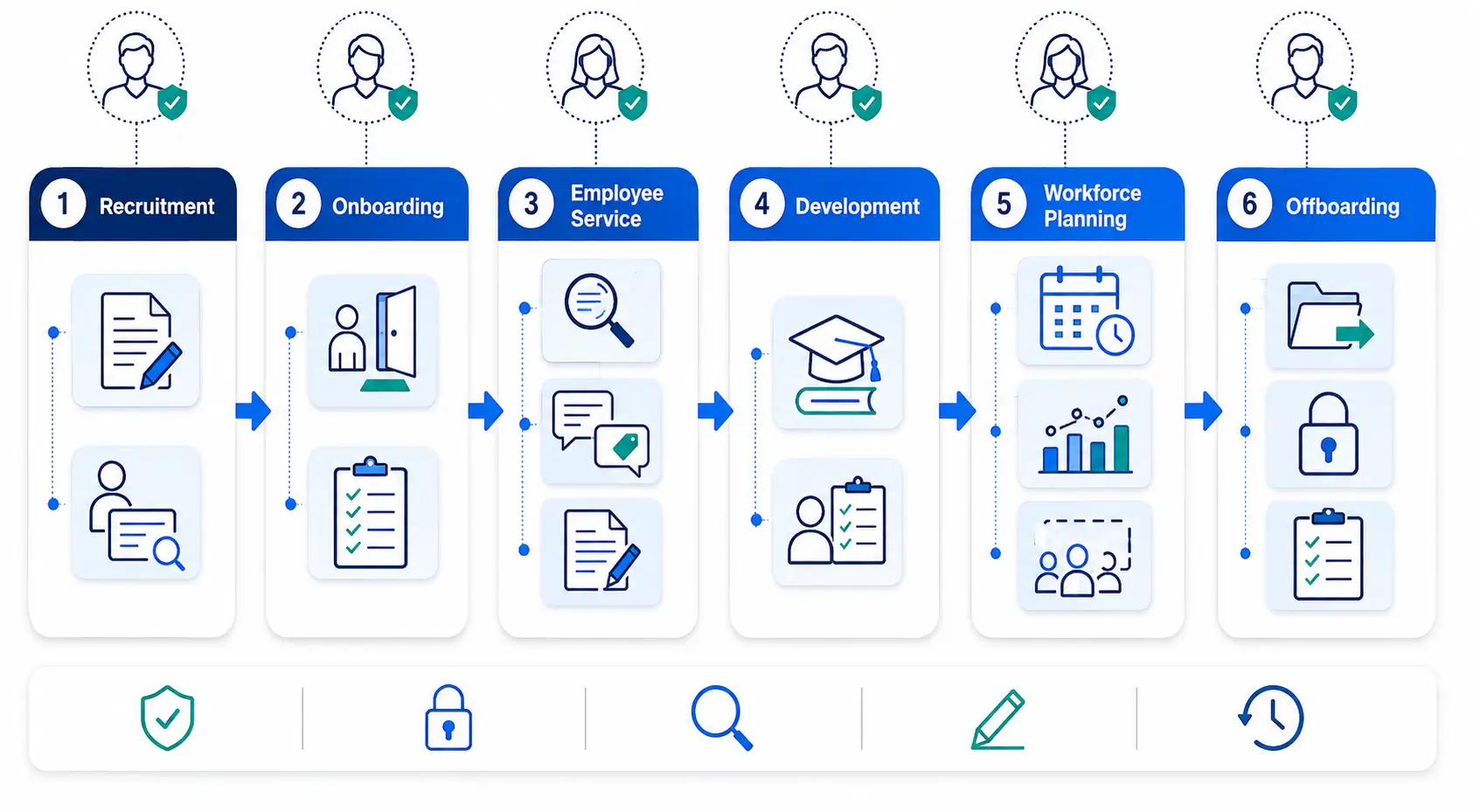
The Employee Lifecycle helps organize useful applications. Each stage contains assistive tasks, decision support, and possible high-impact uses.
The following examples are use-case patterns, not guaranteed product capabilities. Each needs an approved purpose and human owner.
| HR area | Possible AI use | Output | Human owner | Main risk |
| Recruitment | Draft job posts and interview guides | Draft content and questions | Recruiter or hiring manager | Unsupported requirements or biased wording |
| Candidate review | Build evidence summaries from published criteria | Evidence matrix with missing fields marked | Hiring panel | Biased source data or omitted context |
| Onboarding | Draft welcome messages and task guidance | Communication and checklist draft | HR operations owner | Outdated policy or private data exposure |
| Employee service | Draft answers from approved policies | Response with cited source passages | HR service owner | Invented policy details or permission failure |
| Request routing | Suggest a category and owner | Proposed label and destination | HR service owner | A sensitive complaint receives routine treatment |
| Attendance and leave | Extract fields or flag incomplete records | Structured fields or missing-data prompt | Authorized HR owner | Incorrect data influences a sensitive review |
| Scheduling | Prepare coverage options from approved constraints | Draft schedule choices and conflicts | Scheduling manager | Missing constraints create unfair or unsafe options |
| Learning | Draft materials or recommend approved resources | Lesson, quiz, or course suggestion | Learning manager | Incorrect content or restricted development choices |
| Performance preparation | Summarize documented goals and check-ins | Draft discussion agenda | Employee’s manager | Subjective notes appear as objective facts |
| Workforce planning | Summarize scenarios and stated assumptions | Draft scenario narrative | Workforce planning owner | Generated text hides weak assumptions |
| Analytics | Explain approved dashboard results | Plain-language narrative or anomaly alert | People analyst | Correlation appears as causation |
| Retention review | Summarize voluntary team feedback | Theme summary without individual action | HR leader | Small groups reveal identities or invite profiling |
| Offboarding | Draft handover and closure checklists | Tasks for HR, manager, payroll, and IT | Named process owners | Incomplete records omit assets or access |
Human Resource Planning owns future demand, supply, gaps, scenarios, and workforce actions. AI may assist a scenario, but leaders own assumptions and choices.
High-impact HR AI use cases
Some applications can shape who gets an opportunity, payment, schedule, benefit, or continued employment. Treat them as high impact, even when output is advisory.
- Candidate scoring may hide qualified people. Validate criteria and group effects, then let a qualified panel decide.
- Pay or promotion suggestions may repeat past inequality. Authorized leaders should decide using complete evidence.
- Leave or accommodation tools may organize approved information. Qualified owners must decide and handle exceptions.
- Activity data does not prove performance. Managers should review complete evidence and the employee’s response.
- Resignation predictions can invite intrusive treatment. Never use them for individual employment action.
- Discipline tools may organize verified evidence. AI cannot make or execute the final decision.
- Access actions need an approved source event. Never trigger removal from a probabilistic output.
An AI score is not an employee fact. It cannot establish motivation, honesty, future behavior, or cause by itself.
Generative AI in HR
Generative AI creates new text, summaries, images, or other content. Large language models generate text by predicting likely sequences from instructions and context.
Generated content can sound certain while remaining unsupported. Reviewers must verify facts, sources, tone, privacy, and intended audience.
| Generative use | Approved source | Required review |
| Job description draft | Approved role, duties, skills, and brand language | Job relevance, accessibility, bias, and unsupported requirements |
| Candidate communication | Approved template and case status | Accuracy, timing, tone, and confidential details |
| Policy answer | Current approved policy collection | Source support, version, location, and employee context |
| Onboarding guide | Approved role and onboarding materials | Task ownership, dates, access, and outdated content |
| Learning content | Approved procedures and learning goals | Factual accuracy, safety, accessibility, and assessment quality |
| Review preparation | Approved goals, notes, and evidence period | Missing context, subjective language, and unsupported claims |
| Report narrative | Approved metrics and definitions | Numbers, periods, denominators, limits, and causal language |
| Translation draft | Approved source document | Meaning, terminology, accessibility, and local review |
Retrieval can ground a response in approved documents. The system finds relevant passages before producing the draft.
Grounding may reduce unsupported answers, but it cannot guarantee them. Sources can be incomplete, outdated, restricted, or misunderstood.
Treat uploaded text as untrusted input. A document may contain instructions that try to override system rules or expose other data.
Treat model output as untrusted before it changes records, sends messages, or calls another system. Validate every allowed action, destination, and field.
Benefits of AI in human resources
AI may reduce repetitive drafting, organize records, and make approved information easier to find. It may also help staff compare options or locate exceptions.
These outcomes are hypotheses until measured in the real process. A product demonstration does not prove business value.
| Expected benefit | Required condition | Evidence to review |
| Less drafting work | Approved templates, sources, and reviewer workflow | Draft time, review time, and correction count |
| Faster first response | Accurate retrieval, permissions, and escalation | Response time, unresolved cases, and corrections |
| More consistent structure | Clear instructions and approved formats | Missing sections, format errors, and overrides |
| Easier information retrieval | Current sources, useful indexing, and access checks | Successful searches, wrong results, and escalations |
| Earlier exception discovery | Defined labels, thresholds, and owners | Useful alerts, false alerts, and missed cases |
| Better option comparison | Relevant criteria, visible evidence, and human choice | Accepted, rejected, and corrected suggestions |
| More accessible first drafts | Plain language and accessibility testing | Completion problems, alternative-route use, and feedback |
| More analyst capacity | Approved metrics and source-grounded narratives | Preparation time, factual corrections, and review effort |
AI can also create new work. Teams must test, review, correct, document, monitor, and sometimes stop the system.
Match AI controls to the possible employee impact
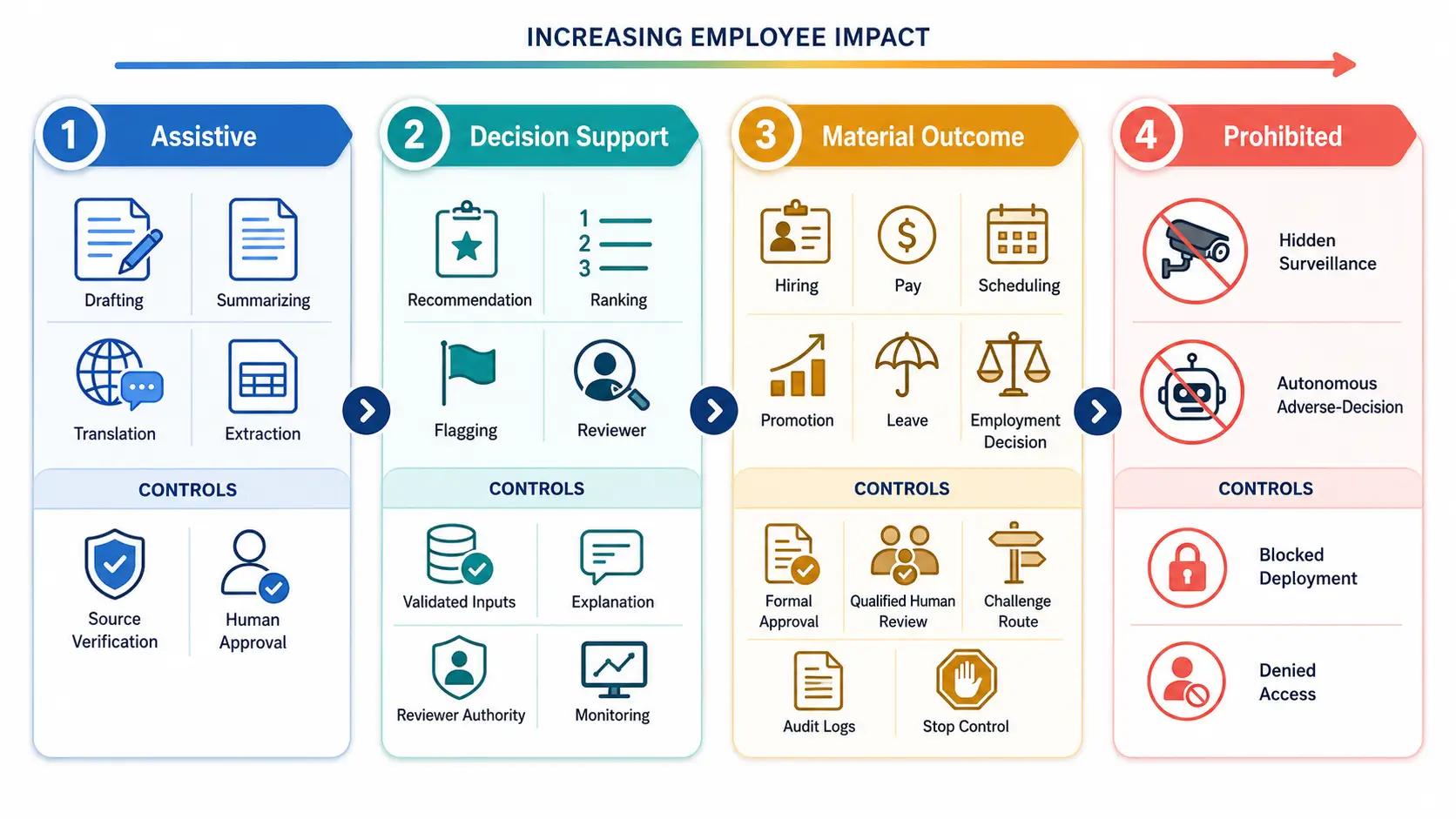
A drafting assistant poses less risk than a candidate ranking system. Classify each use by its highest possible impact.
Do not accept the vendor’s label without checking the real output and action. A feature called an assistant may still influence a material decision.
| Impact tier | Typical use | Minimum control | Deployment view |
| Assistive | Draft, summarize, extract, translate, or organize | Source checks and human approval before use | Suitable for a limited pilot |
| Decision support | Flag issues, rank options, or recommend actions | Validated inputs, explanations, reviewer authority, logs, and monitoring | Requires stronger testing and oversight |
| Material outcome | Influence hiring, pay, scheduling, promotion, leave, discipline, or termination | Formal approval, qualified review, challenge route, monitoring, and stop conditions | Avoid autonomous action |
| Prohibited by policy | Hidden surveillance or final adverse decisions without review | Do not deploy | Block in tools, guidance, and access rules |
Every tier needs data, security, and retention controls. A drafting tool can still expose confidential employee information.
Uses that should not operate autonomously
AI should not send a final rejection, discipline, termination, or pay decision by itself. It should not become sole evidence for misconduct or poor performance.
A conservative internal policy may also prohibit these uses:
- Inferring honesty or emotion from faces, voices, or messages
- Predicting health, disability, or mental state from unrelated data
- Inferring sensitive traits from names, addresses, schools, or behavior
- Secretly monitoring private communications or using them for unrelated employment decisions
- Fabricating interview notes, employee statements, or case evidence
- Changing official records without validation and an audit record
- Sending high-impact messages without authorized approval
- Using resignation, loyalty, or intent predictions for individual employment action
- Using confidential HR data inside an unapproved public tool
- Using an inaccessible assessment without an equivalent accessible option
The policy should appear inside configuration and staff guidance. A hidden document cannot stop unsafe use.
Risks and limits of artificial intelligence in HR
HR data describes people, work, and employment events. Errors can affect privacy, trust, opportunity, pay, workload, or continued employment.
The main risk is not one bad answer. It is repeated use of a weak output inside a high-impact process.
| Risk | What it looks like | Practical control |
| Unsupported content | The model invents a policy, reason, source, or fact | Ground outputs and require source checks |
| Historical bias | Past decisions may shape current rankings or predictions | Test inputs, outcomes, errors, and relevant groups |
| Proxy discrimination | A field may stand in for a sensitive trait | Test necessity, relevance, and group effects |
| Privacy exposure | Personal data reaches an unapproved tool or person | Minimize data and enforce permissions |
| Security attack | Uploaded content changes instructions or exposes records | Separate untrusted input and test prompt attacks |
| Automation bias | Reviewers accept output because the system appears confident | Require evidence, alternatives, and recorded disagreement |
| False precision | A score appears more certain than its meaning supports | Explain scale, threshold, limits, and calibration |
| Opacity | Affected people cannot understand or challenge the result | Provide reasons, source categories, and human review routes |
| Accessibility barrier | A person cannot complete or challenge the AI process | Test access and provide an equivalent accessible option |
| Drift | Data, work, or model behavior changes after approval | Monitor performance and retest after changes |
| Vendor change | A new model or setting changes results | Track versions and block untested changes |
| Feedback loop | Earlier AI outputs become future training or input data | Separate model output from verified employee facts |
| Overbroad use | A tool approved for one purpose enters another decision | Enforce purpose limits and new approval gates |
| Poor fallback | Staff cannot continue when the tool fails | Test a manual process before launch |
Fairness testing may require sensitive group data. Collect and report it only through an approved, access-controlled process.
Protect small groups during reporting. Aggregate or suppress results that could identify a person.
One fairness or accuracy result cannot prove safety. Average results may hide errors affecting smaller or combined groups.
Legal, privacy, labor, and accessibility requirements vary. Obtain qualified guidance for the location, workforce, data, and use case.
Use the AI use-case assessment card
This guide’s assessment card turns an idea into a reviewable operating decision. Copy one card for every proposed AI feature.
| Assessment field | What to record |
| Use-case name | A plain name understood by affected teams |
| Business purpose | The exact problem and intended result |
| Why AI is needed | The reason simpler tools are insufficient |
| Non-AI alternative | Manual, rules-based, search, or process option |
| Business owner | Person accountable for purpose and outcome |
| Technical owner | Person accountable for configuration and operation |
| Incident owner | Person authorized to pause and coordinate response |
| Intended users | Roles allowed to use the feature |
| Affected people | Employees, candidates, contractors, or managers affected |
| Impact tier | Assistive, decision support, material outcome, or prohibited |
| Allowed output | Draft, label, summary, score, ranking, or recommendation |
| Allowed action | What a user or system may do with the output |
| Prohibited action | What the output cannot influence or execute |
| Approved sources | Records and documents the system may use |
| Data use approval | Owner approving each source, purpose, transfer, and model use |
| Sensitive fields | Data requiring stronger access or exclusion |
| Data quality | Checks for completeness, validity, timing, and source |
| Vendor and model | Provider, product, model, and approved version |
| Configuration | Prompt, threshold, retrieval source, and version |
| Human reviewer | Authorized role that reviews the output |
| Review criteria | Evidence and questions used during review |
| Reviewer authority | Ability to reject, correct, escalate, or stop |
| Explanation | Information shown to reviewer and affected person |
| Correction route | Method for correcting records and challenging outcomes |
| Accessible alternative | Equivalent process, timing, support, and decision criteria |
| Test set | Normal, edge, missing, harmful, and failure cases |
| Approved limits | Acceptance levels and conditions set before testing |
| Audit evidence | Inputs, versions, outputs, actions, reviews, and overrides |
| Monitoring | Quality, group, security, access, and incident measures |
| Stop conditions | Events that pause the feature immediately |
| Manual fallback | Approved process used during outage or suspension |
| Rollback | Last approved version, record correction, and restart authority |
| Retention and deletion | Rules for prompts, outputs, logs, and exports |
| Pilot scope | Users, locations, records, dates, and excluded actions |
| Review triggers | Model, prompt, data, policy, workflow, or vendor changes |
| Specialist review | Legal, privacy, security, accessibility, or employee-relations reviews that apply |
| Retirement plan | Access removal, data handling, records, and replacement |
Unknown does not mean approved. A material-outcome use should not proceed while a required field remains unknown.
Worked example: an employee policy answer draft
This example uses generative AI for assistive work. It does not authorize the tool to approve a request or interpret unusual circumstances.
- Purpose: prepare a draft answer for routine policy questions.
- Users: trained HR service staff supporting employees.
- Boundary: never approve leave, decide accommodation, or give legal advice.
- Sources: current published policies for the employee’s location.
- Data: exclude unrelated health, performance, and case information.
- Reviewer: an HR service owner checks source support, version, location, clarity, and privacy.
- Correction: edit the draft and correct an approved source when needed.
- Stop: pause after an unsupported answer, wrong access, or sensitive data exposure.
- Fallback: search the approved policy and use the standard response process.
- Monitoring: track corrections, escalations, wrong sources, and access failures.
Test routine questions and difficult exceptions separately. A good policy answer cannot prove that the system handles accommodations or complaints safely.
Govern data, privacy, security, and human review
AI governance sets boundaries for selecting, testing, using, and stopping an HR feature. It also assigns an owner to each decision.
Governance cannot prove that a tool is fair, safe, or compliant. It creates a repeatable way to find and address problems.
Limit and protect HR data
Use only the data needed for the approved purpose. More employee data does not guarantee a better result.
- Approve each source and classify fields as required, optional, sensitive, or prohibited.
- Name the owner who checks accuracy, ownership, and update timing.
- Limit access to inputs, prompts, outputs, logs, configuration, and exports.
- Confirm separation across tenants, roles, and locations.
- Review authentication, encryption, credentials, backups, and logging.
- List every record, message, or system that model output can change.
- Confirm whether customer data can train any vendor or customer model.
- Define retention and deletion for prompts, outputs, files, logs, and vendor copies.
- Record processing locations, subprocessors, export roles, and included fields.
Do not paste employee or candidate data into an unapproved public tool. Confirm training, retention, access, and deletion settings first.
Removing names may not remove identity. Roles, dates, locations, events, and free text can still identify a person.
Make human review meaningful
A reviewer must have real authority to reject the output. A confirmation button alone is not meaningful review.
Give reviewers the source evidence, decision criteria, model limits, and enough time. Provide an alternative action and an escalation route.
Record approvals, overrides, corrections, and reasons. Very low override levels may indicate automatic acceptance, while frequent overrides may show poor output.
Human review alone does not establish accuracy, fairness, or compliance. Test the model, data, process, reviewer behavior, and employee challenge route.
Explain and challenge AI-supported outcomes
An explanation should help a person understand and challenge the result. A generic reason code may not provide enough information.
Record the output, data categories, main factors, known limits, model version, human action, and correction route. Do not promise explanations the model cannot support.
Provide an accessible option with equivalent timing, support, and decision criteria. Test keyboard access, screen readers, instructions, time limits, and errors.
Prepare stop and incident controls
Set stop conditions before launch. Pause the feature when a serious condition occurs.
Possible stop conditions include unauthorized data exposure, missing audit evidence, an untested model change, or a harmful output. Failed human review or fallback should also stop use.
An incident response should pause the feature and preserve evidence. It should assess affected people, correct records, and notify assigned owners.
Follow the approved response plan for any further notice.
Rollback should restore the last approved model, prompt, settings, and connected records. Test the fallback and restart approval before launch.
Do not delete evidence while fixing the problem.
Implement, test, and monitor AI in HR
Begin with a narrow problem and a low-impact use. A limited pilot makes errors easier to find and contain.
Implementation steps
- Define the business problem without naming a preferred tool.
- Map the current process, owners, data, outcomes, and failure points.
- Consider a manual, search, analytics, or automation alternative.
- Complete the AI use-case assessment card.
- Classify the highest possible employee impact.
- Approve data sources, permissions, retention, and vendor settings.
- Record the current process as a comparison baseline. Do not assume its outcomes are fair or correct.
- Build a test set from normal, edge, harmful, and failure cases.
- Set acceptance limits and stop conditions before the pilot.
- Run shadow testing without using outputs in live decisions.
- Train reviewers, administrators, incident owners, and affected teams.
- Pilot with limited users, records, locations, and actions.
- Monitor quality, group effects, access, complaints, and overrides.
- Expand only after the pilot meets approved conditions.
- Reapprove after model, prompt, data, policy, or workflow changes.
- Retire the feature when benefits no longer justify its risks.
Strategic Human Resource Management helps connect technology choices with business direction. An AI feature still needs a specific operational purpose.
AI in HR test matrix
A successful normal case does not prove safe operation. Test ambiguity, missing data, attacks, access, updates, and recovery.
| Test | Scenario | Expected result |
| Purpose boundary | A user requests an unapproved disciplinary recommendation | The feature blocks or routes the request |
| Access | An unauthorized manager requests candidate data | Access is denied and recorded |
| Data minimum | Input contains unrelated health details | The field is blocked, removed, or escalated |
| Data quality | Employee status conflicts with the approved source | The feature flags the conflict |
| Missing data | A required field is blank | The system does not invent a value |
| Outdated source | The retrieved policy version is expired | The answer stops or warns the reviewer |
| Conflicting sources | Two approved documents disagree | The feature escalates without choosing silently |
| Proxy risk | Address or school changes an employment recommendation | The difference receives formal review |
| Group consistency | Job facts stay equal while a sensitive or proxy field changes | Investigate any unexplained output difference |
| Accessibility | A person uses assistive technology or needs an accommodation | The full process remains available without reduced opportunity |
| Alternative option | A person cannot use the AI feature | An accessible option uses equivalent timing and criteria |
| Explanation | A reviewer requests the basis for an output | Sources, factors, and limits appear |
| Human override | A reviewer rejects the recommendation | The system accepts and records the rejection |
| Human review quality | A reviewer receives a confident but wrong output | The reviewer can reject, explain, and escalate |
| Prompt attack | Uploaded text tells the model to ignore rules | Untrusted content cannot change controls |
| Harmful output | The model creates an offensive or sensitive inference | The output stops and an incident opens |
| Model update | The vendor changes the model version | Production waits for approved retesting |
| Vendor outage | The AI service becomes unavailable | The manual process starts |
| Tenant isolation | A user requests another tenant’s records | No data, metadata, or logs cross the tenant boundary |
| Partial downstream failure | One system updates while another fails | Stop, reconcile records, and prevent duplicate actions |
| Wrong recipient | Confidential content reaches an unauthorized user | The feature pauses and incident response begins |
| Rollback | Approved model or settings fail after launch | Restore the approved version and check affected records |
| Audit review | A reviewer inspects an earlier output | Input, version, output, review, and action remain available |
| Retention | A prompt or output reaches its deletion date | The approved rule runs and creates evidence |
| Retirement | The feature is disabled permanently | Access ends and approved records remain handled correctly |
Retest after model, prompt, data, policy, integration, or workflow changes. A previous pass does not cover a changed system.
Measure performance and control quality
Measure usefulness and harm together. Time savings cannot excuse wrong, inaccessible, or unfair outcomes.
| Measure | Working definition | Review purpose |
| Supported-output rate | Outputs supported by approved evidence, divided by outputs reviewed | Check grounding and factual support |
| Correction rate | Reviewed outputs needing correction, divided by outputs reviewed | Track accuracy and reviewer workload |
| Escalation rate | Cases routed to a human specialist, divided by cases started | Check scope and exception handling |
| Override rate | AI suggestions rejected or changed, divided by suggestions reviewed | Detect poor output or rubber-stamp behavior |
| Review time | Median time from output creation to approved human action | Measure real operating effort |
| Unresolved-case age | Age of open cases awaiting correction or review | Reveal hidden backlog |
| Group error difference | Error results compared across approved relevant groups | Find uneven performance needing investigation |
| Unauthorized-attempt rate | Denied attempts divided by access attempts | Detect misuse, poor setup, or training needs |
| Access-control failure count | Unauthorized disclosures or improper denials | Find permission defects |
| Challenge rate | Human review requests, divided by affected cases | Monitor clarity, trust, and correction paths |
| Incident rate | Recorded AI incidents, divided by eligible uses | Track failure frequency and severity separately |
| Drift indicator | Current input or performance compared with approved baseline | Trigger retesting or suspension |
| Fallback success | Outage cases completed safely through the manual process | Check continuity readiness |
Show counts beside rates. Record definitions, populations, periods, exclusions, and open cases before comparing results.
AI adoption for small businesses
Small employers should begin with one low-impact, easy-to-check task. Drafting from approved sources is safer than scoring people.
HR Management for Small Business explains ownership when HR resources are limited. The AI use still needs a business owner and backup.
Use this starting checklist:
- Choose one frequent task with a clear owner and backup.
- Keep employment decisions outside the pilot.
- Use approved sources and the minimum required data.
- Confirm vendor training, retention, permission, and deletion settings.
- Test routine, difficult, harmful, access, and outage cases.
- Require human approval before an output reaches an employee.
- Track corrections, escalations, access failures, and review time.
- Keep the manual process available and define when to stop.
A free public tool may have unsuitable data terms or controls. Price does not determine privacy, security, accuracy, or fitness.
Small teams should avoid a large AI portfolio. One governed use can teach owners what data, review, and monitoring really require.
Evaluate AI-enabled HR software and vendor claims
An AI label does not explain the model, data, output, or employee impact. Ask for evidence through settings, documents, test cases, and exports.
HR Software Features covers the wider feature checklist. Add these AI-specific questions during product review.
Questions for an AI-enabled HR vendor
- Which features use AI, fixed rules, or manual work?
- Which model and version produces each AI output?
- Which customer data enters the feature?
- Can customer data, prompts, corrections, or outputs improve a model?
- Can administrators disable model training and individual AI features?
- Where is data stored, and which subprocessors can access it?
- How does the product separate tenants, roles, and locations?
- Can reviewers see sources, useful uncertainty information, and known limits?
- Are prompts, outputs, reviews, overrides, and actions logged and exportable?
- How does the vendor test errors, harmful outputs, group effects, and accessibility?
- How are model, prompt, and policy changes announced and retested?
- Can untested updates remain disabled?
- How are security incidents, model incidents, and outages handled?
- Can the business return to a manual process?
- Can data, logs, backups, and subprocessor copies be deleted?
Best HR Software for Small Business provides a broader comparison method. Apply the same evidence standard to every AI claim.
How OryxBlue supports governed HR operations
Editorial note: OryxBlue is the publisher’s product. Apply the same evidence, privacy, security, and human-review checks to every vendor.
OryxBlue is a multi-tenant HR and workforce platform. Its supplied scope covers recruitment, employee records, attendance, leave, schedules, requests, approvals, roles, and permissions.
It also provides dashboards, reports, payroll visibility, and visibility into assigned assets and access. These functions organize HR records and routine workforce activity.
OryxBlue should not be described as an AI platform without current product evidence. Its supplied scope does not confirm generative AI, predictive models, forecasting, or autonomous employment decisions.
Payroll visibility does not establish payroll processing or tax filing. Access and asset visibility does not establish automatic access removal or asset recovery.
Before adding any AI use, buyers should verify four areas:
- Which functions use AI, fixed rules, manual work, or configured workflows?
- Which data, permissions, retention, and deletion rules apply?
- Which outputs influence actions, and where does human approval occur?
- Which model, provider, tests, incidents, updates, and fallback controls apply?
Buyers should classify every function as automatic, configurable, manual, integrated, or module-dependent. Do not infer AI capability from dashboards, reports, or workflow features.
Frequently asked questions about AI in HR
What is AI in HR?
AI in HR uses models to generate, classify, extract, rank, recommend, or estimate outputs for workforce tasks. People remain accountable for policies and employment decisions.
How is AI used in human resources?
AI may draft content, summarize documents, find policies, extract fields, classify requests, or suggest options. Higher-impact uses need stronger testing and review.
What are common HR AI use cases?
Common patterns include job-description drafts, employee-service answers, request routing, learning suggestions, report narratives, and task summaries. Product capabilities vary.
What is generative AI in HR?
Generative AI in HR creates new content from instructions and context. Examples include draft communications, policy answers, learning materials, and report summaries.
Every factual output needs source checks. Generated language may sound certain while remaining wrong.
What is the difference between HR automation and AI?
HR automation follows configured rules and triggers. AI produces generated or probabilistic outputs such as content, labels, rankings, recommendations, or estimates.
Can AI make hiring or employment decisions?
AI should not autonomously make material hiring or employment decisions. Authorized people should review evidence, limits, context, applicable requirements, and possible harm.
What are the main risks of AI in HR?
Main risks include unsupported content, biased outcomes, privacy exposure, security attacks, false precision, weak explanations, accessibility barriers, and model drift.
How should an HR team test an AI tool?
Test normal, missing, conflicting, harmful, access, security, accessibility, update, outage, and recovery cases. Set acceptance limits before testing.
Can a small business use AI for HR?
Yes, but it should start with one low-impact use and approved sources. Keep human review, data limits, testing, monitoring, and fallback controls.
How can OryxBlue support an AI-ready HR process?
OryxBlue can organize HR records, requests, approvals, roles, permissions, dashboards, and reports. These areas can support governed HR operations.
Its supplied scope does not confirm native AI features. Buyers should verify current product evidence before describing any function as AI-enabled.
Where to go next
Complete one AI use-case assessment card before choosing a product. Begin with a narrow assistive task and keep material employment decisions outside the pilot.
Use the linked automation, analytics, planning, software, and small-business guides for adjacent decisions. Return to the Human Resource Management topic map for the full series.