
Top HR recruitment software for small teams
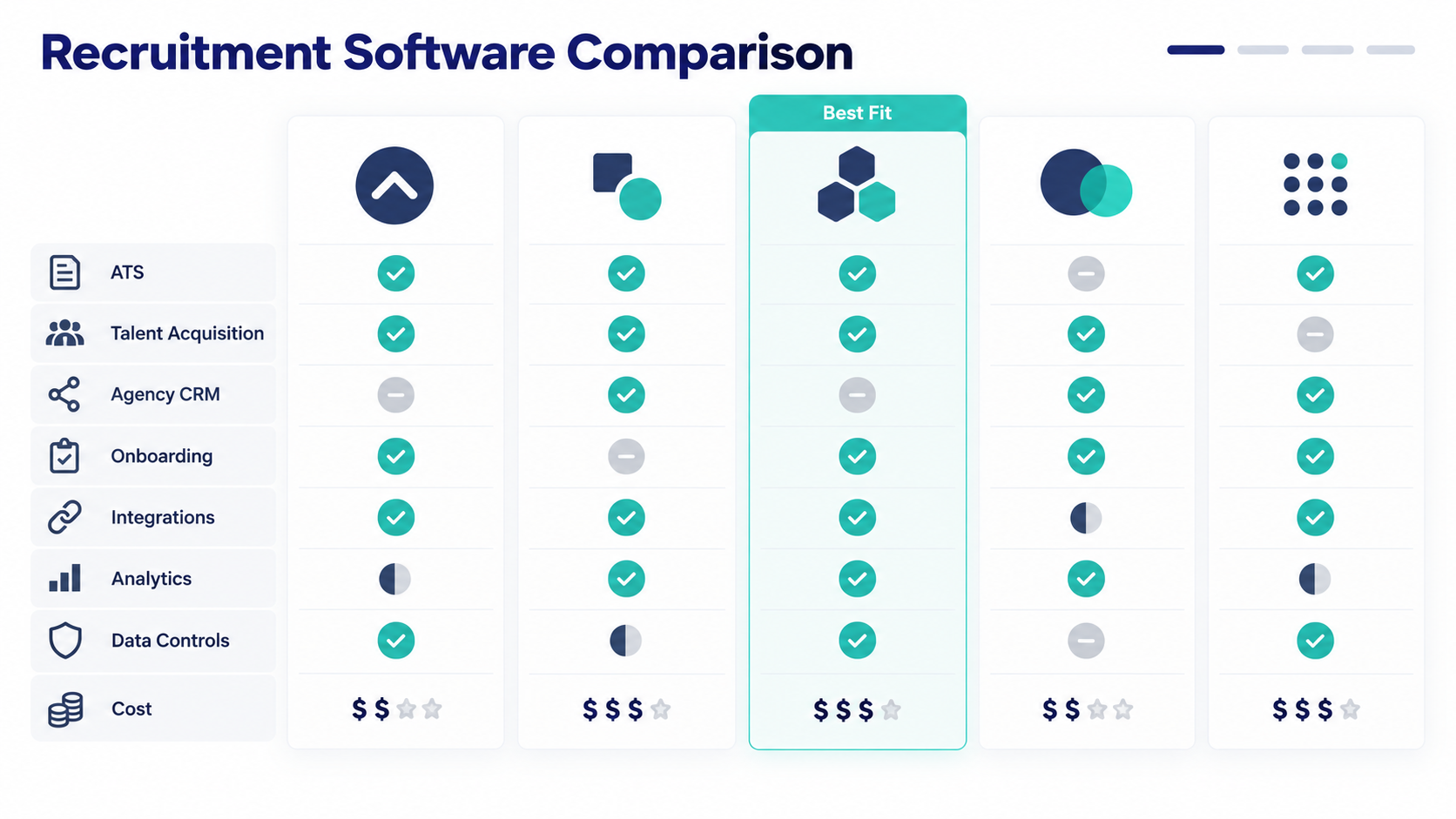
The top HR recruitment software is the system that fits your hiring model. Small internal teams can compare OryxBlue, Zoho Recruit, Greenhouse, and Workable.
Staffing agencies should assess Bullhorn as a different product category. These systems solve different jobs, so one shared ranking would mislead buyers.
First, separate applicant tracking systems from agency CRMs and point tools. Then test each shortlisted product through your complete hiring process.
This approach gives you a useful answer, not a hollow winner.
Publisher disclosure: This guide appears on the OryxBlue website. The research used a global English search snapshot from September 7, 2026.
We did not independently test every named product. Verify current features, plans, limits, and terms with each vendor.
Define the recruiting software category before comparing tools
Recruiting software covers several product types that solve different problems and should not share one score.
- An applicant tracking system (ATS) moves applicants through defined hiring stages.
- A talent acquisition suite supports a broader internal hiring process.
- A recruiting CRM builds relationships with possible candidates before they apply.
- An agency CRM manages agency work involving clients, jobs, submissions, and placements.
- A point tool handles one task, such as sourcing, assessments, or interview notes.
- A job board attracts applicants but does not manage the full hiring workflow.
General HR software may include recruitment besides employee records and onboarding. That connection can reduce duplicate data after someone accepts an offer.
Write your need in one sentence before the demo. Name the team, workflow, and required outcome.
Reject products from the wrong category before scoring features.
Top HR recruitment software shortlist
The research found five relevant products or vendor entities and shows where each belongs in a first review.
This shortlist does not claim a tested winner because product scope can change.
| Product | Best fit to investigate | Why it belongs on the shortlist | What to verify |
| OryxBlue | Startups and SMBs linking recruitment with employee records | Indexed documentation supports a recruitment and employee-record connection | Exact pipeline, posting, parsing, interview, offer, integration, security, and AI capabilities |
| Zoho Recruit | Teams comparing dedicated recruiting products | Its recruiting software page appeared in the observed results | Internal versus agency use, plan limits, workflow depth, exports, integrations, and total cost |
| Greenhouse | Teams reviewing talent acquisition software | Its talent acquisition guide appeared in the observed results | Company-size fit, implementation needs, workflow coverage, data controls, and full cost |
| Workable | Teams building an ATS shortlist | Workable appeared as a product entity in the observed results | Current category, feature scope, contract terms, integrations, support, and export options |
| Bullhorn | Buyers comparing ATS needs with agency-focused workflows | Its recruiting software guide appeared in the observed results | Product edition, internal or agency fit, client workflows, billing needs, limits, and cost |
Treat each row as a research task because search visibility does not prove product quality or buyer fit.
Compare the full recruitment workflow
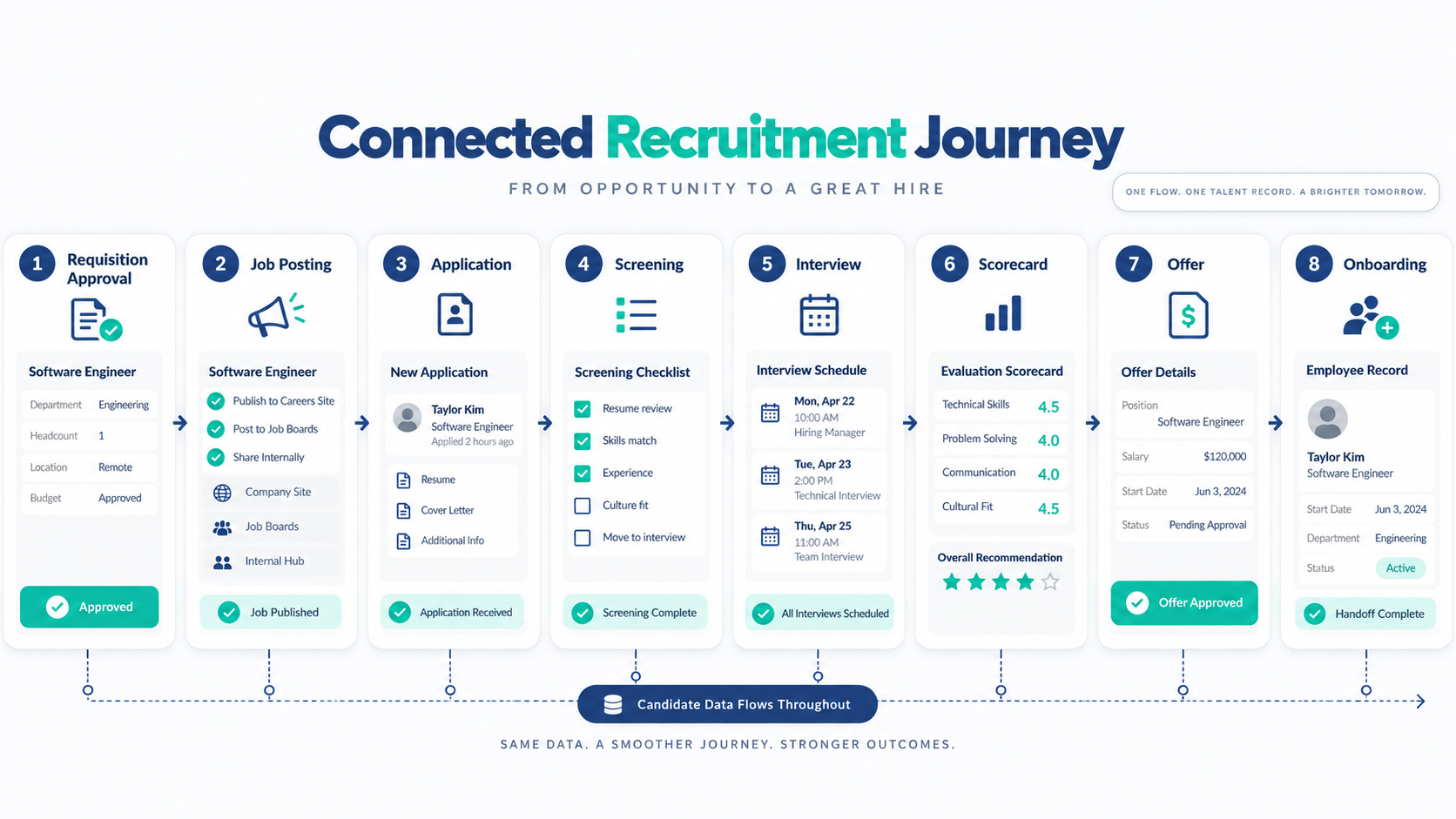
A feature list can hide broken handoffs, so test every step between role approval and employee-record creation.
Requisition approval and job posting
A requisition requests approval for an open role and records each requester, reviewer, approver, and change.
Check how the software publishes jobs, including destinations, careers-site controls, closing rules, and approval records.
Application and candidate pipeline
The ATS should track each hiring stage while handling duplicates, required fields, resume parsing, and searches.
Check who can move, reject, or restore candidates because clear permissions protect data quality and privacy.
Interviews and structured scorecards
Interview scheduling should support candidates, panel members, time zones, changes, cancellations, reminders, and calendar connections.
A structured scorecard records shared evidence without turning human judgment into an unexplained automatic score.
Offers, onboarding, and employee records
Offer acceptance should start a controlled handoff that moves approved data without repeated manual entry.
Follow that handoff into the wider employee lifecycle. Check ownership, effective dates, required documents, and corrections.
Use this workflow as your test script: approve, post, apply, screen, interview, score, offer, and onboard.
Match recruitment software to your hiring model
Small internal teams need simple ownership, clear pipelines, easy administration, fewer handoffs, and dependable exports.
Growing talent teams may need deeper approvals, reporting, multiple roles, several locations, and more hiring managers.
Recruitment agencies use another model that may include client contacts, submissions, placements, billing, and candidate data.
Point-tool buyers should define the gap because sourcing tools cannot replace an ATS that owns candidate records.
Avoid unsupported employee bands because hiring volume, role complexity, countries, and team capacity often matter more.
Write your hiring model before the demo, including ownership, open roles, candidate volume, countries, and expected growth.
Check the recruitment features that affect daily work
Core features should support a real process because their names alone do not prove connected work.
Check these areas during selection:
- Requisition creation, approval, and change history
- Job distribution and careers-site controls
- Application forms and resume parsing
- Candidate pipeline stages and permissions
- Interview scheduling and candidate messages
- Structured interview scorecards
- Offer creation, approval, and acceptance
- Onboarding and employee-record handoff
- Recruiting analytics and routine reports
- Integrations, API evidence, and data export
Ask vendors to show your hardest case. A polished standard demo may avoid the limits that affect your team.
Compare total cost instead of the starting price
Recruiting software pricing can depend on users, open jobs, or candidate volume. Modules and service levels may add further costs.
Calculate the complete ownership cost. Include the base fee, add-ons, setup, implementation, support, integrations, renewal, and exit work.
Contract minimums can also change the result. Check billing periods, renewal terms, upgrade triggers, and data access after cancellation.
Use the same cost period for every vendor. Record all assumptions beside the total, then ask each vendor to confirm them.
Protect candidate data and govern automated decisions
Candidate records can contain sensitive personal information. Ask how the system controls access, retention, deletion, exports, and audit history.
Check the privacy notice and consent process. Requirements vary by location, so obtain suitable local advice before launch.
Some tools may offer automated screening, matching, or interview notes. Ask what data trains or informs each output.
Human reviewers should remain accountable for hiring decisions. They need a way to question results, correct errors, and handle candidate concerns.
Use the HR automation guide to separate routine workflow steps from sensitive human decisions. Also review bias risk, explainability, and applicable local rules.
Create two lists before approval. The first lists permitted automation.
The second names decisions that require human review.
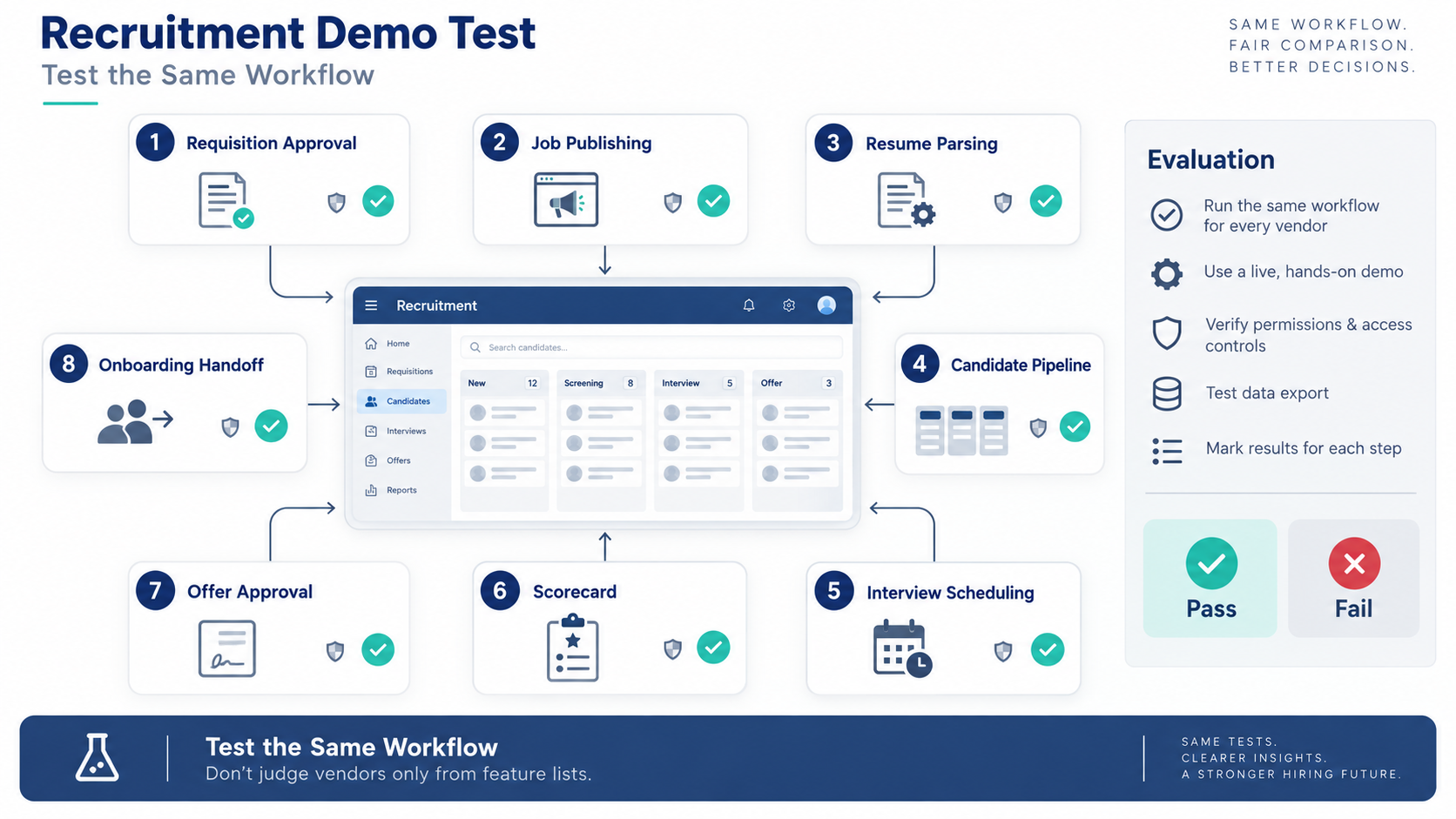
Run eight tests during every recruitment software demo
Repeatable tests reveal more than a vendor’s slide deck. Use the same sample role and candidate data for every product.
- Create a requisition and route it for approval.
- Publish a role and update its closing details.
- Submit and parse a sample resume.
- Move a candidate through custom pipeline stages.
- Schedule a panel interview across time zones.
- Submit a scorecard and correct an entry.
- Prepare an offer and complete the approval path.
- Export candidate data and complete the onboarding handoff.
Record every missing step, manual workaround, delay, and permission problem. Save screenshots where the vendor permits them.
Test support after the workflow test. Ask one realistic question and record the quality of the answer.
Avoid common recruiting software buying mistakes
Category mismatch. A sourcing tool may look modern but cannot own hiring records. Confirm the product type before comparing scores.
Feature-count bias. A longer list does not prove a better workflow. Judge how well the steps connect.
Starting-price bias. A low entry figure may exclude required users or modules. Compare full costs under matching assumptions.
Review-score bias. A star average lacks context without count, date, source, and company fit. Read recurring themes instead.
Handoff neglect. Recruitment does not end with an accepted offer. Test how approved candidate data becomes an employee record.
Exit neglect. Confirm which records you can export and their format. Also test attachments, notes, scorecards, and audit history.
Uncontrolled automation. Do not accept an unexplained hiring recommendation. Require human review, clear ownership, and a correction route.
Turn these mistakes into pass-or-fail gates. A product that fails a required gate should not win on optional features.
FAQs
What is HR recruitment software?
HR recruitment software manages tasks across the hiring process. It may support approvals, applications, interviews, offers, reporting, and onboarding handoffs.
The exact scope depends on the product category. An ATS, recruiting CRM, and agency CRM do different jobs.
What is the difference between recruiting software and an ATS?
An ATS tracks applicants through defined hiring stages. Recruiting software is a broader label covering ATSs, CRMs, suites, and specialist tools.
Do recruitment agencies need different software?
Often, yes. Agencies may need client, submission, placement, and billing workflows that internal hiring teams do not use.
Buyers should confirm the exact agency scope. A generic recruiting label does not prove those functions exist.
What is the best ATS for a small business?
No ATS is best for every small business. The right choice matches hiring volume, workflow, countries, budget, and admin capacity.
Use one shortlist and run the eight tests above. Remove any system that fails a required workflow or data-control gate.
Can recruiting software connect hiring with onboarding and payroll?
Some systems may support a candidate-to-employee handoff. However, buyers must verify which functions are native, connected, or externally managed.
Test effective dates, field mapping, approvals, corrections, and ownership. Never assume payroll calculation or filing is included.
How much does recruitment software cost?
The research does not provide reliable current prices. Vendors may price by users, jobs, candidates, modules, services, or contracts.
Request a written total using your real hiring model. Include setup, support, integrations, renewal, and data exit costs.
Conclusion
The top HR recruitment software fits your category and completes your real workflow. It also protects candidate data and supports accountable hiring decisions.
Define your model, compare total cost, and run the same tests. If candidate-to-employee continuity matters, review the OryxBlue product documentation and verify every required step.