
HR management software: definition, uses, and selection guide
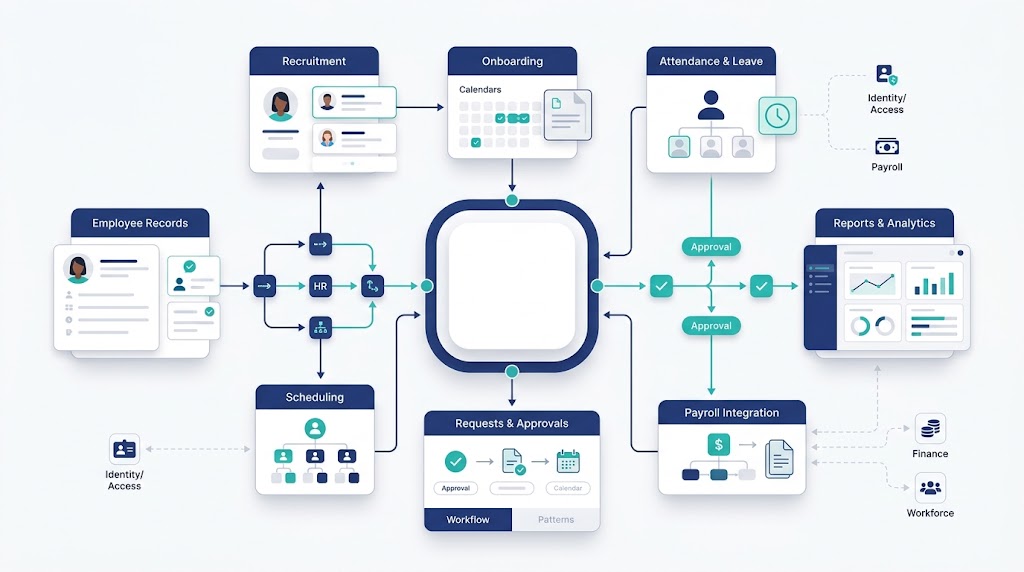
Choosing the best HR management software by feature count is an expensive mistake. A long checklist cannot prove that payroll works in your country.
It also cannot show whether your data is easy to export.
The right system fits your company size, locations, workflows, integrations, and budget. This guide compares seven platforms across those factors.
It also explains pricing limits, implementation risks, and useful demo tests.
There is no universal winner. A startup, an international contractor team, and a multinational enterprise need different systems.
How we compared the best HR software
We reviewed official product and pricing pages on September 7, 2026. We did not conduct hands-on product testing.
Prices and features can change, so confirm your final quote before signing.
Publisher disclosure: the company publishing this guide sells the first platform listed. We applied the same criteria to every option.
Our shortlist considered five buyer questions:
- Which company size, workforce, and locations does the system suit?
- Which core HR tasks does each plan cover?
- Is pricing public, modular, or quote-based?
- What limits could increase cost or implementation work?
- Can buyers verify integrations, permissions, support, and data exports?
Use this list to build a shortlist. Test every finalist with your own workflows before deciding.
Best HR management software at a glance
The prices below reflect public information available on the fact-check date. “Custom quote” means the vendor does not publish a complete list price.
| Software | Best fit | Main strength | Public pricing position | Important check |
| OryxBlue | Startups and growing SMBs | Connected recruitment, employee records, attendance, leave, and payroll operations | Free forever for up to 8 users; paid tiers available | Confirm payroll tax and country coverage |
| Zoho People | Cost-conscious teams using Zoho products | Configurable core HR, time, leave, performance, and learning | Free for up to 5 users; regional paid pricing | Several functions require higher plans |
| BambooHR | Growing organizations wanting approachable core HR | Employee records, hiring, onboarding, reporting, and employee experience | From $10 per employee monthly above 25 employees | Payroll and benefits add-ons are US-only |
| Rippling | Teams connecting HR, IT, and finance | Shared employee data, workflows, app access, devices, and payroll | Custom quote; limited entry offer has separate base fee | Core platform and selected apps affect total cost |
| Deel | International employees and contractors | HR records, global payroll, EOR, contractor, and compliance services | HR Core from $5 per employee monthly | Coverage and price vary by service and country |
| HiBob | Scaling, multi-country midsize teams | Multi-entity HR, workflows, analytics, talent, and compensation | Custom modular price per employee | Payroll and several talent tools are separate modules |
| Workday | Complex midsize and enterprise organizations | HCM, talent, planning, analytics, finance, and payroll connections | Custom quote | Native payroll coverage is country-specific |
Seven HR management systems compared
1. OryxBlue: best for connected HR and recruitment
This cloud platform suits startups and SMBs replacing separate recruitment and employee files. It connects hiring, onboarding, records, attendance, leave, payroll operations, permissions, and reports.
Its free plan supports eight users and includes 10 GB of storage. Paid plans support larger teams and added workflows.
Review the product documentation before assuming country-specific tax filing or employer-of-record services are included.
2. Zoho People: best for affordable customization
Zoho People suits teams that want configurable HR processes within the Zoho ecosystem. Its modules cover records, leave, attendance, shifts, timesheets, onboarding, performance, learning, automation, and mobile access.
The free edition supports five users. However, it excludes onboarding, attendance, and performance management.
Paid amounts vary by region, and larger organizations may need a quote.
3. BambooHR: best for approachable core HR
BambooHR fits growing organizations that value a clear interface and established core HR tools. It covers employee records, hiring, onboarding, reporting, time, performance, and employee experience.
Published pricing starts at $10 per employee monthly for organizations above 25 employees. Smaller teams pay a flat rate starting at $250 monthly.
Payroll and benefits administration add-ons cover US employees only.
4. Rippling: best for HR, IT, and finance automation
Rippling suits businesses that want employee changes to trigger actions across several departments. One data model connects HR, payroll, finance, software access, devices, permissions, workflows, and analytics.
The general pricing page requires a quote. A small-business offer starts at $8 per user monthly, plus a $40 base fee.
That figure does not represent the complete platform. Buyers need the core platform and selected apps.
5. Deel: best for international workforce management
Deel fits distributed teams managing employees, contractors, payroll, or employer-of-record services. It combines global HR records with hiring, payroll, compliance, benefits, recruiting, and IT options.
HR Core starts at $5 per employee monthly. Global payroll starts at $29, while EOR starts at $599.
Full HR pricing is custom. Confirm country coverage because each service has different availability and requirements.
6. HiBob: best for scaling multinational teams
HiBob suits midsize companies managing multiple entities, locations, and local policies. Its platform covers core HR, workflows, people analytics, talent, compensation, planning, learning, and time.
Pricing is custom and modular, with the core platform required. Hiring, payroll, compensation, learning, and other tools are separate modules.
Native payroll is listed for the US and UK. Other locations may need integrations.
7. Workday: best for complex enterprise HCM
Workday HCM suits midsize and large organizations with complex planning, talent, analytics, finance, and payroll needs. Its breadth can support detailed structures and international operations.
Workday does not publish an HCM list price. Buyers must contact its sales team.
Native payroll is country-specific, with partners supporting other markets. Smaller teams should weigh that depth against cost and implementation work.
HRIS vs HRMS vs HCM: which system do you need?
These labels often overlap because vendors define them differently. Focus on the work each product can complete.
- HRIS: Usually centers on employee records, documents, reporting, and basic administration.
- HRMS: Often adds operational modules such as recruitment, leave, time, payroll, and workflows.
- HCM: Usually includes wider talent, compensation, workforce planning, learning, and analytics functions.
Choose the smallest category that covers your current needs and expected growth. Extra modules create cost and setup work when nobody uses them.
How to choose HR management software
1. Define the workflows causing problems
List the processes that create delays, duplicate records, or missed approvals. Connect each problem to a measurable outcome using this HR software benefits guide.
2. Separate required features from optional modules
Mark every feature as required, useful, or unnecessary. Ask which pricing plan contains each required function.
This exposes module gating before contract talks begin.
3. Check workforce and country coverage
Document every worker type, legal entity, and operating country. Verify payroll, tax, benefits, language, currency, and data-hosting conditions for each location.
4. Calculate the total cost of ownership
Include subscription fees, base charges, setup, migration, integrations, training, support, and add-ons. Ask how renewal increases and minimum contracts affect later years.
5. Inspect integrations, access, and data portability
Check role-based permissions, audit history, API access, and existing integrations. Request a sample export containing employees, documents, leave, attendance, and historical records.
6. Run a workflow-fit demo
Give every vendor the same tasks. Test a new hire, leave approval, payroll change, manager transfer, and employee departure.
Include one exception that needs human review.
7. Plan implementation and adoption
Name the owner for data cleaning, configuration, testing, training, and support. Smaller employers can use this small-business HR guide to clarify responsibilities.
Score each finalist from one to five. Multiply each score by its weight, then divide the total by 100.
| Evaluation area | Weight | Evidence to request | Score (1 to 5) |
| Workflow fit | 25% | Live completion of five real employee workflows | |
| Company and workforce fit | 15% | Examples serving similar sizes, worker types, and locations | |
| Country and payroll coverage | 15% | Written coverage for every country and worker type | |
| Integrations and data control | 15% | Working data exchange plus a complete sample export | |
| Security and permissions | 10% | Role tests, audit history, encryption, and incident process | |
| Total ownership cost | 10% | Quote covering setup, modules, support, and renewals | |
| Implementation and support | 10% | Named owners, timeline, training, and escalation routes |
Set non-negotiable requirements before scoring. Reject any vendor that fails required payroll, security, or data-export tests.
Common HR software buying mistakes
- Feature-count trap. More modules can mean more cost, setup, and unused screens.
- Headline-price trap. Entry prices may exclude base fees, payroll, support, or required modules.
- Coverage assumption. A global platform may not offer every service in every country.
- Demo theatre. A polished vendor script does not prove your approval rules will work.
- Data lock-in. Buyers often test imports but forget to test a complete export.
- Security shortcuts. A broad security claim cannot replace permission and audit-log testing.
- Owner gap. Migration problems grow when nobody owns data cleaning or failed integrations.
Before signing, record every promise inside the contract, order form, or service schedule. Sales-call statements are harder to enforce later.
Frequently asked questions
What is HR management software?
HR management software centralizes employee data and related processes. Common functions include recruitment, onboarding, records, leave, time, payroll connections, performance, and reporting.
How much does HR software cost?
Pricing may be flat, modular, per user, or per employee. Calculate setup, migration, integrations, support, and add-ons alongside the subscription price.
Does HR management software include payroll?
Some systems include payroll, while others connect with separate providers. Coverage may differ by country, worker type, and selected plan.
Confirm tax filing responsibilities directly.
What is the difference between HRIS, HRMS, and HCM?
HRIS usually focuses on core records. HRMS often adds daily HR operations.
HCM generally covers wider talent and workforce planning, although vendor definitions overlap.
What is the best HR software for a growing business?
The best choice covers today’s required workflows without blocking future growth. Compare user limits, added modules, integrations, data exports, country coverage, and implementation support.
Choose software that fits your real workflows
A credible shortlist starts with business needs, not vendor rankings. Compare full costs, test difficult workflows, and verify every important promise in writing.