
HR management for small business: a practical operating guide
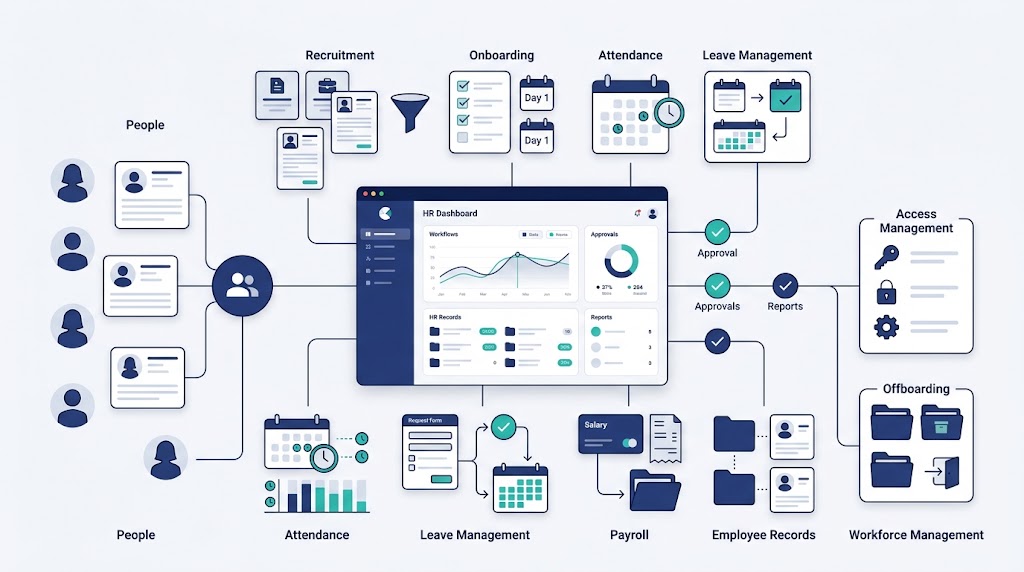
HR management for small business organizes people decisions, workforce records, responsibilities, and recurring employee work. It creates dependable structure without needless administration.
A small company can keep the system lean. Lean does not mean informal.
The business still needs clear owners, controlled records, repeatable processes, approval routes, and regular checks. These parts connect with wider Human Resource Management.
This guide provides an operating framework. It does not replace legal, tax, payroll, benefits, or other qualified advice.
What human resource management means for a small business
Human resource management for small business covers how the company plans, hires, supports, pays, develops, and separates employees. It also assigns responsibility for each decision.
Owners asking how to manage HR in a small business often begin with scattered tasks. The better starting point is one operating system.
That system should answer six questions:
- Which employee event or business need starts the work?
- Who owns the next action?
- Who approves the final decision?
- Which record supports the action?
- What proves that the work is complete?
- Which change requires another review?
A small-business system differs in scale, not in the need for control. Fewer employees can still create important decisions and sensitive records.
| Topic | Small-business approach | Boundary |
| Ownership | One accountable HR owner with distributed manager duties | The HR owner should not inherit every people decision |
| Records | One recognized workforce record with controlled access | Inboxes and manager memory should not become competing sources |
| Policies | Short guidance for frequent or important decisions | Every policy needs an owner, approval, and review trigger |
| Processes | Repeatable steps for material employee events | Each process needs a trigger, owner, approval, record, and completion check |
| Expertise | Internal ownership with outside help when needed | A provider does not replace business accountability |
| Technology | Tools selected after workflow and data needs are clear | Software should not define policies or employment decisions |
Importance of HRM explains the wider business value. This page shows how a small company can organize the work.
The minimum viable HR operating system
A minimum viable HR system is an operational starting point. It is not a universal legal minimum.
The system has six connected parts:
| Component | Minimum operating requirement | Control question |
| Ownership | One accountable owner and named process owners | Who answers when work is late or unclear? |
| Workforce records | One approved source for employee and role information | Who may view, change, approve, and verify each record? |
| Decision rules | Written guidance for recurring workplace choices | Which cases need review or an exception? |
| Workflows | Repeatable steps for important employee events | What starts, approves, completes, and closes the work? |
| HR calendar | Recurring and event-driven duties in one schedule | Which task, owner, backup, input, and due point are recorded? |
| Review controls | Checks for missing, late, conflicting, or open work | Which evidence supports closure or correction? |
Objectives of HRM can help define the desired workforce results. The operating system turns those results into owned work.
Keep the structure proportional
Do not copy a large-company model without testing it. Start with the risks, decisions, records, and events present in your business.
Add more structure when complexity rises. Do not wait for a fixed employee number before correcting a known control gap.
Keep one recognized source for each record
Different tools may support different tasks. The business should still name the approved source for every important field.
For example, define which record controls the employee’s manager, status, schedule, and approved change date. Connected tools should follow that source.
Keep pending requests separate from approved changes
A requested role, schedule, pay, or status change is not yet a confirmed fact. Records should show the current state and pending decision.
Update connected records only after the correct approval. Record the effective date and completion owner.
How to manage HR without a full HR team
Small-business HR works best with one accountable owner and shared execution. Managers must still lead their teams.
Functions of Human Resource Management describes the recurring work areas. A small company can combine roles while keeping responsibilities visible.
| Role | Core responsibility | Work that should remain visible |
| Business owner or leader | Sets priorities, budgets, authority limits, and major decisions | Exceptions, investment choices, and business risk |
| HR owner or administrator | Coordinates processes, records, guidance, handoffs, and reviews | Missing tasks, data issues, approvals, and follow-up |
| Line manager | Plans work, selects people, manages schedules, and gives feedback | Role needs, employee support, evidence, and daily decisions |
| Employee | Maintains accurate information and completes required actions | Requests, time records, updates, and agreed follow-up |
| Finance or payroll owner | Processes approved payroll inputs and reviews outcomes | Cutoffs, exceptions, corrections, and final confirmation |
| Operations or technology owner | Manages workplace access, systems, equipment, and assets | Provisioning, changes, recovery, and removal |
| External provider or adviser | Supports defined specialist work | Scope, advice, deliverables, open issues, and handback |
One person may fill several roles. The requester, reviewer, approver, executor, and verifier should still remain clear.
Use a decision-rights matrix
Decision rights show who recommends, reviews, approves, executes, and verifies an action. They also show authority limits and exception routes.
| Decision | Recommender | Final approver | Executor and record owner | Completion verifier |
| Create or replace a role | Manager explains the need and duties | Authorized business decision owner | HR owner records and routes the request | Finance confirms approved budget status |
| Select a candidate | Interview team and hiring manager assess defined criteria | Authorized hiring decision owner | HR owner records the decision and next action | Hiring manager confirms the selected role details |
| Change pay-related information | Manager submits the reason and required details | Authorized compensation decision owner | HR owner records the approved change | Finance or payroll verifies the input and effective date |
| Approve routine leave | Employee requests and manager checks coverage | Authorized manager under company rules | HR owner records the decision and linked change | Schedule or payroll owner verifies affected inputs |
| Address performance concerns | Manager records evidence and recommends action | Authorized decision owner under company rules | Manager acts and HR maintains restricted records | Named reviewer checks follow-up and closure |
| Process a departure | Manager or authorized leader provides the required information | Authorized employment decision owner | HR owner coordinates records and handoffs | Named owners verify payroll, access, assets, and work transfer |
The first HR hire should not become the administrative owner of every employee issue. Managers still own expectations, feedback, schedules, and team communication.
Essential employee records and access controls
A reliable workforce record supports daily decisions and employee events. It also reduces conflicting information across files and messages.
| Record area | Useful information | Linked action |
| Employee profile | Identity, contact details, status, manager, department, and location | Communication, reporting, and employee changes |
| Role and work details | Responsibilities, schedule, work arrangement, and reporting line | Planning, recruitment, onboarding, and performance |
| Recruitment and hiring | Role approval, candidate stages, selection decision, and accepted details | Employee creation and pre-start handoffs |
| Onboarding | Records, guidance, access, equipment, training, and manager tasks | Readiness and early follow-up |
| Time and availability | Schedule, attendance, time records, leave, and approved changes | Coverage and payroll inputs |
| Employee changes | Request, reason, approval, effective date, and connected updates | Manager, department, access, schedule, and payroll records |
| Performance and learning | Expectations, evidence, feedback, actions, skills, and review points | Manager support and capability decisions |
| Assets and access | Assigned equipment, accounts, permissions, and return status | Provisioning, role changes, and offboarding |
| Departure | Decision details, work handover, final inputs, access, assets, and status | Closure and record updates |
Each record category needs a named owner. It also needs defined viewing, editing, approval, and verification rights.
Use only workforce data needed for a defined purpose. Limit sensitive information to authorized people with assigned duties.
Apply one record-control standard
Each important record should show:
- Record owner and approved source.
- Current status and effective date.
- Last update and responsible editor.
- Approver and decision date.
- Pending action and accountable owner.
- Related evidence or document.
- Completion or verification status.
- Access and sharing limits.
Do not guess how long a record should remain. Verify applicable requirements and document the approved retention rule.
Review access after role, manager, provider, or employment changes. Protect downloaded reports and exported files as well.
Core HR processes for small business
The following HR processes for small business cover frequent employee events and operating handoffs. Each process should use one consistent workflow card.
The reusable card contains nine fields:
- Trigger
- Accountable owner
- Required inputs
- Process steps
- Decision or approval
- Employee communication
- Record updates
- Completion check
- Review measure or trigger
This card extends the wider Human Resource Management Process. It gives managers enough structure without unnecessary layers.
Workforce planning and role requests
Begin with required work, capability, timing, location, and available capacity. Do not begin with a preferred job title.
Human Resource Planning explains demand, supply, gaps, scenarios, and workforce actions. A small-business role request should record the need and approval.
The completed request should include duties, manager, work location, schedule, timing, selection criteria, budget status, and recruitment owner.
Recruitment and hiring records
Use the same core selection criteria for candidates in the same role. Record interview ownership, candidate status, decision evidence, approval, and next action.
An accepted offer should trigger linked tasks. Create the employee record, confirm reporting details, and prepare payroll, access, equipment, and onboarding handoffs.
Onboarding and role readiness
Onboarding should connect company guidance with practical job readiness. Paperwork alone does not confirm that an employee can start assigned work.
Separate the checklist into three parts:
- Company readiness: required records, contacts, guidance, and employee information.
- Operational readiness: schedule, location, access, equipment, and assigned tools.
- Role readiness: duties, training, work standards, support, and early priorities.
The manager owns role readiness. HR coordinates shared records and handoffs.
Scheduling, attendance, leave, and payroll inputs
Scheduling connects workforce plans with daily work. Managers need current availability, coverage, shifts, leave, attendance exceptions, and approved changes.
An approved leave request should update the schedule. The record remains incomplete when coverage still assumes the employee is available.
Use a controlled payroll-input sequence:
- Gather approved time and attendance.
- Confirm approved leave and schedule changes.
- Record employee changes and effective dates.
- Resolve missing or conflicting entries.
- Obtain the required approval.
- Send confirmed inputs to the payroll owner.
- Record completion or returned issues.
HR can control input quality without replacing payroll processing. The business must verify applicable payroll and time requirements separately.
Performance, feedback, and learning
Small-business performance management can stay simple without becoming vague. Employees need clear results, priorities, quality standards, support, and review points.
Managers should record important evidence, agreed actions, owners, and follow-up. HR can support consistency and sensitive cases.
Learning should connect with required work. Course completion does not confirm that an employee can apply a skill.
Employee changes and requests
One employee change can affect several records. A department change may alter the manager, schedule, permissions, reports, and payroll inputs.
The change workflow should identify every connected update. It should also record approval, effective date, communication, and completion verification.
Give employees one recognized request route. Each request should show status, owner, decision, reason where appropriate, and resulting record changes.
Employee concerns and issue handling
Employees need a known reporting route and a second route outside their direct manager. Explain who receives a concern and how follow-up works.
Restrict sensitive information to responsible people. Use qualified support when independence or specialist knowledge is needed.
A basic issue workflow can follow eight steps:
- Record the concern through an approved channel.
- Check whether immediate action is needed.
- Assign a responsible reviewer.
- Gather relevant information.
- Record the decision and approved action.
- Complete the agreed follow-up.
- Communicate with the appropriate people.
- Close the record after required actions finish.
Do not promise complete confidentiality. Explain that information remains limited to people handling the matter.
Offboarding, access, assets, and handovers
Offboarding joins people, operational, and information handoffs. It should not depend on one manager’s memory.
The checklist should cover departure details, employee status, work transfer, customer ownership, final inputs, access, assets, and open issues.
The Employee Lifecycle explains the full journey. Small-business offboarding should end with verified closure across every affected record.
HR calendar for recurring and event-driven work
An HR calendar combines recurring duties with employee-event deadlines. The business should choose a cadence that matches its operating rhythm.
Each calendar entry needs an owner, backup, required input, due point, completion evidence, and escalation route.
| Event or task | Trigger or cadence | Owner | Backup | Required input | Due point | Completion evidence | Escalation route |
| Hiring | Approved role request | Hiring owner | Named backup | Role brief, criteria, approval, and budget status | Before recruitment advances | Recorded stages, decision, and next action | Authorized hiring decision owner |
| Onboarding | Accepted offer and confirmed start | HR owner | Named administrator | Employee, role, manager, access, equipment, and schedule details | Before each owned task is needed | Company, operational, and role-readiness checks | Hiring manager or business owner |
| Schedule publication | Chosen scheduling cycle | Line manager | Backup manager | Demand, availability, leave, skills, and coverage needs | Before the affected work period | Approved and communicated schedule | Operations leader |
| Payroll-input review | Chosen payroll cycle | Payroll-input owner | Named finance or HR backup | Time, attendance, leave, and approved employee changes | Before confirmed inputs enter processing | Approval and reconciliation record | Finance or payroll decision owner |
| Employee change | Approved change and effective date | HR owner | Named administrator | Request, approval, affected records, and communication plan | Before or at the approved effective point | Every connected record verified | Authorized change approver |
| Access review | Role, status, manager, or provider change | Technology or access owner | Named operations backup | Approved employee change and current access list | At the related change and chosen review point | Updated permissions and exception record | Business or security owner |
| Policy review | Chosen cadence or material business change | Policy owner | Named leadership backup | Current policy, applicable guidance, issues, and exceptions | Before revised guidance enters use | Approval, effective date, and review trigger | Qualified adviser or business owner |
| Departure | Confirmed departure event | HR owner | Named administrator | Decision, dates, handover, access, assets, and final inputs | At each approved handoff point | Closure across every affected owner | Authorized leader |
The small-business HR control board
The control board turns recurring HR work into a copy-ready operating register. Use one row for each material process or employee event.
| Process or event | Trigger | Owner | Backup | Approver | Source record | Required handoff | Completion evidence | Access limit | Review trigger |
| New role request | Approved workload or capability need | Hiring manager | Named manager | Business owner | Role request | HR and finance | Approved role and assigned recruiter | Decision roles only | Scope, timing, or budget changes |
| New employee | Accepted offer | HR owner | Named administrator | Hiring manager | Employee record | Payroll, manager, access, and equipment | Pre-start and role-readiness tasks verified | Assigned process owners | Start details or role changes |
| Leave request | Employee request | Line manager | Backup manager | Defined authority | Request record | Schedule and payroll inputs | Decision recorded and schedule updated | Employee and assigned reviewers | Coverage or date changes |
| Employee change | Approved role or work change | HR owner | Named administrator | Defined authority | Change request | Manager, payroll, access, assets, and reports | Every connected record updated | Assigned owners only | Effective date or scope changes |
| Departure | Confirmed departure event | HR owner | Named administrator | Authorized leader | Departure record | Manager, payroll, access, assets, and records | Handoffs and closure checks completed | Restricted roles | Date, risk, or open-work changes |
Use the board in five steps:
- List every recurring HR process and major employee event.
- Name one owner, one backup, and the required approver.
- Identify the recognized record and connected handoffs.
- Define what proves completion and who can access it.
- Add the condition that forces another review.
Keep incomplete work visible. An open exception should have an owner, next action, and review point.
Policies, procedures, and manager guidance
A policy states the rule or expected outcome. A procedure explains the steps, while a form captures required information.
Small businesses should focus first on frequent or important decisions. Possible topics include schedules, attendance, leave, conduct, concerns, access, expenses, performance, and employee changes.
Each policy should state:
- Purpose and covered workforce group.
- Policy owner and approval authority.
- Expected employee and manager actions.
- Request, exception, or escalation route.
- Required record and access rule.
- Effective date and review trigger.
Do not copy another company’s policy without checking fit. Verify current requirements for your locations, operations, and workforce arrangements.
Manager guidance should explain authority limits and exception routes. It should also provide reusable forms for common decisions.
Compliance ownership without false confidence
Small-business HR needs assigned rule checks. A policy, provider, or software platform cannot decide every applicable requirement.
Requirements can differ by location, operation, workforce arrangement, and decision. Verify current federal, state, and local rules with official guidance or qualified advisers.
Record each important verification:
| Verification field | What to record |
| Process or decision | The policy, workflow, configuration, or change under review |
| Covered location | Where affected employees work |
| Workforce group | Which roles or arrangements are included |
| Source or adviser | Who confirmed the requirement |
| Date checked | When the guidance was verified |
| Accountable owner | Who owns the resulting action |
| Evidence | Guidance, advice, approval, or configuration record |
| Review trigger | Which change requires another check |
Repeat the check after material location, workforce, provider, policy, or operating changes. Also use a recurring review schedule chosen by the business.
Do not treat a completed checklist as legal assurance. The control proves that the business assigned and recorded a review.
When small-business HR needs stronger structure
Growth in complexity matters more than one fixed headcount threshold. Use visible operating problems as action triggers.
| Growth trigger | What it may signal | Practical response |
| The owner approves every routine request | Decision rights are too narrow | Delegate routine authority and define exception limits |
| Managers give different answers | Guidance or manager support is weak | Standardize criteria, workflows, and exception routes |
| Hiring becomes hard to coordinate | Ownership and handoffs are unclear | Create role requests, candidate stages, and onboarding triggers |
| Records spread across files and inboxes | No recognized workforce source exists | Assign record ownership and controlled access |
| Payroll corrections repeat | Inputs, cutoffs, or approvals need control | Reconcile sources and verify connected changes |
| Onboarding relies on memory | Tasks lack owners and completion evidence | Use shared checklists with due points and backup owners |
| New sites, shifts, or work arrangements appear | More rules and handoffs may apply | Recheck requirements, ownership, coverage, and records |
| Employee questions remain open | Intake and follow-up are weak | Create request routes, status visibility, and escalation |
| Access remains after changes or departures | Employee events are not connected | Link status changes with access and asset review |
| Basic reports remain unreliable | Definitions or records are inconsistent | Standardize source fields and verification rules |
Strategic Human Resource Management helps leaders choose longer-term workforce priorities. Small-business structure should support those priorities without adding empty programs.
Priorities for the first HR hire
A first HR hire should establish control before expanding programs. Use this rollout sequence:
- Assign process ownership, backups, authority, and exception routes.
- Stabilize workforce records and access rules.
- Map hiring, onboarding, time, leave, payroll-input, change, and departure workflows.
- Standardize approvals, handoffs, effective dates, and completion checks.
- Build the HR calendar with due points and escalation routes.
- Give managers approved criteria, guidance, and reusable templates.
- Resolve recurring exceptions and conflicting records.
- Add reports, automation, or programs after core controls work.
Small-business HR examples by operating context
The same control model works across industries. Each business should adapt the drivers, owners, records, and handoffs.
Manufacturing example
A new production requirement changes role and skill needs. Managers compare the work with current shifts, skills, assignments, and availability.
The response may combine reassignment, development, scheduling, recruitment, or process changes. Each action receives an owner and review trigger.
Packaging and textile example
An order change affects production, quality, packing, and dispatch. The business reviews capability and coverage across every connected department.
Approved staffing or schedule changes update attendance, payroll inputs, responsibilities, and employee communication together.
Software and SaaS example
A product commitment creates a capability gap. Leaders compare development, internal movement, recruitment, work sequencing, and approved external support.
A team change should update the manager, role, permissions, project ownership, equipment, and performance expectations.
Service-business example
Customer bookings change coverage needs by time or location. Managers match schedules and skills with confirmed demand and employee availability.
An approved leave request should trigger customer reassignment, schedule updates, and notification to responsible teams.
Measures for a lean HR system
Small-business measures should guide a named decision. More reports do not repair unclear ownership or unreliable records.
| Measure area | What it helps review | Interpretation warning |
| Record completeness | Whether required workforce fields and documents are present | Complete fields may still contain old information |
| Process completion | Whether required actions and handoffs closed | Completion does not prove the decision was correct |
| Open exceptions | Which missing, late, or conflicting items need action | A low count may hide unreported issues |
| Decision time | Where requests or approvals remain blocked | Speed should not replace suitable review |
| Correction patterns | Which records or handoffs cause repeated rework | Treat causes rather than isolated errors |
| Onboarding readiness | Whether company, operational, and role tasks finished | Checklist completion does not prove job capability |
| Employee-change alignment | Whether connected records match an approved change | Matching fields require a confirmed source |
| Access closure | Whether permissions and assets reflect current status | System closure should follow approved business timing |
People Analytics explains deeper metric design. Keep each measure connected with an owner, threshold, and management action.
How OryxBlue supports HR management for small business
OryxBlue is presented as a multi-tenant HR and workforce platform. It can help organize workforce information and routine HR workflows.
| Small-business need | OryxBlue support | Business-owned decision |
| Recruitment visibility | Recruitment records, funnel stages, and reporting | Role need, selection criteria, approvals, and hiring decisions |
| Employee information | Profiles, records, departments, locations, and lifecycle status | Required fields, accuracy rules, and employment status decisions |
| Roles and access | Role assignments, permissions, and access visibility | Authority, access policy, exceptions, and final approvals |
| Daily workforce coordination | Shifts, schedules, assignments, attendance, and leave records | Coverage rules, schedules, leave decisions, and corrections |
| Internal requests | Requests and role-based approvals | Policy rules, decision rights, approval limits, and exceptions |
| Payroll oversight | Payroll visibility and related reports | Compensation, payroll inputs, checks, corrections, and final decisions |
| Management reporting | Dashboards, headcount views, and workforce reports | Definitions, measures, review timing, and resulting action |
| Resource tracking | Asset and access visibility where configured | Ownership rules, assignment, recovery, and removal timing |
OryxBlue can support administration, visibility, and recorded handoffs. It does not make employment or payroll decisions for the business.
Employers remain responsible for policies, rule checks, schedules, pay decisions, hiring, performance actions, and departures. Verify current product scope before configuration or selection.
Best HR Software for Small Business will cover selection criteria and comparisons. HR Management Software explains the wider category.
HR Automation covers rules-based routing, reminders, and repeatable tasks. Define ownership and exception handling before automating a workflow.
Common small-business HR failures
Most failures begin when people work has no recognized owner, record, or completion check. These patterns deserve early correction:
- Owner bottleneck. Every routine decision waits for one leader.
- Administrative catch-all. Managers send every team responsibility to HR.
- Verbal approval. Important changes remain in conversations or private messages.
- Copied policy. Another company’s guidance enters use without a fit check.
- Scattered record. Files, inboxes, and spreadsheets hold different employee facts.
- Broad access. People retain workforce information beyond their assigned responsibility.
- Recruitment before approval. Hiring begins without clear duties, timing, reporting, or budget status.
- Paperwork onboarding. A completed form replaces operational and role readiness.
- Disconnected change. One employee update misses payroll, schedule, access, or reporting records.
- Payroll by message. Late or unclear inputs enter processing without structured approval.
- Single reporting route. Employees cannot raise concerns outside their manager.
- Software-first action. Configuration begins before process ownership and decision rules are clear.
Use the control board to correct each failure. Add its owner, source, approval, handoff, completion evidence, and review trigger.
Small-business HR audit checklist
Use this checklist to review the operating system:
- Does every HR process have one accountable owner?
- Do important processes have backup owners?
- Are manager duties and authority limits clear?
- Does each important field have an approved source?
- Are requests separated from approved changes?
- Are employee records current and complete enough for decisions?
- Is sensitive information limited to authorized roles?
- Are access rights reviewed after role or provider changes?
- Do policies have owners, approvals, and review triggers?
- Do managers use approved criteria and forms?
- Does each employee event follow a known workflow?
- Are important decisions and exceptions recorded?
- Do employee changes update every connected record?
- Are schedules, attendance, leave, and payroll inputs reconciled?
- Does onboarding check operational and role readiness?
- Does offboarding cover work, access, assets, and final inputs?
- Can employees report concerns outside their direct manager?
- Are open exceptions visible with owners and next actions?
- Were applicable rules checked using current guidance?
- Does every software workflow have a human decision owner?
- Do measures lead to a defined management action?
- Do material business changes trigger another HR review?
Turn every “no” answer into an owner, corrective action, due point, and verification step.
Frequently asked questions about HR management for small business
Does a small business need HR management?
Yes, the business needs the function even without a dedicated department. Someone must own people decisions, records, processes, and rule checks.
Does a small business need a dedicated HR employee?
There is no universal answer. The business still needs assigned accountability, suitable capability, backups, and access to qualified support.
What are the essential HR processes for a small business?
Start with planning, hiring, onboarding, time, leave, payroll inputs, performance, employee changes, concerns, records, and offboarding.
Who should manage HR in a small company?
Name one accountable HR owner. Distribute daily work among business leaders, managers, employees, finance, operations, and qualified providers.
What employee records should a small business keep?
Keep records needed for approved purposes and applicable requirements. Define ownership, access, approval, update, retention, and deletion rules.
Can a small business outsource HR?
It can outsource defined work or specialist advice. The business should retain an accountable owner and verify provider outputs.
Can HR software make a small business compliant?
No. Software can support records, permissions, workflows, and reports, while the employer verifies rules and owns decisions.
When should a small business add stronger HR structure?
Act when ownership, records, decisions, handoffs, or employee support become unreliable. Use operating triggers instead of one fixed headcount threshold.
What should the first HR hire focus on?
Start with ownership, reliable records, core workflows, manager guidance, open exceptions, and review controls. Stabilize these before expanding programs.
How should a small business choose HR software?
Define workflows, data, roles, approvals, access, integrations, reports, and support needs first. Then compare products against those requirements.
Where to go next
Start with the control board and list every recurring employee event. Assign owners, records, approvals, handoffs, completion evidence, and review triggers.
Fix the highest-risk gaps before adding new programs or software. Keep the system proportional to the business and its operating needs.