
What’s the Best HR Software Available?

The best HR software depends on your team, countries, and daily work, so no single product fits every category.
OryxBlue fits startups that want connected hiring and employee operations. BambooHR focuses on approachable core HR, while Rippling connects HR with IT and finance.
Deel suits international workforces, and Workday serves complex enterprises.
Publisher disclosure: the company publishing this guide sells the first platform listed. We used the same comparison questions for every provider.
Product features and prices can change, so confirm every important detail before signing.
Choose HR software by need, not feature count
A long feature list can hide a poor operational fit. Start with the work your team must complete each week.
Write down your employee count, worker types, locations, and payroll needs. Then list the people who will own the system.
Your shortlist should reflect six facts:
- How many employees and administrators need access
- Which countries, entities, and worker types you support
- Whether payroll must be native, connected, or external
- Which hiring, leave, attendance, and reporting workflows matter
- Which systems must exchange employee data
- How much implementation work your team can manage
Use the HR management guide for small businesses if ownership remains unclear. It can help you assign essential HR tasks before buying software.
Best HR software options at a glance
The following shortlist uses official product information checked on September 7, 2026. It does not reflect hands-on testing or current user ratings.
| Software | Best fit | Main advantage | Important point to verify |
| OryxBlue | Startups and growing SMBs | Hiring, onboarding, records, attendance, leave, and payroll operations | Country-specific payroll and tax coverage |
| Zoho People | Cost-conscious teams using Zoho tools | Configurable HR processes and broad module choice | Which functions require higher plans |
| BambooHR | Growing teams that want clear core HR | Employee records, hiring, onboarding, and reporting | US limits on payroll and benefits add-ons |
| Rippling | Teams connecting HR, IT, and finance | Employee changes can trigger work across departments | Total cost of the core platform and selected apps |
| Deel | Companies managing international workers | Global HR, contractor, payroll, and EOR service options | Availability and cost for each country and service |
| HiBob | Scaling, multi-country midsize companies | Multi-entity HR, workflows, analytics, and talent tools | Separate modules and local payroll options |
| Workday | Complex midsize and enterprise organizations | Broad HCM, talent, planning, finance, and analytics | Country-specific payroll and implementation demands |
This table should start your research, not end it. A vendor becomes suitable only after passing your own workflow tests.
Which HR platform fits your situation?
You need a first HR system for a startup
Choose a system that removes spreadsheets without adding heavy administration. Core needs often include recruitment, employee records, onboarding, leave, attendance, permissions, and basic reports.
The first platform in the table targets this connected startup use case. Zoho People also deserves review when price and configuration matter most.
Check user limits and plan restrictions carefully. A free plan may exclude attendance, onboarding, performance, or payroll functions.
You want simple core HR for a growing team
BambooHR is a common shortlist choice for approachable employee records and hiring workflows. Its broader tools cover onboarding, reporting, time, performance, and employee experience.
Confirm which services work outside the United States. Payroll and benefits availability can narrow the fit for international teams.
Zoho People can suit teams that prefer more configuration. However, added modules may require higher plans and more setup.
You need HR changes to reach IT and finance
Rippling connects employee information with payroll, finance, software access, and devices. This model can reduce handoffs between separate teams.
That breadth also changes the buying process. Request a complete quote covering the core platform, selected applications, setup, and support.
Test one employee change across every connected department. A title or location change should update the correct systems without unwanted access.
You employ people or contractors across countries
Deel combines HR records with international payroll, contractor, and employer-of-record options. These services can support different worker models within one provider relationship.
Do not treat broad global coverage as universal coverage. Verify every country, service, currency, filing duty, and local support route.
HiBob fits a different international operating need for midsize companies. It targets scaling companies with multiple entities, policies, workflows, and talent programs.
You manage complex enterprise requirements
Workday covers HCM, talent, planning, analytics, finance, and payroll connections. Large organizations may value this depth and structural control.
Smaller teams may find the same depth costly to configure and maintain. Compare implementation capacity, data governance, and internal support before shortlisting it.
Decide whether payroll belongs inside your HR system
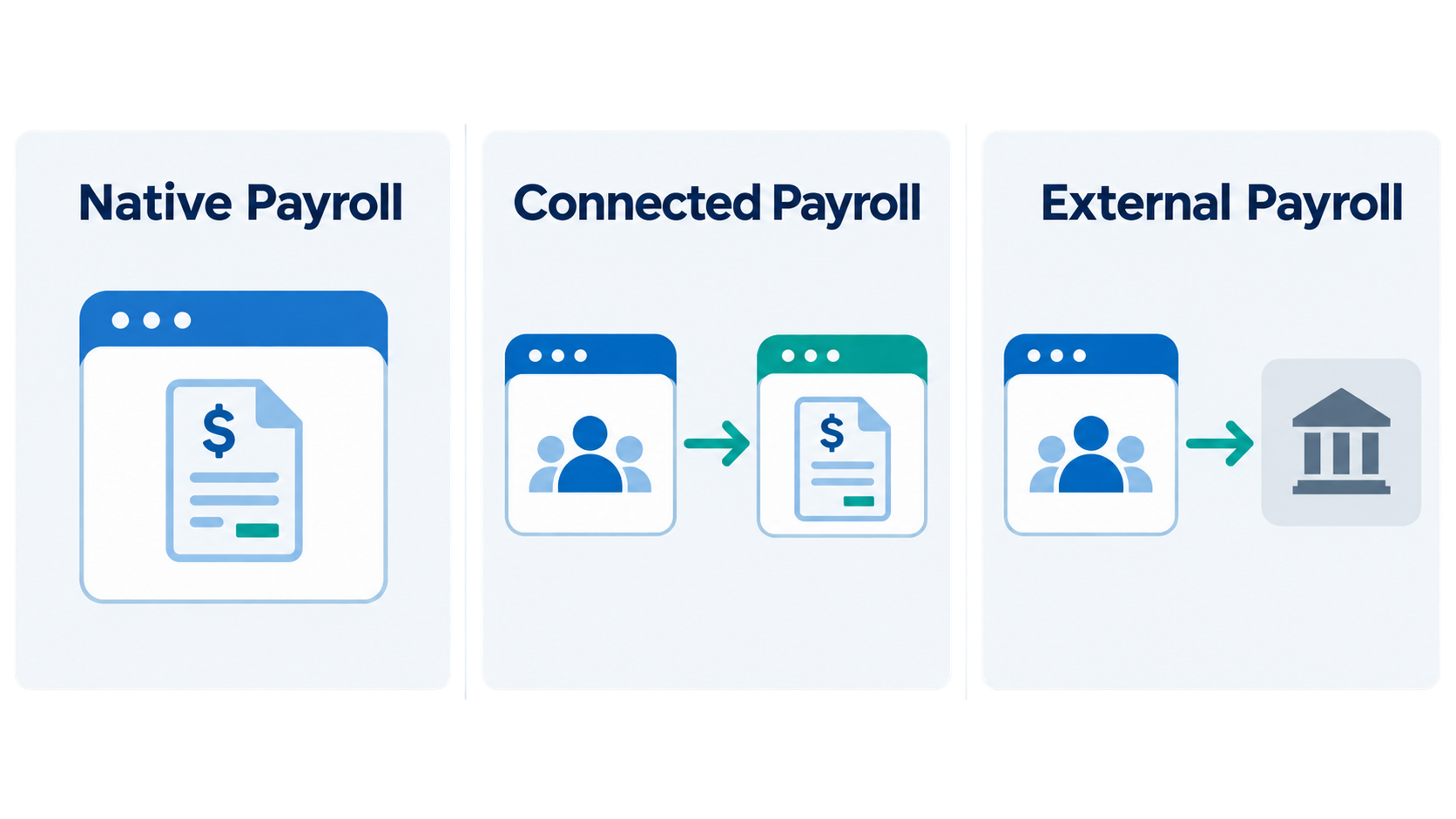
“Includes payroll” can describe three very different arrangements. The platform may process payroll, connect with another provider, or only prepare data.
Ask each vendor to label the model clearly:
- Native payroll: The vendor runs payroll functions within its own platform.
- Connected payroll: Employee data moves to a separate payroll product.
- External payroll: Your team exports files and manages the provider relationship.
Next, confirm exact country, entity, and worker coverage. Employee payroll, contractor payments, and employer-of-record services solve different problems.
Ask who owns tax calculations, filings, corrections, and failed data transfers. Software can support a workflow without accepting legal responsibility.
Read the guide to HR software benefits before setting success measures. Tie each expected benefit to a process you can test.
Compare full HR software costs
Headline prices rarely show the complete cost. Some vendors charge by employee, while others use modules or custom quotes.
Build a cost worksheet with these items:
- Base subscription and minimum monthly charge
- Price per employee, user, entity, or country
- Required core platform and optional modules
- Payroll, benefits, recruiting, or support add-ons
- Data migration, configuration, and training
- Integration or API access charges
- Contract length and renewal terms
- Data export and switching work
Use the same workforce assumptions for every quote. Otherwise, the cheapest headline price may become the most expensive final option.
Request costs for your current team and expected growth. This exposes pricing jumps before they become a budget problem.
Test real work during every product demo
A polished presentation shows the vendor’s preferred path. Your team needs proof that its own rules will work.
Give each finalist the same seven tasks:
- Add a new employee with missing information.
- Move an approved candidate into onboarding.
- Approve leave with a backup manager.
- Change an employee’s salary and location.
- Correct an attendance or employee record.
- Run a report with role-based access.
- Export records, documents, leave, and history.
Include one exception in every task because normal workflows often look easy. Exceptions expose weak ownership and unclear permissions.
Ask a manager and employee to join the test. Administrator convenience does not prove that self-service feels clear.
Use the product documentation to check stated platform boundaries. Written documentation should match the live demonstration and final contract.
Treat user reviews as evidence, not a winner
Review averages cannot identify one universal winner. Review sites use different categories, checks, sample sizes, and collection periods.
A strong score based on few reviews may be less useful. An older review may describe a retired interface or plan.
Look for repeated themes across several recent reviews. Focus on setup, support, reporting, payroll accuracy, permissions, and data export.
Record these details for each review source:
- Rating and total review count
- Date checked and review recency
- Reviewer company size and country
- Product plan or modules used
- Repeated positive and negative themes
- Any disclosed incentive or commercial placement
Review evidence should challenge your shortlist, not replace a demo. Your workflow, workforce, and contract still decide the fit.
Avoid common HR software buying mistakes
Buying more modules than your team can use
Unused tools still create cost, training, and permission work. Buy the smallest workable set, then add proven needs later.
Trusting the starting price
Entry prices may omit required platforms, payroll, support, or implementation. Compare complete quotes using one cost worksheet.
Assuming “global” means every country
Country coverage often changes by service, so verify payroll, tax, benefits, data hosting, and support for every location.
Skipping the data export test
Many buyers test migration into a platform. Fewer test how they will leave it.
Request a complete sample export before purchase. Check whether it includes history, attachments, and audit records.
Letting the vendor control the demo
Vendor scripts can avoid difficult exceptions, so bring your own tasks, data fields, roles, and approval rules.
FAQs
What is the best HR software available for a small business?
The best option fits the team’s size, budget, and administrative capacity. Start with essential records, hiring, leave, attendance, payroll needs, and reporting.
Avoid enterprise depth unless the business can manage its cost and setup.
Which HR software is easiest to set up?
Setup depends on your data, rules, integrations, and modules. A simple interface cannot fix unclear processes or poor employee records.
Ask vendors to configure one real workflow during the demo.
Should HR software include payroll?
It should support your chosen payroll model. Native payroll may reduce handoffs, while connected products can preserve specialist providers.
Confirm country coverage, responsibility, corrections, and reconciliation before deciding.
How many HR software reviews are enough to trust?
No fixed review count proves product quality. Consider sample size, recency, reviewer fit, verification, and repeated themes together.
Use reviews to find questions for your demo.
Can I change HR software later?
Yes, but poor data portability can raise switching costs. Test complete exports, contract terms, and migration support before purchase.
Conclusion
The best HR software available is the one that passes your real tests. Match each platform to your workforce, payroll model, costs, and implementation capacity.
Build a short list, run the same workflows, and verify promises in writing. If connected startup HR fits your needs, review the free OryxBlue plan as one option.