
How Much Does HR Software Cost? A Practical Pricing Guide
If you’re researching how much HR software costs, the short answer is: it depends. HR software can cost anywhere from free to hundreds or thousands of dollars per month, depending on the number of employees, features, pricing model, implementation requirements, and integrations you need.
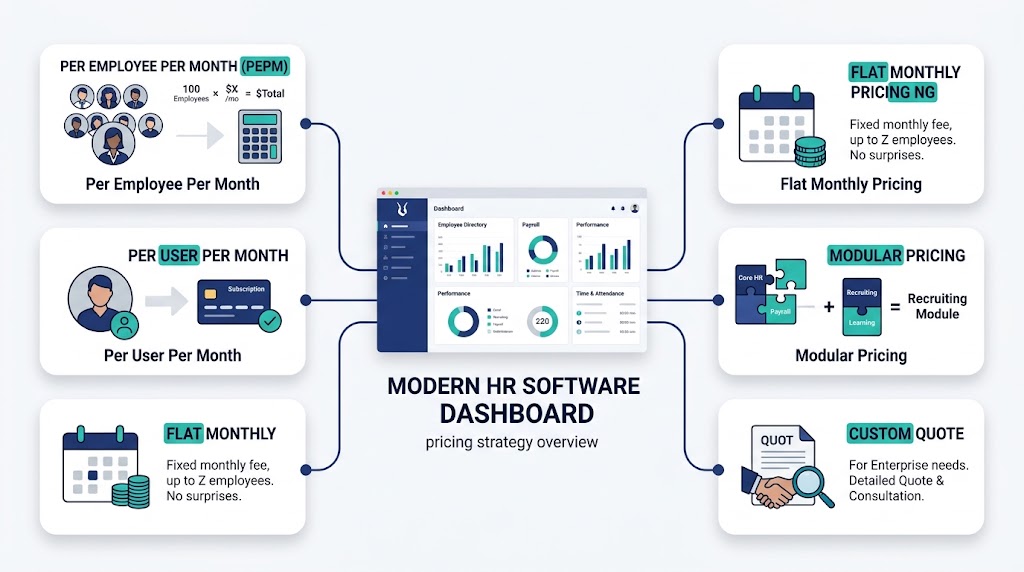
Some HR platforms charge per employee per month, while others use flat monthly pricing, base fees plus per-employee charges, modular pricing, or custom quotes.
The important thing is not to compare the monthly subscription alone. To understand the real cost of HR software, you should also consider implementation, data migration, integrations, training, support, and potential price increases.
This guide explains HR software pricing models, typical costs, hidden fees, and how to calculate the first-year and three-year cost of an HR system.
How Much Does HR Software Cost?
HR software can range from free or low-cost tools to $20+ per employee per month, while larger HR platforms with payroll, workforce management, advanced analytics, integrations, and enterprise features can cost significantly more.
For example, a small company might spend a few hundred dollars per month on a basic HR system, while a growing or large organization may spend thousands per month depending on its workforce size and required modules.
A simple way to think about HR software pricing is:
Total HR software cost = subscription + implementation + integrations + migration + training + support + other fees
This is why two HR platforms with similar advertised prices can have very different total costs.
What Is the Average Cost of HR Software?
There is no single average HR software cost that applies to every business.
A 10-person company and a 1,000-person organization have very different HR requirements. A small company may only need employee records, time tracking, leave management, and basic reporting. A larger organization may require payroll, benefits administration, recruitment, performance management, workforce planning, compliance tools, integrations, and advanced reporting.
The cost should therefore be evaluated against the features and operational value you receive.
Features such as employee self-service, automated workflows, centralized employee records, and reporting can reduce repetitive administrative work and improve HR efficiency. If you want to understand the broader value before comparing prices, see our guide to Benefits of HR Software.
HRIS vs HRMS vs HCM: Does the Type Affect Cost?
Yes. The type of HR system you choose can have a significant effect on pricing.
HRIS
An HRIS (Human Resources Information System) typically focuses on core HR functions such as:
- Employee records
- Employee information
- Time and attendance
- Leave management
- Basic reporting
- Employee self-service
HRIS software is generally suitable for organizations looking for a centralized way to manage essential HR information.
HRMS
An HRMS (Human Resource Management System) usually includes HRIS capabilities plus additional workforce management features.
Depending on the platform, this can include:
- Payroll
- Scheduling
- Performance management
- Recruitment
- Benefits administration
- Workforce analytics
- Employee self-service
- Workflow automation
Because an HRMS normally covers more processes, it can cost more than a basic HRIS.
HCM
Human Capital Management (HCM) platforms typically provide a broader suite designed for larger or more complex organizations.
They may include:
- Core HR
- Payroll
- Recruiting
- Onboarding
- Learning management
- Performance management
- Compensation
- Workforce planning
- Advanced analytics
HCM pricing is often quote-based because enterprise requirements vary considerably.
Common HR Software Pricing Models
Understanding the pricing model is just as important as understanding the advertised price.
1. Per Employee Per Month (PEPM)
With a PEPM model, you pay a fixed amount for each employee every month.
For example:
100 employees × $8 × 12 months = $9,600 per year
This model is easy to understand and scales with your workforce.
2. Per User Per Month
Some providers charge for each user who actively uses the platform.
This can be different from charging for every employee because administrators, managers, contractors, or employees may have different access requirements.
3. Flat Monthly Pricing
Some HR platforms charge a fixed monthly amount regardless of the number of employees within a particular plan or employee range.
This can be attractive for smaller businesses because costs are predictable.
4. Base Fee + PEPM
Some providers combine a fixed monthly platform fee with a per-employee charge.
For example:
$100 monthly base fee + $5 per employee
For 50 employees:
$100 + ($5 × 50) = $350 per month
5. Modular Pricing
With modular pricing, you pay separately for the features you need.
For example, a company might purchase:
- Core HR
- Payroll
- Time tracking
- Recruiting
This can make the software more flexible, but adding modules can increase the total cost quickly.
6. Custom or Quote-Based Pricing
Enterprise HR software frequently uses custom pricing.
The final quote may depend on:
- Employee count
- Locations
- Modules
- Payroll requirements
- Integrations
- Implementation
- Support
- Security requirements
Always ask what is included before comparing a custom quote with a public monthly price.
How Much Does HR Software Cost Per Employee?
The HR software cost per employee depends on the provider and the features included.
A simple calculation is:
Monthly PEPM = Monthly software cost ÷ Number of employees
For example, if your company pays $800 per month for 100 employees:
$800 ÷ 100 = $8 PEPM
However, the advertised PEPM is not always the same as your actual cost per employee.
If you spend another $4,000 on implementation and migration during the first year:
Annual subscription = $9,600
Implementation = $4,000
First-year cost = $13,600
Effective first-year PEPM:
$13,600 ÷ 100 ÷ 12 = $11.33 per employee per month
This is a much more useful number when comparing vendors.
What Factors Affect HR Software Pricing?
Several factors can change the price of an HR system.
Employee Count
Most HR software becomes more expensive as your workforce grows.
However, some providers offer volume discounts or different pricing tiers.
Features and Modules
Basic HR management usually costs less than a platform that includes payroll, recruitment, scheduling, performance management, analytics, and workforce management.
Payroll
Payroll functionality can increase the total cost, especially when multiple countries, tax jurisdictions, or complex payroll rules are involved.
Integrations
Connecting HR software with accounting, payroll, benefits, identity management, recruitment, or other business systems may require additional fees.
Implementation
Some vendors charge separately for implementation and configuration.
Data Migration
Moving employee records from spreadsheets or an existing HR platform can require additional time and professional services.
Support
Basic support may be included, while premium support or dedicated account management can cost extra.
Security and Compliance
Organizations with strict security, compliance, or data requirements may need higher-tier plans or additional services.
Hidden HR Software Costs to Watch For
The subscription price is only part of the total cost.
Before signing a contract, check whether the following are included.
Implementation Costs
Implementation may include:
- Account setup
- System configuration
- Workflow configuration
- User permissions
- Testing
- Launch support
Data Migration Costs
You may need to pay to migrate:
- Employee records
- Historical data
- Documents
- Leave balances
- Payroll information
Integration Costs
Check whether integrations are included or charged separately.
Training Costs
Some providers include onboarding and training, while others charge for training sessions.
Internal Labor
Your own HR and IT teams also spend time:
- Preparing data
- Testing the platform
- Configuring workflows
- Training employees
- Managing the implementation
This internal labor is often ignored when companies calculate HR software costs.
Support Fees
Find out what level of support is included in your subscription and whether premium support costs extra.
Renewal Price Increases
A low introductory price may increase at renewal.
Ask the vendor:
- Is the price fixed?
- How much can it increase?
- Is there a renewal cap?
- Does the per-employee price change as headcount grows?
Data Export and Exit Costs
If you eventually change providers, check whether exporting your employee data costs extra.
How to Calculate First-Year HR Software Cost
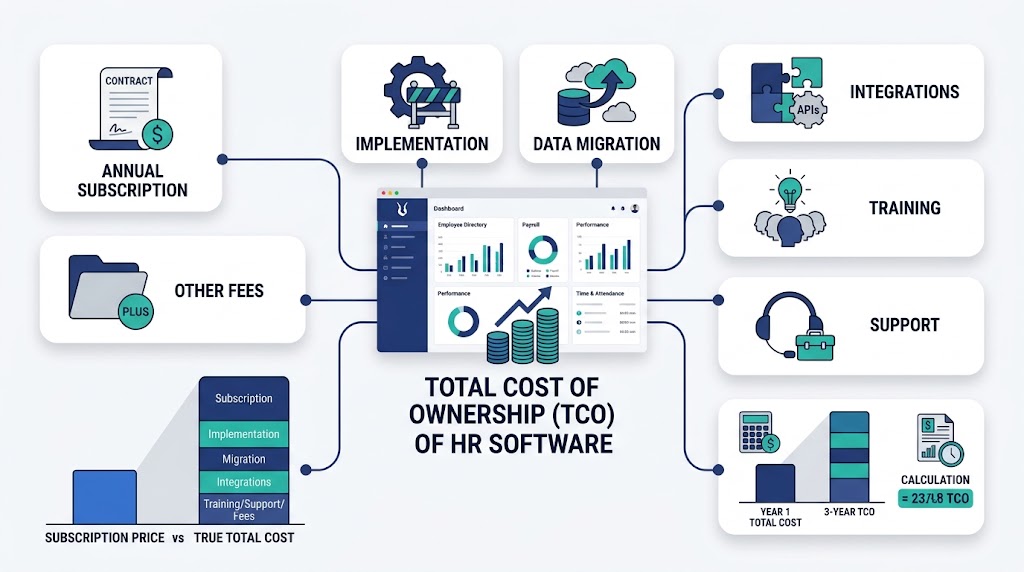
A useful first-year calculation is:
First-year cost = Annual subscription + Implementation + Migration + Integrations + Training + Other fees
For example:
| Cost | Amount |
| Annual subscription | $9,600 |
| Implementation | $2,000 |
| Data migration | $1,000 |
| Training | $500 |
| Integrations | $900 |
| First-year total | $14,000 |
The advertised subscription may have been $9,600, but your actual first-year cost is $14,000.
That difference matters when comparing vendors.
How to Calculate Three-Year HR Software Cost
For a longer-term decision, calculate the three-year total cost of ownership (TCO).
A simple formula is:
3-year TCO = 3 years of subscription + implementation + migration + integrations + training + other costs
For example:
- Annual subscription: $9,600
- Implementation: $2,000
- Migration: $1,000
- Training: $500
- Integrations: $900
Three-year subscription:
$9,600 × 3 = $28,800
Add one-time costs:
$28,800 + $2,000 + $1,000 + $500 + $900 = $33,200
So the three-year TCO is $33,200.
This gives you a better comparison than looking at the monthly subscription alone.
HR Software Cost by Company Size
Pricing varies considerably by provider, but you can use the following framework when budgeting.
Small Businesses
Small businesses may prioritize:
- Employee records
- Time and attendance
- Leave management
- Employee self-service
- Basic reporting
A small company may prefer a low-cost or flat-rate solution with minimal implementation requirements.
Medium-Sized Businesses
Growing businesses often need:
- Payroll
- Scheduling
- Performance management
- Recruitment
- Employee self-service
- Workflow automation
- Integrations
- Advanced reporting
At this stage, scalability becomes increasingly important.
Large Businesses
Large organizations may require:
- Multiple locations
- Complex payroll
- Advanced security
- Custom workflows
- Enterprise integrations
- Workforce analytics
- Dedicated support
- Compliance capabilities
Enterprise pricing is often customized around these requirements.
How Much Does HR Software Cost by Feature?
The more functionality you add, the more the total price can increase.
| HR Feature | Potential Pricing Impact |
| Employee records | Usually included in core HR |
| Employee self-service | Often included |
| Time and attendance | May be an add-on |
| Leave management | Often included or modular |
| Payroll | Frequently additional |
| Recruitment | Often an additional module |
| Performance management | May be an add-on |
| Scheduling | Can increase PEPM |
| Analytics | May require a higher plan |
| Integrations | May involve additional fees |
| Advanced support | May cost extra |
The exact pricing depends on the vendor, plan, employee count, and contract.
Is Free HR Software Really Free?
Some HR software offers free plans or free tiers.
These can be useful for:
- Very small teams
- Testing software
- Basic employee management
- Early-stage businesses
However, free plans often have limitations involving:
- Employee limits
- Features
- Reporting
- Automation
- Integrations
- Support
- Storage
Before choosing a free solution, check whether you will need to upgrade as your organization grows.
Is an Integrated HRMS Cheaper Than Multiple HR Tools?
It can be.
A company using separate tools for HR records, attendance, payroll, recruitment, and employee requests may pay several subscriptions every month.
For example:
| Tool | Monthly Cost |
| HR platform | $300 |
| Payroll tool | $250 |
| Time tracking | $150 |
| Recruitment tool | $200 |
| Total | $900/month |
An integrated HRMS might provide several of these functions in one platform.
However, don’t assume an integrated system is automatically cheaper. Compare the total cost and functionality of both approaches.
How to Compare HR Software Quotes
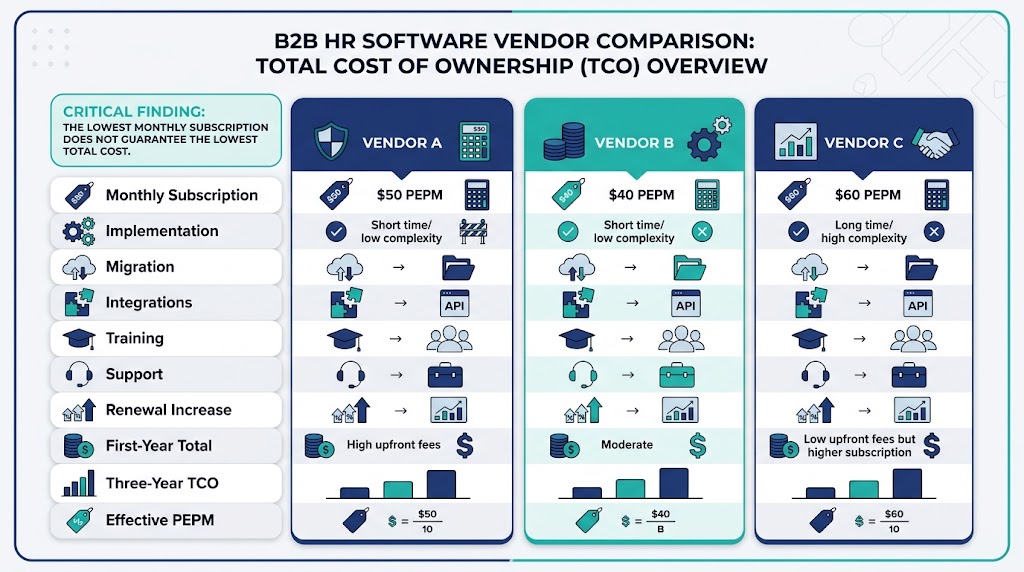
Don’t compare vendors using the advertised monthly price alone.
Compare each provider using the same:
- Employee count
- Required features
- Implementation scope
- Integration requirements
- Support level
- Contract length
- Growth assumptions
You can also compare the best HR software options using the same headcount, feature requirements, implementation scope, and growth assumptions. A static list price is not enough because two platforms with similar starting prices can have very different total costs.
Ask every vendor for a complete pricing breakdown.
A Useful Quote Comparison Table
| Cost | Vendor A | Vendor B | Vendor C |
| Monthly subscription | |||
| Annual subscription | |||
| Implementation | |||
| Migration | |||
| Integrations | |||
| Training | |||
| Support | |||
| Renewal increase | |||
| 1-year total | |||
| 3-year TCO | |||
| Effective PEPM |
This makes hidden differences much easier to identify.
Questions to Ask Before Buying HR Software
Before accepting a quote, ask:
- What is the total monthly subscription?
- Is pricing based on employees or active users?
- Is there a minimum employee count?
- Are implementation fees included?
- Is data migration included?
- Are integrations included?
- Are training and onboarding included?
- What support level is included?
- Can the price increase at renewal?
- Is there a renewal price cap?
- Are there additional payroll fees?
- Are there setup or configuration fees?
- What happens if employee numbers increase?
- Can we export our data if we leave?
- What is the total cost over three years?
HR Software Cost Comparison Checklist
Before choosing a platform, calculate:
- Monthly subscription
- Annual subscription
- Per-employee cost
- Implementation
- Data migration
- Integrations
- Training
- Support
- Additional modules
- Payroll fees
- Renewal increases
- Data export costs
- First-year TCO
- Three-year TCO
- Effective PEPM
How to Choose HR Software Based on Total Cost
The cheapest HR software isn’t always the best option.
Instead, consider the value you receive for the total cost.
A platform that costs slightly more but eliminates several manual processes, provides employee self-service, integrates with payroll, and reduces administrative work may deliver better value than a cheaper system with limited functionality.
Think about:
Cost + functionality + scalability + usability + support = overall value
You should also consider how the platform will perform as your organization grows.
A solution that works for 25 employees may become expensive or difficult to manage at 250 employees if pricing, functionality, or scalability does not fit your future requirements.
Frequently Asked Questions
How much does HR software cost per employee?
HR software can range from a few dollars to $20 or more per employee per month depending on the provider, features, and pricing model. Enterprise systems may use customized pricing.
What is the average cost of HR software?
There is no universal average because HR software pricing varies by employee count, features, modules, implementation requirements, and provider.
Is HR software charged monthly or annually?
Both options are common. Many providers advertise monthly pricing but offer discounts or different rates for annual contracts.
What is the biggest hidden cost of HR software?
Implementation, data migration, integrations, training, and internal employee time are among the most commonly overlooked costs.
Is HR software worth the cost?
For many businesses, HR software can be worthwhile if it reduces manual administrative work, centralizes employee information, improves employee self-service, and automates HR processes.
How can I reduce HR software costs?
Start by identifying the features you actually need, compare multiple vendors, negotiate pricing, review implementation fees, avoid unnecessary modules, and calculate the three-year total cost before signing a contract.
Final Thoughts
The answer to how much HR software costs depends on much more than the monthly subscription price.
Your real cost can include:
- Software subscription
- Per-employee charges
- Implementation
- Data migration
- Integrations
- Training
- Support
- Additional modules
- Renewal increases
The best way to compare HR software is to calculate the first-year cost, three-year TCO, and effective PEPM for each option.
Once you understand the complete cost, you can choose an HR platform that fits your current budget while still providing the functionality and scalability your organization needs.