
HR software for tech companies: selection and rollout guide

HR software for tech companies coordinates workforce records and workflows across changing roles, teams, locations, and digital systems.
The operating design must preserve ownership, effective dates, permissions, and history. It must also expose failed handoffs.
This guide covers requirements, selection, configuration, testing, migration, and rollout. HR for Tech Companies covers the wider people operating model.
Important: This article provides general information, not legal, tax, wage, privacy, security, or procurement advice.
Requirements depend on workforce facts, locations, contracts, and current law. Verify them with primary authorities and qualified advisers.
Source review date: September 2, 2026.
What HR software for tech companies should manage
A tech-focused HR platform should maintain trusted workforce records and coordinate approved people changes.
It may support hiring, onboarding, schedules, attendance, leave, requests, approvals, reporting, and employee lifecycle status.
The platform should connect those workflows without claiming ownership of every result. Payroll, finance, identity, security, and project systems may remain authoritative.
HR Management Software explains the wider category, common uses, and general selection process.
For most tech-company shortlists, require:
- Effective-dated workforce changes
- Distributed-team and location support
- Controlled permissions and approval delegation
- Connections with visible failure and recovery
- Exception handling across lifecycle events
- Security, privacy, and tenant evidence
- Traceable reports and usable exports
Start with workforce events
Static profiles show the present. Tech companies also need reliable records when a person’s situation changes.
Build requirements around events such as:
- A candidate becomes an employee.
- A start date changes after tasks begin.
- An engineer moves between product teams.
- A manager changes during a review cycle.
- A remote employee reports a new work location.
- A contractor becomes an employee.
- Leave overlaps a schedule or team change.
- A promotion changes pay and access needs.
- A reorganization moves several teams together.
- An urgent departure affects privileged systems.
For each event, define the decision owner, effective date, authoritative fields, downstream actions, and final proof.
Treat feature labels as claims to verify
Two products may advertise the same feature and handle exceptions differently.
One system may preserve dated history. Another may overwrite the current employee row.
One approval flow may support delegation and escalation. Another may stop when a manager is absent.
Use HR Software Features for the broad capability list. This page focuses on tech-company proof.
Create ten high-risk workforce events. Use them as the evaluation spine.
Define the buying problem before comparing products
A software request often hides an operating failure. Write the failure before naming a preferred tool.
“We need onboarding software” is a tool request. “New hires start while required tasks remain unconfirmed” defines the problem.
“We need analytics” is another tool request. “Leaders cannot reconcile approved and active headcount” gives a decision problem.
Create a written buying case
Record these items before viewing products:
- Current process failure
- Affected workforce groups
- Business decision or outcome at risk
- Systems and teams involved
- Data, access, pay, or service risk
- Executive decision owner
- Process and data owners
- Available implementation capacity
- Work intentionally outside scope
- Evidence required for approval
- Approved budget route
- Target decision and rollout windows
Avoid invented savings or productivity claims. Use current records to establish any baseline.
Human Resource Planning can help connect system demand with approved workforce plans.
Build a tech-company buying team
People Ops cannot assess the platform alone. The decision crosses employment processes, data, money, access, and daily management.
Include these roles when they own part of the result:
- Executive sponsor
- HR or People Ops process owner
- IT system owner
- Security and privacy reviewers
- Payroll and finance owners
- Recruiting and onboarding owners
- Representative managers
- Employee or accessibility representative
- Procurement and legal reviewers
- Implementation and support owners
Name one final decision owner. A committee can review evidence, but unclear authority delays difficult trade-offs.
Map the people technology stack and data ownership
The HR platform will sit among other systems. Map those boundaries before choosing a suite or several specialist tools.
The surrounding stack may include:
- Applicant tracking
- Core employee records
- Payroll and benefits
- Time, attendance, leave, and scheduling
- Performance and learning
- Identity and access management
- Finance and headcount planning
- IT service management
- Collaboration and communication
- Reporting or data platforms
Do not assume the HR platform should own every field. Assign one approved source for each important data domain.
Define each system of record
A system of record is the approved source for a data field. Other systems may receive or display that value.
Assign an authoritative source for:
- Personal and contact details
- Employment status and worker type
- Legal employer and reported work location
- Department, team, role, and manager
- Compensation inputs and effective dates
- Schedules, recorded time, and leave balances
- Candidate and offer information
- Platform accounts and access status
- Documents, acknowledgments, and approvals
Use this copy-ready ownership record:
- Data domain: Name the related fields.
- Authoritative system: State where approved values originate.
- Permitted editors: Name the roles allowed to change them.
- Approval owner: Name the person accountable for approval.
- Data consumers: List systems receiving the values.
- Effective-date rule: Explain when changes become active.
- Failure owner: Assign reconciliation when data movement fails.
- Correction method: Explain how an error is fixed.
- History retained: State which earlier values remain available.
A sync should not overwrite a newer approved value without a visible rule. Conflicting masters weaken pay, access, approvals, and reporting.
Decide between a suite and specialist tools
A suite may reduce vendor count and repeated administration. Specialist tools may provide deeper support for selected processes.
The decision depends on workflow fit, integration work, internal ownership, exceptions, and control needs.
Product labels do not settle the choice. HRIS vs HRMS vs HCM explains why category boundaries overlap.
Use a people stack event contract
A people stack event contract defines how one workforce change moves across people and technology systems.
It exposes gaps that feature checklists can hide. Create one contract for each high-risk event.
Record the full event
Every contract should include:
- Workforce event and business trigger
- Decision owner and required reviewers
- System where the event begins
- Authoritative fields and source systems
- Previous state and approved future state
- Effective date, time, and time zone
- Downstream systems and responsible owners
- Minimum data sent to each system
- Expected confirmation from each receiver
- Failure signal and escalation route
- Reconciliation owner and manual fallback
- Correction or reversal method
- Evidence retained after completion
Keep the contract readable. A process owner should understand it without studying system documentation.
Work through a future-dated engineering transfer
Assume an engineer moves between product teams next month. The transfer may change several records at once.
The event contract may cover:
- Manager and department
- Cost center
- Assigned work location
- Role responsibilities
- Pay inputs
- Reporting permissions
- Application access requests
- Customer or service handoffs
- Effective date and local time
The HR system records the approved workforce state. Finance, payroll, identity, and system owners confirm their own actions.
The event remains unresolved when a required confirmation is missing. A completed HR record cannot prove every external action occurred.
Set pass conditions before the demonstration
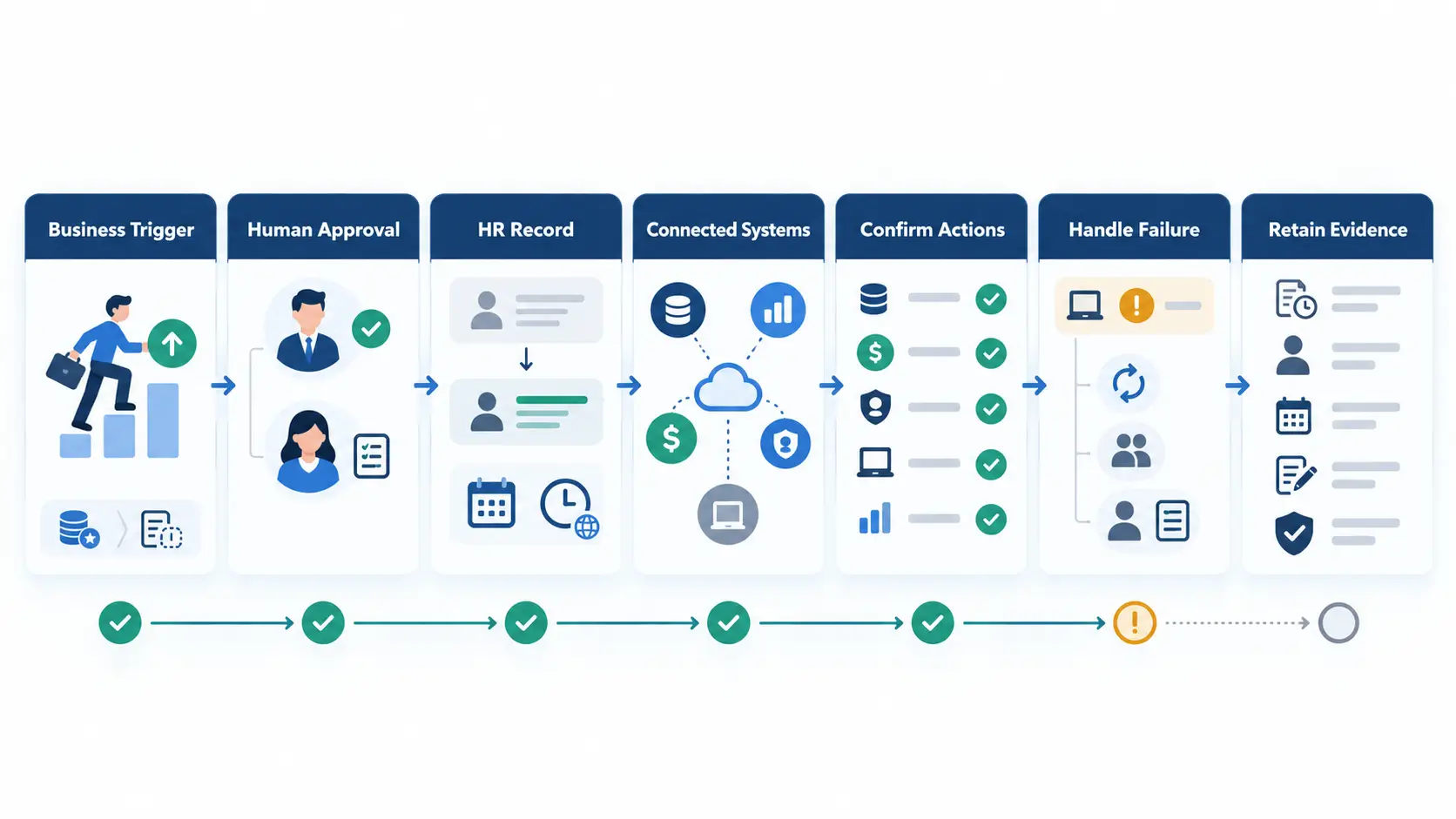
A candidate platform passes the event contract when:
- Each important value has one approved source.
- The future state activates on the correct date.
- Users can see pending and completed states.
- Failed downstream actions remain visible.
- A retry does not create duplicate actions.
- Authorized users can correct the event.
- History preserves previous and corrected states.
- Each system receives only required information.
- A named person owns every reconciliation.
- The final record contains useful evidence.
Prepare three event contracts and use them with every shortlisted product.
Assess HRMS for software companies against role changes
HRMS for software companies must handle role movement without erasing workforce history.
Product teams can change faster than titles. One person may also hold temporary and continuing responsibilities.
Separate the person, job, position, and assignment
The person record identifies the individual. A job can describe a reusable type of work.
In position-managed systems, a position represents an approved organizational slot.
An assignment connects a person with work for a defined period. Not every platform uses this model.
Test whether its model preserves managers, teams, dates, and concurrent assignments without duplicating people.
Preserve concurrent and historical work
Give one sample person a continuing role and a temporary assignment. End the temporary work without closing the continuing role.
Then rehire a departed worker. Preserve the person record, separate engagements, earlier managers, and effective dates.
For a reorganization, require a preview of affected workers, fields, permissions, dates, and reports.
Current reports should not rewrite the earlier organizational view. Keep one historical report in the requirements pack.
Compare HR software for SaaS companies by operating model
HR software for SaaS companies should reflect the company’s real work model. A SaaS label does not create one universal requirement set.
Map the company’s:
- Workforce locations and time zones
- Legal entities and business units
- Employee and contractor groups
- Product and customer-facing teams
- Support and on-call schedules
- Manager layers and delegated administrators
- Security responsibilities
- Current systems and planned changes
- Approved growth and restructuring plans
Support distributed and hybrid work
Store approved and reported work locations separately from home addresses. Preserve dates for every location change.
The system may need distinct legal employer, country, state, work location, time zone, calendar, and schedule fields.
Route location changes to relevant HR, payroll, tax, benefits, legal, IT, and security owners.
Software can apply configured rules. It cannot determine every legal duty or prove worker classification.
Support customer-facing and on-call teams
Approved schedules and absences should remain visible to permitted managers. A leave change should expose an unresolved coverage gap.
Do not assume an HR schedule manages engineering capacity or incident response. Keep those system boundaries explicit.
Check how the platform handles overnight schedules, time zones, local holidays, rotations, and manager absence.
Test time, attendance, and leave exceptions
Test recorded events, calculated totals, approvals, and payroll outputs separately. One correct total can hide a poor correction trail.
Use these cases:
- Overnight work crossing a calendar date
- A worker changing time zones
- Missed clock events and manager corrections
- Leave accrual, carryover, caps, and proration
- Leave spanning a schedule or policy change
- Late approval after a reporting period closes
- A correction after data reaches payroll
The record should retain the original event, correction, actor, reason, approval, and export result.
Review entity and tenant needs
Separate legal entities from departments and locations. Each structure may carry different ownership and reporting needs.
A multi-tenant architecture uses shared platform infrastructure while separating each tenant’s data and access logically.
The design label does not prove tenant isolation.
Select people ops software for startups by administration capacity
People ops software for startups should fit approved growth and the team’s administration capacity. Employee count alone is a weak rule.
A founder-led team may need records, hiring approvals, onboarding, leave, payroll handoffs, offboarding, restricted access, and exports.
A dedicated People Ops owner can add manager service, dated changes, reporting definitions, and permission reviews.
Several teams or locations may require delegated administration, local variations, connection monitoring, and configuration governance.
Ask who will configure, test, document, support, and review each module. Unowned modules create work without solving the buying problem.
Prefer modular expansion when later needs remain uncertain. Keep current must-pass controls separate from approved future requirements.
Best HR Software for Small Business provides a wider shortlist method for lean organizations.
Keep contractor engagements separate
Track the person separately from each employment or contractor engagement.
Preserve the sponsor, scope, dates, location, access owner, equipment owner, renewal status, and offboarding evidence.
Contractor classification remains a legal decision. Software status cannot determine it.
Test extensions, engagement endings, re-engagement, and later employee hiring without overwriting previous history.
Test recruiting and specialist onboarding continuity
Tech hiring can involve specialist roles, remote starts, contractors, and several access dependencies.
The system should preserve approved information without copying every candidate field into the employee record.
Follow one candidate into employment
If recruiting is included, create an approved candidate and convert the record.
Otherwise, test the applicant tracking system handoff.
Check these points:
- Requisition and headcount approval
- Current role requirements
- Interview evidence and reviewer access
- Offer terms and approval history
- Candidate communication status
- Required prehire information
- Candidate-to-employee field mapping
- Employee identifier creation
- Manager, team, location, and start date
- Payroll, equipment, and access handoffs
- Role-based onboarding tasks
- Missing-data and correction routes
Not every candidate note belongs in the employee file. Define which records move, remain restricted, or follow a retention process.
Change the start date after approval
Move the start date after onboarding tasks begin. Confirm that dependent actions use the new date.
The original date and approval should remain visible. Late or failed updates need owners and escalation routes.
Check equipment, account requests, payroll inputs, meetings, policies, and manager tasks. One changed field should not create conflicting starts.
Keep hiring decisions human-owned
Scoring or drafting tools may support administrative work. Authorized people should remain accountable for employment decisions.
Give candidates a route for accommodation, questions, and correction. Limit sensitive information to responsible reviewers.
Use one candidate-to-employee contract with a delayed start and rejected handoff.
Test joiner, mover, and leaver handoffs
The Employee Lifecycle describes the full path from hiring through departure.
Each lifecycle event crosses data and ownership boundaries. Map those boundaries before testing detailed scenarios.
Map the receiving owners
A joiner may cross HR, payroll, equipment, identity, security, and manager workflows.
A mover may change the manager, team, role, location, cost center, reporting, and access needs.
A leaver may affect work handoff, pay, accounts, sessions, devices, records, and communications.
The HR platform may start or record tasks. Each receiving owner must confirm the result in the responsible environment.
Keep exceptions visible
Add manager absence, rehire, cancellation, rejected data, partial completion, and backdated corrections to the acceptance pack.
The handoff passes only when required receiving owners confirm the target state. Otherwise, keep the exception visible and assigned.
Verify workflow, approval, and administration controls
Workflow quality depends on states, authority, evidence, and recovery. A colorful process diagram proves none of them.
Require explicit workflow states
Every important request needs named states. Examples include draft, submitted, under review, approved, rejected, canceled, failed, and completed.
Define which role can move each state. Record required evidence, notification, effective date, and next owner.
Check these controls:
- Required and optional reviewers
- Sequential and parallel approvals
- Approval limits
- Temporary delegation
- Escalation when an owner is absent
- Separation between approval and execution
- Effective-dated activation
- Cancellation before activation
- Correction after activation
- Visible failure and retry states
- Final confirmation from the result owner
HR Automation explains wider controls for routing, retries, exceptions, and duplicate prevention.
Review permissions as operating rules
Permissions should follow assigned responsibility. Test field, record, team, location, and tenant boundaries separately.
Ask practical questions:
- Can managers approve requests only for assigned employees?
- Can recruiters view candidates without seeing employee pay?
- Can finance view approved pay inputs without changing job history?
- Can IT view work dates without opening medical details?
- Can local administrators manage only assigned locations?
- Can employees see only permitted records and requests?
- Do temporary privileges expire and remain reviewable?
- Does each sensitive change show the actor and time?
Permission changes need an approval path. Shared accounts and unreviewed broad administrator privileges weaken accountability.
Control configuration changes
Configuration can alter who sees data or approves decisions. Treat material changes as governed releases.
Require a test environment, named owner, review evidence, production approval, and reversal plan.
Ask an authorized administrator to change one low-risk workflow. Observe the steps, documentation, permission checks, and effect on existing records.
Keep a workflow-state list and permission script for every high-risk event.
Treat integrations as operating dependencies
An integration logo does not explain what moves or what happens after failure.
Require a plain-language data contract for each connection. The contract should identify fields, direction, timing, ownership, and recovery.
Document each connection
Record these details:
- Sending and receiving systems
- Business event that starts the exchange
- Authoritative fields
- Data direction
- Trigger or schedule
- Identity-matching rule
- Required and optional fields
- Authentication owner
- Expected confirmation
- Failure alert and recipient
- Retry behavior
- Duplicate protection
- Unique event or correlation identifier
- Record version and event sequence
- Field mapping and schema owner
- API limits, pagination, and bulk behavior
- Deletion and disablement behavior
- Version-change and deprecation notice
- Reconciliation method
- Manual fallback
- Support ownership
- Export alternative
Do not accept “real-time” without a defined trigger and measured behavior. Do not accept “available” without verified scope.
Demonstrate a failed integration
In a test environment, reject one payroll or identity exchange during a workforce change.
Confirm the receiving system rejected it and no external action occurred. Keep the failure visible until reconciliation.
Correct the sample data and retry. Check both systems for one intended result and no duplicate downstream action.
An idempotent retry produces one intended result after repeated attempts. Require platform evidence and receiving-owner confirmation.
Preserve system boundaries
Payroll software may calculate pay and handle filings. Identity systems may create, change, and remove external accounts.
Finance systems may own budgets and payments. Project tools may own sprint assignments and engineering capacity.
The HR platform can coordinate approved information and tasks. Each receiving owner must confirm the external result.
Each integration review needs a failure owner, manual fallback, reconciliation method, and export alternative.
Review security, privacy, and tenant separation
Employee platforms can contain identity, pay, attendance, leave, performance, and access-related information.
Security review needs evidence. Broad claims such as “enterprise security” do not explain actual controls.
Organize the security review
The NIST Cybersecurity Framework 2.0 groups security outcomes across six functions.
Those functions are Govern, Identify, Protect, Detect, Respond, and Recover. The framework does not certify a product.
Ask the vendor to explain and evidence:
- Privileged administrator and temporary access controls
- Authentication options and any offered SSO or SCIM support
- Field, team, location, and tenant boundaries
- Integration credential storage and rotation
- Support personnel access and session controls
- Test-environment data protection
- Incident communication
- Backup and recovery testing
- Data export and deletion processes
NIST explains that multi-factor authentication uses two or more distinct factors.
Confirm which users can receive that protection. Employees, managers, administrators, and support personnel may follow different paths.
Test tenant separation
The design label does not prove tenant isolation.
Use vendor-approved test tenants or an isolated security test environment. Do not probe production tenants without written authorization.
Test interfaces, APIs, object identifiers, file links, search, notifications, exports, reports, and support access.
Manual checks cannot prove complete isolation. Review suitable architecture evidence and independent testing results.
Define privacy controls before migration
The NIST Privacy Framework can guide privacy-risk discussions. It is not a compliance certificate.
Define purpose, access, sharing, retention, correction, deletion, and incident responsibilities for each sensitive data group.
Collect only information with an approved purpose. More available data does not create a valid business need.
Use HR Compliance Checklist to organize a broader review. Confirm current duties with appropriate advisers.
Do not score security through marketing labels. Record evidence, tenant results, owners, and unresolved gaps.
Review automation and AI features carefully
Rules-based automation follows configured conditions. AI-assisted features may generate, classify, rank, summarize, or recommend outputs.
Different controls apply because AI output can be uncertain. Ask what the feature does before judging its label.
Test rules-based automation
Routine automation may route requests, send reminders, collect approvals, and update workflow status.
Test permissions, conditions, retries, exceptions, notifications, and final ownership. Failed jobs should not create duplicate or conflicting actions.
Keep an accountable human decision or approved policy visible for pay, access, discipline, classification, and termination changes.
Ask direct AI questions
Review every AI-assisted feature with these questions:
- What task does the feature perform?
- Which inputs and employee data does it use?
- Is customer data used for model training?
- Can an administrator disable the feature?
- Can a person review and correct the output?
- Are prompts, outputs, or decisions stored?
- Can users see when AI assisted a result?
- What happens when the feature fails?
- Which decisions remain human-owned?
- How can an affected person request review?
The Equal Employment Opportunity Commission explains that federal discrimination laws can apply to workplace AI.
Human review is a useful control, but it cannot guarantee a lawful outcome. Review current requirements and actual decision use.
AI in HR provides a wider framework for employment-related AI.
For each AI feature, record its owner, correction route, disablement decision, and evidence.
Define reports before viewing dashboards
Start with the business question. A polished chart cannot repair an unclear headcount or leave definition.
Create a report contract
For every required report, define:
- Business question
- Decision or action supported
- Named owner
- Included population
- Source fields and systems
- Calculation or grouping rule
- Date and effective-state logic
- Worker-type treatment
- Access rules
- Refresh timing
- Exception treatment
- Row-level review path
- Export need
- Correction route
Ask the vendor to demonstrate headcount for a selected date. Then trace the total to its source records.
Repeat that review for hires, transfers, departures, leave, time exceptions, open positions, and platform seats.
Protect reporting permissions
Scheduled reports should respect the recipient’s permissions. Exports should not reveal fields hidden in the interface.
Small groups can expose individuals. Restrict or broaden a report when aggregation fails to protect sensitive cases.
Avoid treating online status, message volume, or screen activity as direct performance measures.
Review the purpose and privacy risks before collecting them.
People Analytics explains the wider method for measures, definitions, interpretation, and safeguards.
Accept each dashboard only after its report contract is complete.
Compare full cost and vendor commitments
Subscription price shows only one part of the commitment. Include implementation and internal work in the decision.
Review these cost areas:
- Subscription basis and included worker types
- Optional modules and feature limits
- Data cleaning and migration
- Configuration and implementation support
- Connected systems and maintenance
- Test environments
- Training and change support
- Internal administration
- Premium support
- Contract expansion
- Data export and exit work
Ask how the vendor counts employees, contractors, candidates, former workers, administrators, locations, and legal entities.
Ask whether APIs, storage, sandboxes, reports, support, and integrations have usage limits or separate charges.
Separate one-time costs from recurring costs. Record which work belongs to the vendor, a partner, or your team.
Review contract terms for support, service changes, data access, renewal, and exit. Do not publish unverified prices or promises.
Benefits of HR Software explains how to connect expected outcomes with evidence and full costs.
Run a people-change software acceptance test
Most demonstrations follow a clean hire. Real operations include changed dates, absent owners, rejected data, and corrected records.
Use one acceptance pack across every shortlisted platform. Score observed results and documented commitments separately.
Give each scenario a complete record
Start each acceptance test with a completed people stack event contract. Add these result fields:
- Test identifier
- Test user and permission level
- Expected result
- Actual result
- Platform evidence
- Confirmation from every receiving owner
- Defect reference
- Retest result
- Final reviewer and decision
A scenario passes only when every required result has evidence. Partial completion remains open.
Run the tech-company scenario pack
Use safe sample data for these tests:
- Convert an approved candidate into an employee.
- Change the start date after onboarding tasks begin.
- Schedule a future product-team and manager transfer.
- Convert a contractor without creating a duplicate person.
- Process a remote work-location change.
- Add leave that affects a support schedule.
- Delegate an approval during manager absence.
- Process an urgent departure with privileged access.
- Change a role with broader access, then reject and reverse it.
- Change a pay-related field after cutoff and obtain payroll-owner confirmation.
- Reject one payroll or identity handoff and confirm the receiving state.
- Correct and retry the event without duplication in either system.
- Reproduce a report from before the change.
- Export the event, history, approvals, and exceptions.
Repeat sensitive actions through employee, manager, HR, finance, IT, and unauthorized roles.
For multi-tenant products, use two test organizations in an approved environment.
Attempt cross-tenant searches, reports, exports, notifications, and support access. Record blocked results as evidence.
Record red flags by severity
Pause the purchase when the product cannot preserve key history, export usable data, or prove permission boundaries.
Also pause when reports cannot trace totals to records. Unsupported security or compliance claims need evidence before review continues.
Investigate vague integration scope, unclear pricing units, broad administrator roles, and undocumented configuration work.
A concern may have a safe workaround. Record its owner, manual effort, risk, contract status, and review date.
Approve fit after high-risk events pass with platform evidence and confirmation from responsible receiving owners.
Plan migration, implementation, and rollout
Implementation should turn approved event contracts into working controls. It should not copy every old process into a new interface.
Govern the project
Name the executive sponsor, process owners, system owner, data owners, security reviewers, and final acceptance authority.
Keep scope decisions and known gaps in one decision log. Assign every workaround an owner and review date.
Prepare and migrate workforce data
Before moving production records:
- Map each source field to its destination, transformation rule, and accountable owner.
- Define required, optional, invalid, and duplicate values.
- Standardize locations, departments, managers, roles, and worker types.
- Preserve source identifiers and approved effective dates.
- Test active, inactive, contractor, leave, and exited records.
- Reconcile record counts and high-risk fields.
- Review history after each trial load.
- Quarantine rejected records and assign every correction.
- Repeat the same trial load after corrections and compare results.
- Rehearse, reconcile, and approve the final change-only load before cutover.
- Preserve an approved source export and cutover baseline.
Trial migrations should not send live emails, payroll files, or access requests. Verify those safeguards before every trial.
Preserve history needed for approved operational and recordkeeping purposes.
Apply documented retention and deletion rules to other data.
Configure, pilot, and expand
Configure roles, workflow states, approvals, integrations, reports, and event contracts in a test environment.
Pilot one contained workforce group with real complexity and manageable exposure.
Define entry, exit, stop, and rollback criteria first.
Reconcile records, permissions, reports, and handoffs against trusted sources and receiving-owner confirmations.
Expand only after evidence and pilot exit criteria pass review. Record manual work before adding more teams.
Define rollback and go-live gates
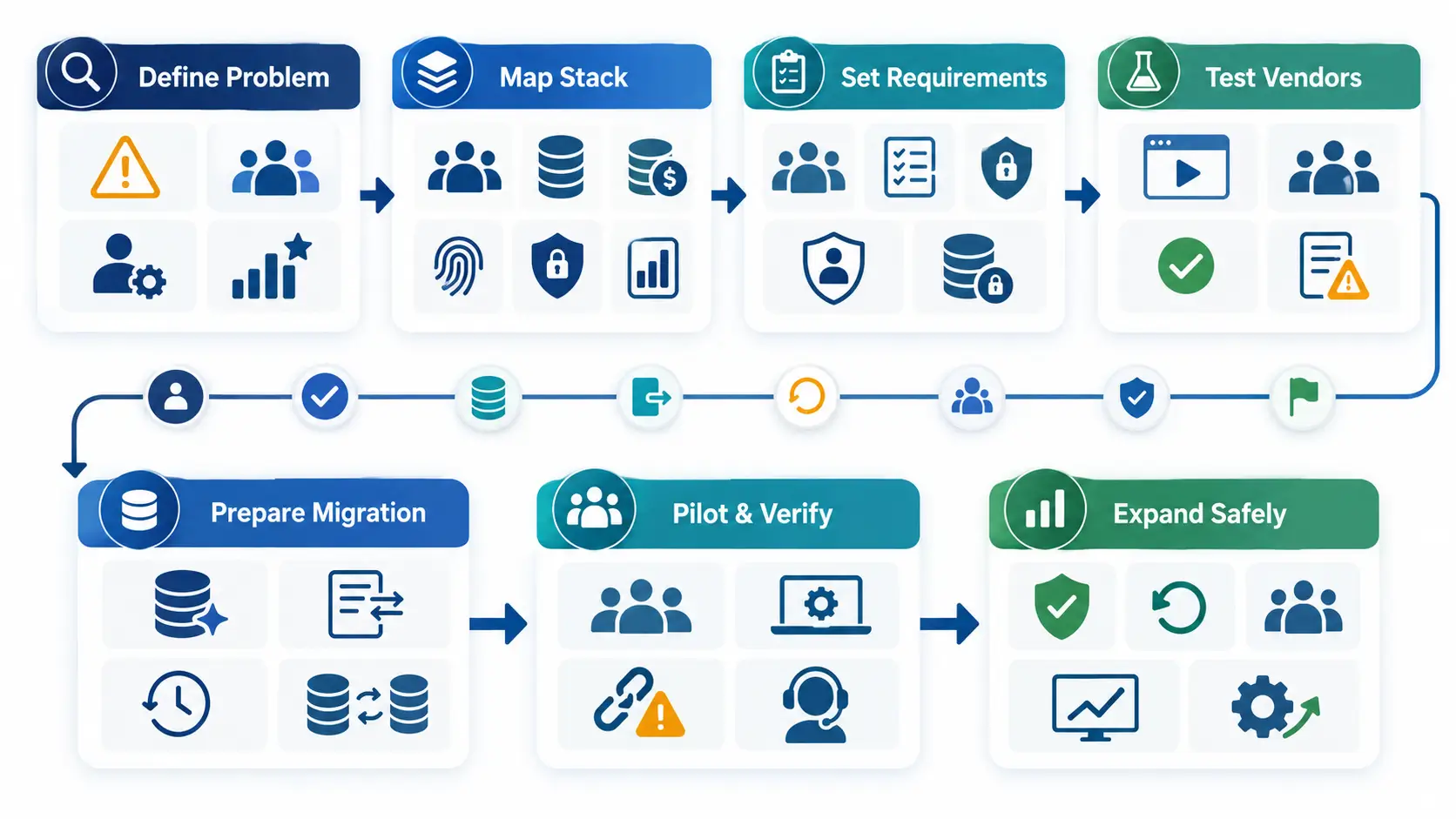
Set failures that stop launch or trigger rollback.
Include wrong statuses, broad permissions, duplicates, lost history, tenant exposure, and missing external handoffs.
Name the rollback owner and backup. Rehearse pausing writes, preserving queued changes, invoking recovery, and reconciling after restoration.
Approve launch only when:
- Critical workforce events have passed with evidence and owner approval.
- Migration totals and high-risk fields reconcile.
- Permission boundaries pass authorized and unauthorized role tests.
- Connection failures, retries, and reconciliations pass in both systems.
- Payroll and access fallbacks have owners and completed rehearsals.
- No unresolved defect threatens pay, status, access, departures, or tenant separation.
- Affected users receive role-specific training and cutover instructions.
- Rollback is rehearsed and the restored state is reviewed.
- Cutover monitoring has named checks, owners, thresholds, and escalation.
Do not approve launch because common screens look correct. Important changes must finish or fail safely.
Each external result also needs confirmation from its responsible owner.
Measure tech-company results after launch
Use measures tied to the original buying case. Establish baselines and targets from company records.
Review incomplete onboarding, late changes, duplicate records, failed exchanges, approval exceptions, and manual corrections.
Also review access exceptions, report preparation work, user completion, and support requests by workflow.
Do not treat login counts as proof of business value. Connect each measure with an approved outcome or control.
Assign each result an owner and response. Retire measures that do not support a decision.
During stabilization, compare payroll, identity, and access results with HR records.
Keep mismatches open until receiving owners confirm correction.
Where OryxBlue may fit a tech-company shortlist
Editorial disclosure: OryxBlue is the publisher’s product. This section reflects supplied product information, not independent testing.
Supplied materials describe OryxBlue as a multi-tenant platform supporting workforce records and routine HR coordination.
Its supplied scope covers recruitment, onboarding, employee records, locations, departments, roles, permissions, schedules, and rotations.
It also covers attendance, leave, requests, approvals, lifecycle status, dashboards, reports, payroll visibility, and seat tracking.
Apply the event contract to OryxBlue
Ask OryxBlue to demonstrate these supplied areas with safe sample data:
- Show recruitment, onboarding, and employee records for one sample person.
- Change a test employee’s location, department, role, and permissions.
- Show an approved leave request, then display a schedule and rotation for the same sample worker.
- Create sample roles, assign permissions, and compare their allowed actions.
- Change a sample lifecycle status, then check whether dashboards or reports reflect the change.
- Demonstrate tenant separation within a vendor-approved test environment.
- Explain payroll visibility and seat-tracking behavior.
Record the observed result, manual work, exception, owner, and retest need. Do not score an unshown capability as delivered.
Keep the product boundaries explicit
The supplied scope does not establish:
- Payroll calculations, tax handling, filings, or payments
- Automatic legal compliance or legal conclusions
- Autonomous hiring, ranking, promotion, discipline, or termination
- Predictive staffing, performance, or retention scores
- Identity provisioning or external account removal
- Device management or physical asset recovery
- Project allocation, sprint planning, or engineering capacity
- Specific integrations, APIs, SSO, SCIM, or webhooks
- Specific certifications, encryption, backups, or recovery controls
Ask for current evidence when any unsupported area matters. Treat external results as incomplete until the responsible system owner confirms them.
Copy-ready tech HR software selection checklist
Before approving a platform, confirm that your team has:
- Defined the operating problem, decision owner, and high-risk events
- Assigned one source for each field and separated later needs
- Tested dated changes, contractor conversion, and rehire handling
- Checked approval delegation, exceptions, and permission boundaries
- Traced required reports and exports to source records
- Tested failed connections, retries, and reconciliation
- Reviewed security, privacy, AI, and automation evidence
- Defined migration, training, full cost, support, and exit work
- Recorded gaps, owners, contract status, rollout gates, and rollback
Frequently asked questions about tech-company HR software
What is HR software for tech companies?
HR software for tech companies manages workforce records and coordinates hiring, changes, leave, approvals, reporting, and lifecycle events.
The right system also preserves dates, permissions, history, and integration evidence. It exposes failed handoffs across the people technology stack.
Which HRMS features do software companies need?
HRMS for software companies should support dated role changes, distributed teams, contractor records, controlled approvals, permissions, and explainable reports.
The exact scope depends on the company’s workforce events, systems, and owners.
How should buyers compare HR software for SaaS companies?
Compare HR software for SaaS companies through the same event contracts and failure scenarios.
Evaluate observed workflow fit, data ownership, security, implementation effort, full cost, and exit rights.
When should a startup adopt People Ops software?
People ops software for startups becomes useful when informal tools lose reliable ownership, history, access control, or reporting.
Choose for current complexity and approved growth. Avoid buying unused enterprise scope.
Can HR software replace payroll?
Some products include payroll functions, while others exchange approved inputs with separate payroll systems.
Verify calculations, filings, payments, jurisdictions, integrations, and support before defining the boundary.
How should a tech company test HR software?
Use real workforce events, safe sample data, assigned user roles, expected outcomes, and failure cases.
Require evidence for success, blocked access, corrections, retries, history, exports, and downstream confirmation.
Can HR software make a tech company compliant?
No. Software can support records, configured workflows, approvals, and reviews.
Employers remain responsible for meeting their applicable employment obligations.
Assign owners for current requirements and configuration. Seek qualified advice for specific decisions.
What should buyers verify when considering OryxBlue?
Verify the supplied workflows against your event contracts. Check exceptions, roles, tenant separation, reports, payroll visibility, and seat tracking.
Request evidence for integrations, security controls, and any capability outside the supplied scope.
Choose software around workforce events
The best-fit platform supports real people changes, preserves ownership, and exposes failed handoffs.
Map three high-risk events before requesting demonstrations. Then require every vendor to prove the same outcomes.