
HR compliance checklist for small and mid-sized businesses

An HR compliance checklist can help employers review people policies, records, decisions, notices, and workplace practices.
Supporting records can help assign owners and document each review.
The checklist cannot confirm that a business meets every legal duty. Requirements change by location, workforce size, industry, contracts, benefits, and employee status.
Use this page as an internal control tool. Verify each requirement through current government guidance or qualified legal, payroll, tax, safety, and benefits advisers.
Compliance supports responsible human resource management. It should guide daily decisions rather than become a yearly paperwork exercise.
Important: This article provides general educational information, not legal advice. Review current federal, state, local, and industry requirements before acting.
What this HR compliance checklist covers
This checklist follows the employment relationship from planning through departure. It organizes controls for identifying, completing, and documenting reviewed work.
Review hiring, classification, pay, eligibility, records, leave, benefits, safety, conduct, employee changes, and departure.
Also review locations, notices, owners, evidence, deadlines, reports, and corrective actions.
This page focuses on operating controls. It does not provide fixed legal thresholds, filing dates, or universal retention periods.
Those details depend on the employer’s facts. Record the applicable rule and current source beside every checklist item.
How to use a human resources compliance checklist
A human resources compliance checklist works only when each item has scope, ownership, evidence, and a review trigger. A checked box alone offers little assurance.
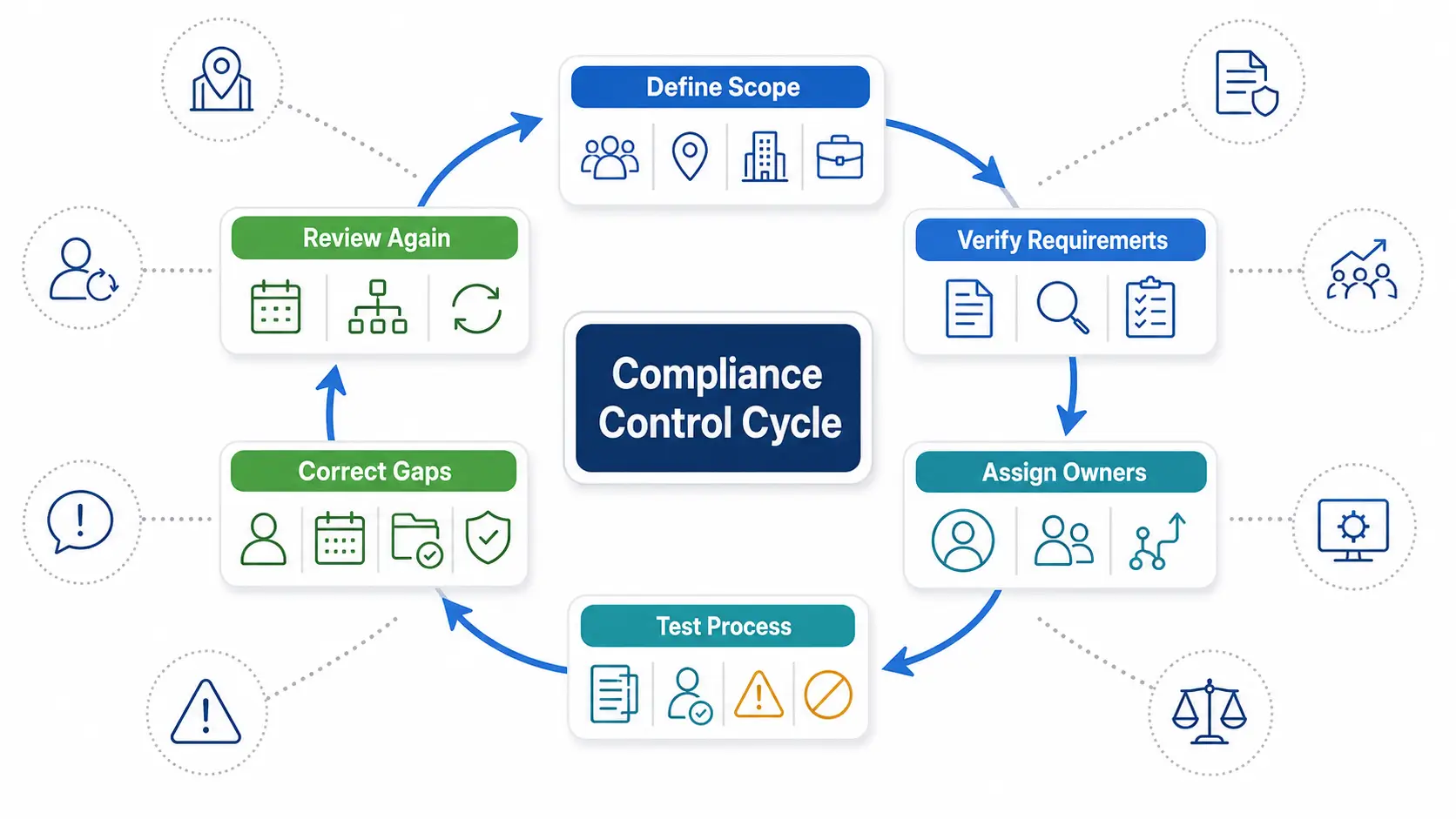
Follow these five steps.
1. Define the employer and workforce scope
List every legal entity, work location, remote-work location, and operating site. Include each worker group and employment arrangement.
Record industries, government contracts, benefit plans, unions, and licensed activities. These facts may change which requirements apply.
2. Build a current requirement register
For each topic, record the governing source and affected workforce. Include federal, state, local, contractual, and policy requirements.
Do not copy another employer’s register without review. Similar companies can have different locations, worker groups, plans, or contracts.
3. Assign accountable owners and backups
Name the qualified source or adviser used to verify each requirement. Name the people who complete, review, and document the work.
The owner may sit in HR, payroll, finance, safety, legal, IT, or operations. A backup should cover absences and departures.
Record the evidence location and escalation route. The Functions of Human Resource Management guide explains the wider responsibilities.
4. Test the real process
Review normal cases, exceptions, corrections, late actions, denied requests, and manager handoffs. Policies alone do not prove daily compliance.
Sample recent records from different roles and locations. Keep the sample method with the review notes.
5. Record gaps and corrective actions
Describe the failed control and affected scope. Assign an action owner, due date, evidence requirement, and approval route.
Escalate uncertain or high-risk issues. Do not close an item because a meeting occurred.
Use the wider Human Resource Management Process to connect these reviews with daily HR work. Compliance must appear inside the process, not beside it.
Quick employment compliance checklist
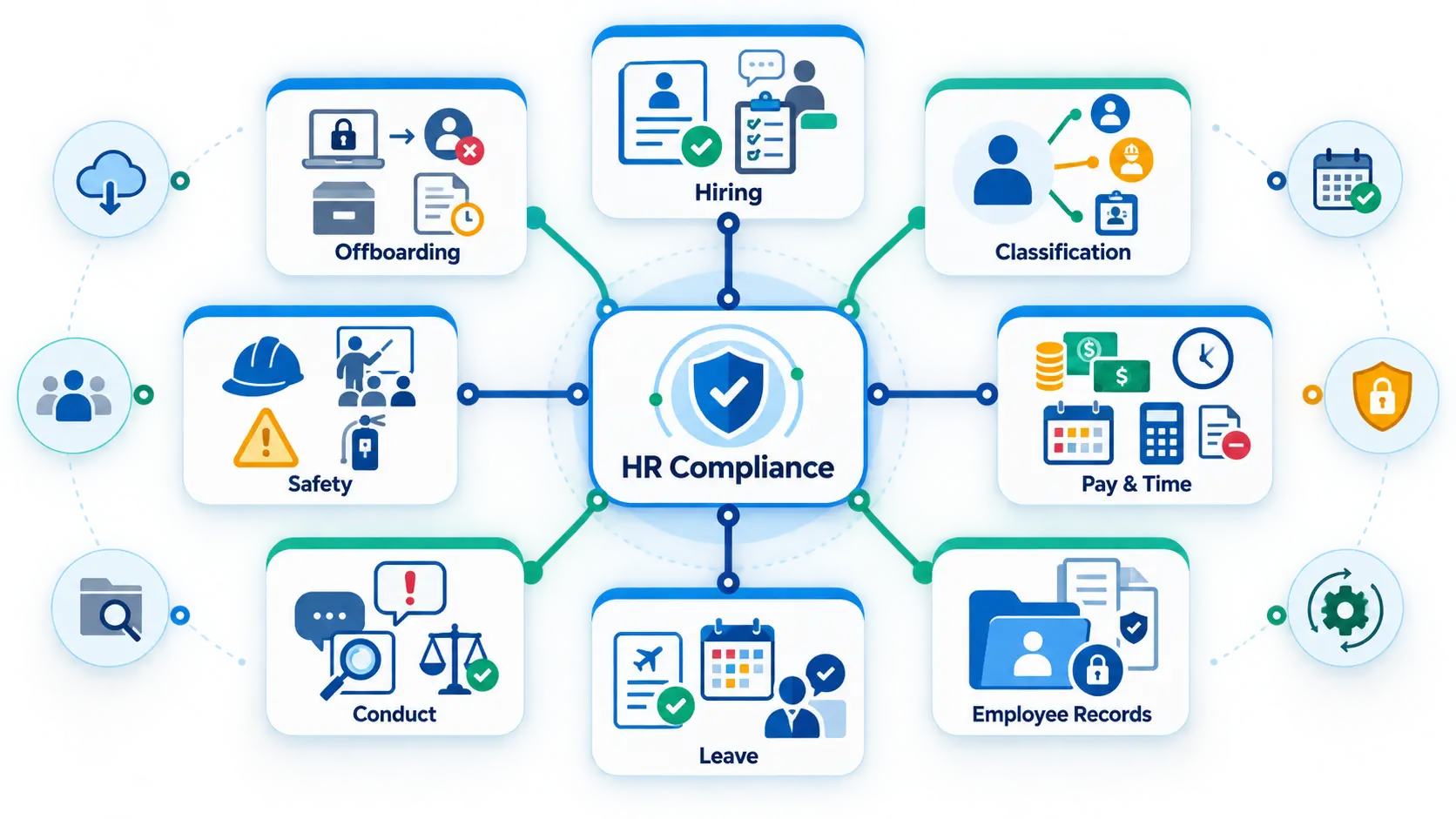
Start with six questions. A “no” or “unknown” answer needs investigation.
- Can you name every location and workforce group covered by the review?
- Does every requirement have a current source, owner, and review date?
- Can you prove how recent hiring, pay, leave, and discipline decisions were handled?
- Are sensitive records restricted, corrected, retained, and disposed of under verified requirements?
- Do managers know when to stop and send an issue to HR?
- Can you track each open gap through correction and approval?
Do not treat six “yes” answers as legal assurance. Use them to decide where the detailed review should begin.
Recruitment and hiring compliance checklist
Hiring controls should support consistent, job-related decisions. They should also preserve the reason behind each decision.
Approve the role before advertising
Confirm the business need, duties, work location, schedule, reporting line, and required qualifications. Review pay range and classification before publication.
Check current pay-transparency, job-posting, and applicant-notice rules for each location. Remote roles may create obligations in several jurisdictions.
Review job advertisements and applications
Use job-related criteria and clear language. Have qualified reviewers assess medical or other restricted questions before use.
Keep approved versions of advertisements and application forms. Record where and when each version appeared.
Standardize screening and interviews
Give interviewers approved questions and evaluation criteria. Record job-related evidence rather than personal impressions.
Apply the same core process to comparable applicants. Document any valid reason for a different step.
Control background checks
Define which roles need screening and why. Confirm applicable federal, state, and local procedures before ordering or using a report.
The Federal Trade Commission’s employer guidance covers the Fair Credit Reporting Act and federal discrimination concerns. Verify current local rules too.
Review offers and pre-employment steps
Use an approved offer template for the role and location. Check pay, status, schedule, conditions, benefits language, and approval evidence.
Track changes between the approved offer and the accepted version. Do not rely on email memory when terms change.
Review automated hiring tools
Record every tool that scores, ranks, filters, or recommends applicants. Identify its data, purpose, users, decision point, and human reviewer.
Check current rules for each affected location. Vendor testing does not transfer the employer’s responsibility for employment decisions.
The AI in HR guide covers governance, testing, human review, and challenge routes. Keep final authority with an accountable person.
Keep this hiring evidence:
- Approved role request and job description
- Published advertisement and application version
- Interview criteria, completed evaluations, and decision reason
- Required notices, permissions, and screening records
- Approved offer, changes, acceptance, and start conditions
The US Equal Employment Opportunity Commission provides current federal guidance for small employers. Verify applicable state and local requirements too.
Worker classification and employment status
Classification affects pay, taxes, benefits, records, and legal rights. Do not treat a title or contract label as sufficient evidence.
Review each arrangement through a controlled process:
- Describe the person’s actual duties and working relationship.
- Identify every federal, state, and local test that may apply.
- Obtain qualified review when the result is uncertain.
- Record the facts, source, reviewer, decision, and approval date.
- Recheck the decision when duties or control change.
Review employee versus independent-contractor status separately from wage-and-hour status. Different legal tests may govern different questions.
Also review temporary workers, interns, apprentices, volunteers, minors, and staffing-agency arrangements. Record who controls work and who completes each duty.
Review trigger: The person’s daily work no longer matches the approved role, contract, or classification record.
Pay, timekeeping, attendance, and payroll controls
Pay errors often begin before payroll. They can start with a wrong status, missed time, unapproved deduction, or late employee change.
The US Department of Labor Wage and Hour Division publishes current Fair Labor Standards Act guidance. Verify state and local rules separately.
Review pay classifications
Confirm each role’s wage-and-hour classification through current rules. Keep the analysis, facts, reviewer, approval, and change history.
Recheck classifications after major duty, authority, schedule, or location changes. Do not assume a salary or title settles the issue.
Capture all required working time
Define which activities count as working time under applicable rules. Cover opening, closing, setup, training, travel, remote work, and after-hours messages.
Give employees a way to report missed or incorrect time. Managers should never remove recorded time to meet a budget.
Review overtime, breaks, and schedules
Map current overtime, meal, rest, predictive-scheduling, and day-of-rest rules by location. Configure systems only after qualified interpretation.
Compare scheduled, recorded, approved, and paid time. Investigate differences instead of editing them without explanation.
Control deductions and payroll changes
Verify the authority and limits for each deduction. Keep employee authorizations where required and preserve effective dates.
Use approved cutoffs for new hires, pay changes, leave, benefits, and departures. Reconcile accepted changes with payroll results.
Keep employer oversight of providers
Outsourcing payroll does not remove every employer duty. The Internal Revenue Service tells employers to monitor federal tax work completed by providers.
Review confirmations, rejected files, notices, corrections, and account access. Assign an owner to investigate every exception.
Apparel employers may need extra review for piece-rate work, hours, and overtime. See Apparel Piece-Rate Overtime for the dedicated US compliance guide.
Potential review evidence includes time records, approvals, pay calculations, corrections, notices, provider confirmations, and reconciliations. Apply a verified retention schedule.
Employment eligibility and onboarding records
Employment eligibility verification needs a controlled process. Hiring managers should not improvise document requests or store copies in personal folders.
Use the current form and instructions from US Citizenship and Immigration Services. Confirm completion, correction, storage, access, reverification, and retention rules there.
Keep employment eligibility review separate from candidate selection. Apply the process consistently and restrict access to the records.
Check each new hire file
- Confirm the accepted offer matches the approved role and pay details.
- Complete current employment eligibility steps through an authorized owner.
- Collect required tax and payroll forms through a protected channel.
- Deliver applicable policies, notices, benefits information, and safety instructions.
- Record required training, acknowledgments, equipment, access, and first-day readiness.
Do not mark an onboarding task complete without evidence. A status label cannot prove that another department finished its action.
The Employee Lifecycle guide covers the wider journey from hiring through departure. This section focuses on compliance controls within those stages.
Employment records, privacy, and access controls
Personnel records contain sensitive information with different access and retention needs. One open folder should not hold every record type.
Use this employment compliance checklist for records and workplace practices.
Inventory every record category
List applicant, personnel, payroll, time, leave, medical, benefits, safety, complaint, training, and separation records. Add electronic logs and vendor-held data.
For each category, name the owner and approved storage location. Record every connected system and export path.
Separate sensitive records
Restrict medical, accommodation, investigation, identity, and background information. Access should match a person’s assigned duties.
Test allowed and denied access. Include administrators, managers, integrations, support staff, and temporary roles.
Create a source-based retention schedule
Do not use one universal retention period. Map each record to current legal, contractual, litigation-hold, and business requirements.
Record the source and last review date. Suspend normal disposal when a valid hold or investigation requires preservation.
Control changes and corrections
Preserve the original value, corrected value, actor, date, source, and reason. Do not overwrite history without a trace.
Review imports, bulk changes, and integration updates. They should receive the same control as manual edits.
Dispose of records securely
Approve disposal only after all requirements and holds are checked. Make paper and electronic records unreadable and unrecoverable where required.
Also review copies, exports, backups, email attachments, and vendor systems. Deleting one screen may leave several other copies.
Review access after role, system, location, or retention-rule changes. Record the result and any corrective action.
Leave, accommodations, and attendance decisions
Employees may describe a need without naming a law or policy. Managers need clear triggers and a prompt route to qualified review.
Coverage, eligibility, notice, documentation, and timing rules can differ. Check current federal, state, local, and company requirements for each request.
The US Department of Labor FMLA page provides current Family and Medical Leave Act guidance. Other duties may also apply.
Review the request process
- Give employees more than one practical request channel.
- Train managers to recognize and escalate possible requests.
- Limit medical questions and access to supporting information.
- Record notices, communications, decisions, dates, and changes.
- Provide a review path for uncertainty, disputes, or new facts.
Apply the approved process consistently. Similar outcomes may still differ when facts or legal requirements differ.
Connect leave with time and pay
Check balances, attendance codes, schedule changes, payroll inputs, and benefit effects. Reconcile the approved decision with downstream records.
Do not let attendance points or automated rules decide a potentially protected issue. Require qualified review when protected leave may apply.
Protect against retaliation
Route later performance or discipline decisions for qualified review when a recent request may receive legal protection.
Record legitimate reasons and supporting evidence for later actions. Seek legal review when timing or context creates added risk.
Workplace safety and health compliance
Safety duties depend on the work, hazards, location, and applicable standards. Office, warehouse, factory, field, and remote settings need different reviews.
The Occupational Safety and Health Administration publishes current federal employer responsibilities. State-plan jurisdictions need a separate authority check.
Build safety controls around real hazards
Start with the work employees perform. Identify equipment, chemicals, lifting, vehicles, heat, noise, ergonomics, and emergency risks where relevant.
Assign owners for inspection, correction, training, protective equipment, and emergency procedures. Employees need a clear way to report hazards.
Review training and communication
Match training to the worker’s duties and exposure. Use a language and vocabulary the worker understands.
Record the topic, trainer, date, audience, version, and completion evidence. A signature alone may not prove understanding.
Control incidents and required records
Create a route for injuries, illnesses, near misses, and urgent events. Define notification, investigation, correction, and reporting ownership.
Confirm current recordkeeping and reporting duties through OSHA or the state plan. Do not rely on an old threshold or deadline.
Verify workplace notices
Identify required federal, state, local, and industry notices for each location. Check remote-worker delivery rules where applicable.
The US Department of Labor poster page explains that federal posting duties vary by statute. State requirements need a separate check.
Potential review evidence includes hazard reviews, inspections, training, reports, investigations, corrections, notices, and delivery records. Apply the verified retention schedule.
Workplace conduct, complaints, and employee rights
A policy cannot stop misconduct by itself. Employees need safe reporting routes, prompt review, and protection against retaliation.
Review conduct and anti-harassment controls
Define prohibited conduct, reporting routes, manager duties, investigation ownership, and corrective action. Provide an alternative when the usual contact is involved.
Check whether employees can use the process in practice. Consider language, disability access, work shifts, remote work, and fear of retaliation.
Handle complaints consistently
Log the concern, date, initial risk, assigned reviewer, actions, findings, and outcome. Limit information to people with a legitimate need.
Track interim protections and promised follow-up. Do not leave an employee without status when a review takes time.
Protect lawful employee activity
Policies should receive review before restricting employee discussions or group action. Managers also need guidance before responding to organizing activity.
The National Labor Relations Board explains protected employee activity under federal labor law. Coverage and exceptions require current review.
Review equal employment practices
Compare hiring, pay, promotion, scheduling, training, discipline, and separation processes. Look for inconsistent criteria, access, results, or records.
Use current EEOC, state, and local guidance for the affected employer and decision. Escalate patterns that may show unequal treatment or impact.
Keep complaint evidence separate from general manager notes. Do not promise complete confidentiality.
Performance management and discipline controls
Performance records can affect pay, promotion, discipline, and separation. Vague or inconsistent records weaken both fairness and decision quality.
Set clear job expectations
Use current job duties, policies, goals, and performance criteria. Tell employees how performance will be reviewed.
Update the record when duties change. Do not evaluate someone against an old role without explanation.
Give managers a consistent process
Managers should describe conduct, results, dates, expectations, and prior guidance. Labels such as “bad attitude” need specific work-related facts.
Require qualified review for serious or unusual actions. Escalate when recent protected activity may be relevant.
Preserve decision evidence
Keep the issue, supporting facts, employee response, comparable cases, decision owner, and approval. Record the expected next step.
Correct factual errors through a visible process. Do not silently replace the original record.
The evidence should explain the decision without relying on private conversations. It should also show who had authority to approve it.
Benefits administration and payroll deductions
Benefit duties depend on plan design, employer facts, and employee events. Providers can administer tasks, but employers still need assigned oversight.
The Employee Benefits Security Administration publishes current federal benefits guidance. State insurance, leave, and continuation rules may also apply.
Review plan and eligibility records
Keep approved plan documents, eligibility rules, waiting conditions, employee notices, elections, waivers, and effective dates. Check that operational settings match approved terms.
Reconcile eligible employees with vendor and payroll records. Investigate missing, duplicate, or late enrollments.
Compare benefit elections with payroll deductions and provider invoices. Track refunds and corrections through completion.
Manage employee events
Define benefit steps for hiring, marriage, birth, leave, reduced hours, transfer, and separation. Record notices, choices, deadlines, and provider confirmations.
Use the current rules for the plan and location. Never assume the vendor will identify every employee event.
Maintain this evidence under the verified retention schedule. Include eligibility reviews, elections, deductions, notices, submissions, exceptions, and reconciliation.
Remote and multi-state workforce compliance
An employee’s work location can affect pay, leave, tax, notice, privacy, and reimbursement duties. The headquarters address may not control every requirement.
Require employees and managers to report proposed work-location changes. Review the location before payroll, policy, or benefit settings change.
Approve each new location through one process
- Confirm the physical work location and expected duration.
- Check business registration, payroll, tax, leave, and notice effects.
- Review timekeeping, expense, safety, privacy, and equipment needs.
- Update policies, systems, access, and responsible owners.
- Record approval, effective date, conditions, and review trigger.
Do not assume a national handbook overrides local rules. Keep location-specific additions controlled and easy to find.
Remote monitoring also needs review. Define the purpose, data collected, notice, access, retention, and decision limits.
Use Human Resource Planning before adding locations or worker groups. Workforce decisions can create compliance work before the first hire starts.
Employee changes, transfers, and lifecycle events
Promotions, transfers, pay changes, schedule changes, and leaves affect several records. One approved change should trigger every required review.
Confirm authority, effective dates, notices, and changes to pay, access, benefits, training, schedules, policies, and reports.
Pending requests should stay separate from approved employee records. Failed handoffs need visible owners and correction evidence.
The main risk is partial completion. HR may update the title while payroll, access, benefits, or schedules remain unchanged.
Separation and offboarding compliance checklist
Departures can create pay, benefit, record, access, property, notice, and communication duties. Requirements differ by location and separation reason.
Review the decision before action
Confirm authority, reason, evidence, policy, contract terms, and comparable cases. Check recent complaints, protected activity, leave, accommodation, injury, or wage concerns.
Seek qualified review for uncertain, sensitive, or high-risk decisions. A manager should not improvise the process under deadline pressure.
Coordinate final employment actions
Verify final time records, payroll inputs, expenses, benefit events, notices, and unemployment responses. Check current timing and content requirements.
Communicate responsibilities to HR, payroll, IT, finance, facilities, and the manager. Record each completed handoff and exception.
Protect records, systems, and property
Request access changes through approved owners. Verify completion in the external system rather than trusting an HR task status.
Track company property and unresolved returns. An offboarding workflow cannot physically recover equipment by itself.
Apply the approved retention schedule and any legal hold. Restrict investigation, medical, payroll, and benefit records after departure.
Close the employee record carefully
Record the final status, date, reason category, responsible owner, and rehire decision where used. Limit access to detailed separation information.
Reconcile the change across connected systems. Keep evidence of corrections and late actions.
Create a recurring and event-based compliance calendar
Legal deadlines and internal review dates serve different purposes. Record both without treating one as the other.
Trigger a review when facts change
Common triggers include:
- A hire, rehire, promotion, transfer, pay change, or work-location change
- A leave request, accommodation request, complaint, injury, or investigation
- A new benefit plan, provider, policy, contract, site, or legal entity
- A merger, reduction, schedule change, remote-work change, or separation
- A changed law, agency form, poster, official guidance, or court order
- A failed integration, payroll notice, missed deadline, or repeated correction
Assign a person to monitor each source. Do not expect busy managers to notice every external change.
Schedule operating reviews
Choose a practical cadence for open actions, access, policies, records, classifications, training, vendors, and reports. The cadence does not replace legal deadlines.
Review higher-risk and fast-changing areas more often. Record why the chosen schedule fits the business.
Use this five-part review cycle:
- Confirm the current rule and affected scope.
- Sample the real process and supporting evidence.
- Compare actual work with the approved control.
- Record gaps, owners, actions, and due dates.
- Verify corrections before closing the review.
Measure the process without creating false comfort
Track overdue actions, unresolved exceptions, repeated corrections, missing records, access failures, and aged investigations. Trends can guide deeper review.
The People Analytics guide explains metric definitions and data checks. Low complaint counts do not prove a healthy workplace.
The best measure may reveal bad news. A trusted reporting route can increase complaint counts before conditions improve.
Small-business HR compliance priorities
Small-business HR compliance needs a smaller operating system, not weaker controls. One owner may coordinate several specialist advisers.
Start with this practical operating structure:
- One accountable compliance owner and one trained backup
- One register of locations, worker groups, obligations, and current sources
- One calendar for legal deadlines, employee events, and internal reviews
- Standard hiring, employee-file, time, leave, complaint, and departure processes
- Clear manager limits and escalation routes
- Protected storage with defined access and retention rules
- Named payroll, tax, benefits, safety, IT, and legal support
- A correction log that stays open until evidence confirms completion
The HR Management for Small Business guide shows how lean teams can assign wider HR work. Keep responsibilities realistic for available staff.
Know when to seek qualified advice
Get added help when the facts exceed internal knowledge or authority. Early review is often easier than correcting several connected actions.
Examples include multi-state expansion, serious injuries, agency contacts, classification disputes, reductions, complex accommodations, and sensitive complaints. Major policy or benefit changes may also need review.
Do not wait for a formal claim before asking for help. Record the advice, affected decision, owner, and next action.
HR compliance for manufacturing and shift-based work
Manufacturing employers coordinate HR controls with daily operations and safety. Shifts, equipment, production incentives, and changing assignments can add risk.
Review time capture around setup, shutdown, training, travel, and required protective steps. Check temporary assignments and changing duties against approved records.
The HR in Manufacturing guide covers the broader operating context. This page stays focused on compliance administration.
Managers should not change records to match planned labor costs. Corrections need employee visibility, reason codes, approval, and history.
Link safety, injury, leave, schedule, and payroll reviews. One event can affect several processes at once.
How HR software can support compliance work
HR Management Software can organize records, tasks, approvals, permissions, reminders, and reports. These capabilities support administration, not legal interpretation.
The HR Software Features guide explains how to test purchased capabilities. A feature label does not prove the control works.
Use software for controlled execution
Software may store approved records and route requests, approvals, exceptions, and corrections. Permissions can restrict configured records and actions.
Systems may track training, acknowledgments, tasks, due points, changes, and access. Reports can expose missing, late, or conflicting work.
HR Automation can apply defined rules and route repeatable work. Every automated step still needs monitoring, exceptions, and a fallback.
Keep legal accountability with the employer
Software cannot decide which laws apply without correct inputs and qualified interpretation. It cannot guarantee a lawful classification, pay calculation, leave decision, or separation.
It also cannot replace manager training, primary-source checks, or legal advice. Vendor settings may be incomplete or wrong for the employer’s facts.
Use the Benefits of HR Software guide to separate capability from measured results. Compliance support should never become a guaranteed-compliance claim.
How OryxBlue can support HR compliance work
Based on supplied product information, OryxBlue can help organize records, permissions, approvals, and routine HR workflows.
Its stated scope includes employee profiles, departments, locations, lifecycle status, attendance, leave, schedules, requests, recruitment, onboarding, and offboarding.
Role permissions, dashboards, and reports may support reviews of missing records, overdue tasks, exceptions, and unresolved approvals. Verify the selected product scope.
These capabilities support process control and recordkeeping. They do not determine whether a policy or employment decision meets applicable law.
Employers remain responsible for policies, configuration, access reviews, decisions, retention, and corrective action. Verify current product scope and legal requirements independently.
OryxBlue is the publisher’s product. This section reflects supplied product information, not independent testing.
Small employers can use Best HR Software for Small Business when comparing products. Test each system against real workflows and evidence needs.
Copy-ready HR compliance checklist
Copy this checklist into your working document. Add the applicable source, owner, evidence, and review date beside every item.
Scope and ownership
- List every entity, work location, remote location, and operating site.
- Record workforce groups, pay arrangements, benefits, contracts, and special conditions.
- Map current federal, state, local, industry, and contractual sources.
- Assign an accountable owner, working owner, reviewer, backup, and escalation route.
Recruitment and selection
- Approve the role, duties, location, pay details, and selection criteria.
- Review advertisements, applications, interview questions, and accommodation routes.
- Apply consistent screening and preserve job-related decision evidence.
- Verify current background-check and automated-tool requirements.
Classification, pay, and time
- Review worker and wage-and-hour classifications using current sources.
- Capture all required working time and provide a correction route.
- Review overtime, breaks, schedules, deductions, and pay changes by location.
- Reconcile approved time and employee changes with payroll results.
Hiring and employee records
- Use the current employment eligibility form and official instructions.
- Collect required onboarding, tax, payroll, policy, and benefits records securely.
- Separate sensitive record categories and test access restrictions.
- Apply source-based retention, legal-hold, correction, and disposal rules.
Leave and accommodations
- Give employees practical request routes and train managers on escalation.
- Verify coverage, eligibility, notices, documentation, privacy, and timing.
- Connect approved decisions with attendance, schedules, pay, and benefits.
- Review later actions for retaliation or inconsistent treatment risks.
Safety and workplace notices
- Identify hazards, required programs, training, equipment, and emergency procedures.
- Define injury, illness, near-miss, reporting, and correction workflows.
- Verify current federal, state-plan, local, and industry requirements.
- Keep evidence of training, inspections, incidents, notices, and corrections.
Conduct, complaints, and discipline
- Maintain accessible reporting routes and a qualified investigation process.
- Protect evidence, limit access, and explain confidentiality boundaries.
- Check performance and discipline decisions for consistent, job-related support.
- Escalate decisions involving recent complaints, leave, safety reports, wage concerns, or group activity.
Benefits and employee changes
- Match plan operations, eligibility settings, notices, and elections with approved terms.
- Reconcile benefit deductions, provider files, corrections, and employee events.
- Route promotions, transfers, pay changes, and location changes through review.
- Verify every downstream payroll, access, policy, training, and reporting handoff.
Separation and offboarding
- Review decision authority, evidence, recent protected activity, and the need for qualified advice.
- Verify final time, pay inputs, benefits actions, notices, and employee communication.
- Request and confirm access changes through the responsible external owners.
- Track property, records, legal holds, retention, and incomplete actions.
Review and correction
- Monitor legal changes, employee events, provider issues, and failed system actions.
- Schedule risk-based reviews without replacing legal deadlines.
- Record each gap, owner, due date, status, and required completion evidence.
- Close actions only after an authorized reviewer verifies the correction.
Copy-ready compliance review record
Use one record for each requirement, control, or identified gap. Keep supporting evidence beside the approved conclusion.
Compliance area:
Requirement or control:
Business entity and location:
Affected workforce group:
Current primary source or adviser:
Source verification date:
Accountable owner:
Working owner:
Reviewer and backup:
Legal deadline or event trigger:
Internal review date:
Expected process:
Actual process:
Evidence checked:
Evidence location:
Sample scope:
Status:
[ ] Process evidence verified
[ ] Partly verified
[ ] Gap found
[ ] Primary-source check needed
[ ] Qualified legal review needed
Gap or question:
Risk created:
Corrective action:
Action owner:
Target date:
Completion evidence:
Approval:
Next review trigger:
Notes:
A completed task is not the same as a verified control. The reviewer should confirm the action and its evidence.
Frequently asked questions about HR compliance
What is an HR compliance checklist?
An HR compliance checklist organizes employment requirements, owners, actions, evidence, and review triggers. It helps a business manage compliance work consistently.
The checklist is an operating aid. It does not prove that every legal requirement was identified or met.
What should a human resources compliance checklist include?
It should cover hiring, classification, pay, time, records, leave, safety, conduct, benefits, employee changes, and separation. It should also name sources and owners.
Is an employment compliance checklist the same for every employer?
No. Requirements may change by location, workforce size, industry, worker status, benefits, contracts, and specific facts.
Build the checklist around the employer’s actual operations. Verify each rule through current primary guidance.
How often should an HR compliance checklist be reviewed?
Use legal deadlines, regular internal reviews, and event-based triggers. A hire, location change, complaint, injury, or new policy may require review.
The right cadence depends on risk and change frequency. Record why the schedule fits the business.
Who manages HR compliance in a small business?
An owner, operations manager, or HR lead may coordinate the work. Payroll, safety, tax, benefits, IT, and legal specialists may own specific tasks.
Every area still needs one accountable owner and a backup.
What is the difference between a checklist and an HR audit?
A checklist organizes expected controls and recurring tasks. An audit tests whether selected controls worked and whether evidence supports the result.
Both tools need defined scope, sources, samples, findings, and follow-up.
How long should employment records be retained?
There is no single period for every employment record. The answer depends on record type, jurisdiction, claims, contracts, and legal holds.
Verify the current rule for each category. Then document the approved retention and disposal process.
Are federal employment requirements enough?
Often, no. State, local, industry, contract, benefit-plan, or government-contractor duties may also apply.
Check every location where employees perform work. Do not rely only on the headquarters address.
Can HR software guarantee compliance?
No. Software can support records, workflows, permissions, reminders, and evidence.
Employers still own applicability, policy, configuration, training, decisions, reviews, and corrections.
When should an employer seek legal advice?
Seek qualified advice when risk, uncertainty, or possible harm exceeds internal expertise. Sensitive complaints, agency contacts, and complex employment decisions often warrant review.
Keep your HR compliance checklist current
Start with locations, worker groups, assigned owners, primary sources, triggers, and evidence. Then test one real process from start to finish.
Compliance is continuing management work. Update the checklist when laws, guidance, people, locations, policies, systems, providers, or operations change.