
Best HR software for small business: seven options by operating need
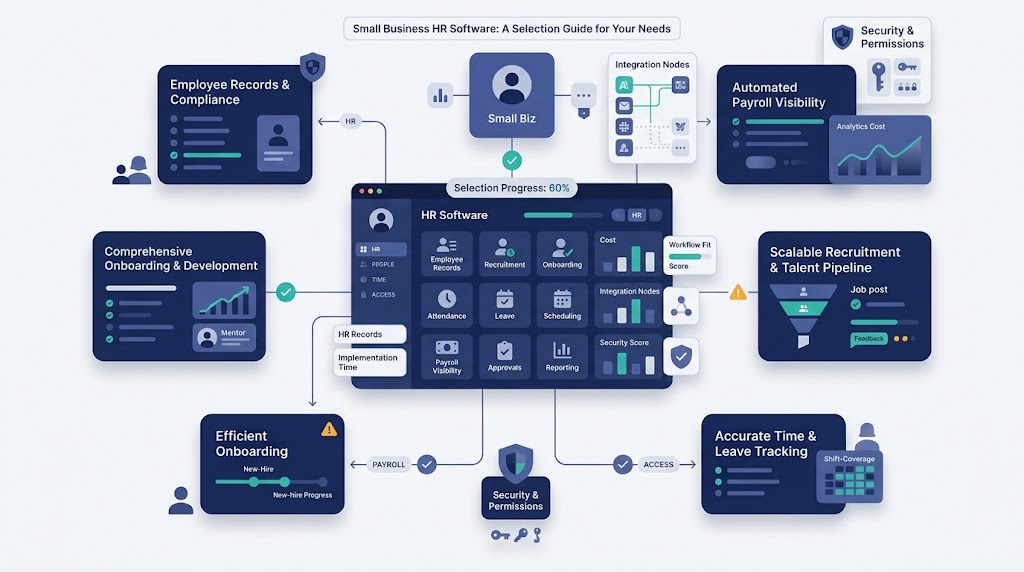
The best HR software for small business is the product that fits its hardest recurring workforce workflow. No platform fits every company.
This guide compares seven options by operating need. It also provides a scorecard, demo tests, security questions, and an implementation plan.
Build the operating basics before selecting technology. HR Management for Small Business explains the required owners, records, rules, and controls.
Best HR software for small business at a glance
Start with the business problem, workforce model, and required integrations. Then shortlist the products that match those conditions.
| Product | Best operating fit | Relevant capabilities | What buyers should verify |
| OryxBlue | Connected HR records and daily workforce operations | Recruitment, profiles, shifts, attendance, leave, approvals, payroll visibility, reports, assets, and access visibility | Current modules, payroll connections, integrations, security, and implementation |
| Gusto | US small businesses with payroll-led HR needs | Payroll, hiring, onboarding, benefits administration, time tracking, employee tools, and HR support | Supported locations, worker types, tax services, scheduling depth, and benefits availability |
| BambooHR | Broad core HR and employee lifecycle management | Employee data, reporting, hiring, onboarding, time, performance, compensation, payroll, and benefits modules | Regional module availability, workflow depth, integrations, and implementation support |
| Homebase | Hourly, shift-based, or location-based teams | Scheduling, time clocks, payroll, hiring, onboarding, HR tools, and team communication | Location limits, payroll coverage, manager permissions, reporting, and wider HR depth |
| Rippling | HR connected with IT, access, devices, and finance | Employee data, payroll, benefits, recruiting, time, application access, devices, expenses, and workflows | Required modules, country coverage, administrator effort, integrations, and service ownership |
| Zoho People | Configurable HR processes and existing Zoho users | Employee data, analytics, attendance, shifts, time off, performance feedback, learning, integrations, and workflows | Configuration effort, payroll connections, integration depth, permissions, and support |
| Deel | International teams and several worker types | Global HR records, employees, contractors, employer-of-record workers, payroll connections, documents, time, and approvals | Country coverage, worker types, local services, data handling, modules, and support roles |
This table is a starting point, not a ranking. A longer feature list does not prove a better operating fit.
Product scope was checked against official vendor pages on September 1, 2026. Plans, pricing, services, and regional availability can change.
The capability labels are not equivalent. Payroll visibility, payroll processing, optional modules, and employer-of-record services assign different responsibilities.
| Label | Possible scope | Evidence to request |
| Payroll visibility | Payroll-related data, reports, approvals, exports, or connections | Exact fields, user actions, handoffs, and system boundaries |
| Payroll product or service | Calculation, filing, payments, corrections, or selected services | Written responsibility matrix for each location and worker type |
| Employer-of-record service | Employment through a provider’s local entity | Country, entity, service, employer, and customer responsibilities |
| Optional module | Additional product capability or service package | Quoted plan, dependencies, limits, and separate charges |
HRIS, HRMS, HCM, and workforce management in one minute
Product labels often overlap. Buyers should compare actual workflows instead of relying on category names.
| Label | Common focus | Small-business buying question |
| HR software | General term for tools supporting people administration | Which required work does the quoted product perform? |
| Human resource information system | Employee records, documents, reporting, and basic workflows | Will this become the approved source for workforce data? |
| Human resource management system | Records plus broader hiring, time, performance, and employee processes | Which modules are included in the proposed plan? |
| Human capital management | Broader talent, workforce, compensation, and planning capabilities | Is that breadth useful now, or does it add avoidable complexity? |
| Workforce management software | Scheduling, time, attendance, capacity, leave, and coverage | Does it match hourly, shift, project, or location-based work? |
People searching for the best HRMS for small business usually need connected records and repeatable workflows. They may not need every enterprise module.
HR Management Software explains the wider category, system design, modules, and integrations. This page focuses on product selection.
How this small-business HR software shortlist was built
The shortlist covers seven distinct operating needs. It does not award one universal first place.
The list is not exhaustive. Inclusion required a distinct use case, relevant current product scope, and enough information for workflow-based comparison.
Exclusion does not mean another product is unsuitable. Buyers should apply the same method to every additional candidate.
Each profile uses current official product information. The comparison does not claim hands-on testing, customer-review scoring, or independent performance results.
Editorial note: OryxBlue is the publisher’s product and receives a dedicated section. The same workflow tests and buyer checks apply to every platform.
The extra detail reflects available publisher information, not an independent rating. OryxBlue must pass the same required workflow tests.
Start with required, preferred, and out-of-scope needs
Classify each requirement before attending a sales demonstration. This step limits feature-driven decisions and unexpected module costs.
- Required: Its absence blocks a core workflow or creates unacceptable business risk.
- Preferred: It improves efficiency, visibility, or adoption but is not essential.
- Out of scope: It adds cost or complexity without solving a current priority.
A requirement can change by company. Shift scheduling may be required for a retailer but irrelevant for a professional services firm.
Define what small business means for this purchase
Headcount alone does not determine product fit. Record the workforce and operating conditions that create complexity.
| Fit signal | Questions to answer |
| Workforce size | How many active employees, contractors, seasonal workers, and future users need records? |
| Work pattern | Are people salaried, hourly, shift-based, project-based, remote, or mobile? |
| Operating reach | How many locations, states, countries, entities, and legal employers are involved? |
| HR capacity | Who will configure, administer, audit, support, and improve the system? |
| Payroll model | Which provider processes payroll, and which data must move between systems? |
| Technology model | Which identity, finance, scheduling, payroll, benefits, and reporting tools must connect? |
A ten-person international company may need more complexity than a larger local office. Build the shortlist around the actual operating model.
Compare operating fit before feature count
Use the same eight questions for every product:
- Which workforce model does the product support well?
- Which record becomes the approved source?
- Which required workflows connect without duplicate entry?
- Which modules, services, and integrations are included?
- Which permissions protect sensitive workforce data?
- Which reports support named management decisions?
- Which work remains manual or belongs to another provider?
- Which implementation and support duties remain with the buyer?
The Functions of Human Resource Management can help identify the work areas needing software support.
Small-business HR software options by operating need
These profiles summarize official vendor positioning and stated capabilities. Verify every required feature within the proposed package and location.
Gusto for payroll-led US small businesses
Gusto presents a small-business platform centered on payroll and connected people administration. Its stated scope includes hiring, onboarding, benefits administration, time tracking, and employee self-service.
Gusto may fit a US employer wanting payroll at the center of its HR setup. Test whether its connected setup reduces common payroll handoffs.
Buyers should verify supported states, entities, worker types, tax services, and benefits availability. They should also test scheduling depth and accounting connections.
Ask which services Gusto performs and which duties remain with the employer. Confirm correction processes, cutoff handling, permissions, exports, and implementation support.
It may be less suitable when non-US workforce administration or deep shift operations dominate. Treat those needs as required demonstration tests.
BambooHR for broad core HR and employee lifecycle management
BambooHR presents a connected platform for employee data and people operations. Its stated applications cover reporting, hiring, onboarding, time, performance, compensation, payroll, and benefits administration.
BambooHR may fit a small business seeking a central employee record with broad lifecycle support. Its modules cover several recurring HR functions.
Buyers should verify payroll and benefits availability for every required region. They should also confirm scheduling needs, workflow configuration, integrations, permissions, and data residency.
Ask the vendor to map each requirement to an included module. Confirm implementation services, data migration work, administrator training, and continuing support.
It may be less suitable when detailed shift operations are the central requirement. Verify that workflow before considering wider module breadth.
Homebase for hourly and shift-based teams
Homebase presents tools for scheduling, time clocks, payroll, hiring, onboarding, HR, and team communication. Its positioning focuses on hourly and location-based work.
Homebase may fit small businesses built around hourly, shift-based, or location-based work. Its tools place scheduling and time workflows near daily operations.
Buyers should verify location limits, team limits, payroll coverage, and time-clock arrangements. They should also test manager permissions and multi-location reporting.
Ask whether broader employee records and lifecycle workflows meet the company’s needs. Confirm point-of-sale connections, offline behavior, exports, support, and required equipment.
It may be less suitable when international administration or broad talent processes dominate. Classify those needs before shortlisting it.
Rippling for connected HR, IT, access, and devices
Rippling presents a platform connecting HR, payroll, IT, and finance. Its stated scope includes recruiting, benefits, time, application access, device management, expenses, and workflows.
Rippling may fit a company coordinating employee changes across people records and technology. Test whether status changes update connected services as required.
Buyers should confirm which applications are required for each workflow. They should also verify regional scope, integrations, API limits, permissions, and administrator separation.
Ask who owns implementation across HR, IT, finance, and security. Confirm support arrangements, data handling, export rights, and ongoing configuration work.
It may be excessive for a company needing only basic records and one payroll connection. Compare administrative effort with the value of connected modules.
Zoho People for configurable workflows and Zoho users
Zoho People presents employee data, analytics, attendance, shifts, time off, performance feedback, learning, integrations, and configurable workflows.
Zoho People may fit businesses wanting configurable HR processes. Existing Zoho users should test whether its integrations simplify their current setup.
Buyers should verify the exact modules included within the proposed plan. They should confirm payroll connections, recruiting handoffs, attendance devices, external integrations, and reporting depth.
Ask the vendor to configure a real approval during the demonstration. Record the setup effort, permission behavior, support scope, and maintenance owner.
It may be less suitable for teams lacking configuration capacity. Verify whether required payroll work depends on another product or provider.
Deel for international teams and multiple worker types
Deel presents a global HR system supporting employees, contractors, and employer-of-record workers. Its stated capabilities include profiles, documents, workflows, time off, time tracking, approvals, permissions, and reporting.
Deel may fit a company managing several worker types across countries. Its wider services can connect international workforce administration with HR records.
Buyers should verify country coverage, supported worker arrangements, and the responsible contracting entity. They should also confirm local payroll, benefits, currencies, and departure responsibilities.
Ask which services belong to each module and country. Confirm data residency, integrations, assigned support roles, implementation work, and export rights.
It may add unnecessary scope for one-country teams with simple domestic needs. Verify shift scheduling when hourly operations drive the purchase.
When OryxBlue fits a small-business HR software shortlist
OryxBlue is an HR and workforce operations platform. It may suit businesses seeking connected employee records and daily workforce visibility.
Its stated scope covers recruitment, employee profiles, departments, locations, roles, permissions, and lifecycle status. It also supports schedules, shifts, attendance, leave, requests, approvals, dashboards, and reports.
OryxBlue provides payroll visibility. Buyers should not assume that this means payroll calculation, tax filing, remittance, or automatic compliance.
| Buyer fit signal | Why OryxBlue may fit | Evidence to request |
| Employee and workforce records sit in separate tools | Its scope connects profiles with daily workforce operations | Demonstrate one status change across affected records |
| Shifts, attendance, leave, and assignments drive daily work | These workforce processes appear within its stated scope | Resolve one leave and schedule conflict live |
| Requests and approvals lack shared status visibility | It supports requests, progress tracking, and role-based approvals | Delegate, approve, reject, and audit one request |
| Leaders need operational workforce reporting | Its reporting covers headcount, recruitment, utilization, capacity, and delivery readiness | Produce a permission-controlled report with defined fields |
| Payroll stays elsewhere, but HR needs related visibility | It provides payroll visibility without an established processing claim | Show exact fields, actions, exports, connections, and owners |
| Access and assigned resources need visibility | Its stated scope includes access and asset visibility | Show assignment, change, recovery status, and accountable owners |
OryxBlue supports the stated administrative, reporting, request, and approval workflows. Employers remain responsible for decisions, payroll, policies, and rule checks.
Request a demonstration spanning recruitment, active workforce administration, and an employee status change. Confirm how shared fields and approvals connect.
Available product information does not define every payroll field, report, approval, or connection. Request a live demonstration of the proposed scope.
Buyers should also verify current modules, integrations, permissions, hosting, retention, exports, training, and support. Ask for written scope before selection.
It may be less suitable when verified payroll processing or tax filing is required. An unsupported required integration can also disqualify it.
Which HR software features does a small business need?
Required features should follow operating needs. A product should solve recurring work without creating another conflicting source.
Employee records and lifecycle changes
The system should identify the employee, manager, role, department, location, status, and effective dates. It should preserve approved changes and history.
One change may affect several records. Test manager, location, schedule, payroll input, permissions, access, and reporting updates together.
The Employee Lifecycle explains the connected events from planning through departure.
Recruitment and onboarding workflows
Useful recruitment software records role approval, candidate stages, decisions, and next actions. An accepted candidate should trigger owned onboarding tasks.
Test whether shared information moves into the employee record without unsafe copying. Confirm manager, payroll, access, equipment, and training handoffs.
The Human Resource Management Process provides a wider trigger, owner, input, action, output, and review model.
Scheduling, attendance, time, and leave
Shift-based teams need current availability, skills, locations, schedules, attendance, and approved leave. Connected records reduce conflicting coverage information.
Test a leave request that conflicts with a published shift. The demonstration should show approvals, schedule changes, notifications, and payroll-related effects.
Payroll and benefits connections
The word payroll can describe different capabilities. It may mean processing, filing, coordination, export, integration, or visibility.
Ask who calculates payroll, files required returns, moves funds, handles corrections, and answers employee questions. Get responsibilities in writing.
Benefits availability can vary by location and provider. Verify plan administration, eligibility data, deductions, employee changes, and service responsibilities.
Requests, approvals, and permissions
Employees and managers need known request routes. Each request should show its owner, status, approver, decision, effective date, and resulting updates.
Permissions should reflect assigned duties. Test temporary delegation without exposing unrelated employee records or granting permanent authority.
Dashboards and workforce reporting
A useful report supports a named decision. Define the measure, source, owner, timing, access, interpretation, and expected action.
Test whether users see only permitted fields. Confirm filters, definitions, history, exports, scheduled delivery, and correction processes.
People Analytics will cover metric design, interpretation, and decision controls in greater depth.
Integrations and workflow automation
An integration should identify its source, destination, fields, timing, error owner, and correction method. A logo on a marketplace page proves little.
Ask the vendor to update a shared field and show the result. Test failures, duplicates, delayed changes, permissions, and audit history.
HR Automation will explain rules, triggers, exceptions, monitoring, and human ownership.
Failure-mode-first HR software fit scorecard
Start with recurring failures, not a vendor feature list. Each requirement should solve important work or reduce an identified risk.
Use one scorecard row for every important failure:
| Current failure | Required outcome | Class | Required data | Owner | Proof requested | Demo test | Deal-breaker | Decision |
| Candidate data needs re-entry after acceptance | Create one approved employee record | Required | Candidate, role, manager, location, and start details | Hiring owner | Workflow map and live demonstration | Convert an accepted candidate | Shared fields disappear or duplicate | Pass, conditional, or fail |
| Approved leave conflicts with a shift | Update coverage and affected records | Required for shift teams | Schedule, availability, leave, role, and location | Schedule owner | Conflict handling and audit evidence | Approve conflicting leave | Schedule remains unchanged | Pass, conditional, or fail |
| A payroll-related change arrives late | Route, approve, and track the exception | Required | Change, effective date, cutoff, owner, and approval | Payroll-input owner | Exception process and export behavior | Submit a late correction | No visible status or approval | Pass, conditional, or fail |
| A manager becomes unavailable | Delegate limited authority temporarily | Required | Role, request type, delegate, dates, and limits | Process owner | Permission and audit records | Delegate one approval | Unrelated data becomes visible | Pass, conditional, or fail |
| An employee changes status | Update every connected record correctly | Required | Employee, status, date, manager, role, and links | Employee-record owner | Dependency map and update history | Change department and manager | Connected records conflict | Pass, conditional, or fail |
| A departing employee retains open items | Close access, assets, records, and handoffs | Required | Departure, access, assets, duties, and owners | Departure owner | Offboarding workflow and closure report | Process a sample departure | Open access lacks an owner | Pass, conditional, or fail |
| A restricted report is exported | Protect fields and record the action | Required | User role, fields, filters, and export rights | Data owner | Role test and audit record | Export under two user roles | Restricted fields appear | Pass, conditional, or fail |
Define pass, conditional, and fail before each demonstration. A conditional result needs an accepted workaround, owner, cost, and review point.
Do not average away a failed required item. One serious gap can outweigh several preferred features.
How to compare total cost and contract scope
Published prices rarely show the complete operating cost. Compare the quoted configuration and the internal work needed to run it.
This page does not provide a vendor price table. Packages and service boundaries change, while similar labels can represent different responsibilities.
Set a three-year cost ceiling before demonstrations. Request written quotes for the same workforce, locations, entities, modules, support, and implementation scenario.
Subscription and module costs
Ask what drives charges. Common factors include employees, locations, administrators, modules, payroll runs, entities, worker types, and support levels.
Map every required feature to the quoted plan. Identify setup fees, minimum charges, add-ons, usage limits, annual commitments, and renewal terms.
Implementation and data migration
Price the work required to clean, map, import, validate, and reconcile records. Include documents, history, permissions, integrations, and report definitions.
Record which tasks belong to the vendor, buyer, partner, payroll provider, and integration owner. Unassigned work becomes a launch risk.
Integrations, support, and training
Ask whether integrations, API access, storage, exports, or support require separate charges. Confirm service hours and escalation paths.
Estimate administrator and manager time for setup, training, testing, maintenance, corrections, and reporting. Internal effort belongs in the cost comparison.
Contract terms and future expansion
Review renewal, price changes, cancellation, data export, deletion, transition help, and service commitments. Confirm these terms before signing.
Use realistic growth scenarios from Human Resource Planning. Test new sites, teams, countries, schedules, entities, and worker types.
Security and data governance questions
HR systems contain sensitive workforce data. Security evidence should match the proposed product, plan, hosting setup, and integrations.
Request current evidence for relevant controls:
- Multi-factor authentication and single sign-on options.
- Role-based access and configurable permission boundaries.
- Approval history and administrator audit records.
- Encryption during transfer and storage.
- Data location, retention, deletion, backup, and restoration practices.
- Subprocessor disclosure and change notices.
- Security incident response and notification terms.
- Independent reports or certifications relevant to company obligations.
- Account suspension, access review, and offboarding controls.
- Export formats, ownership rights, and deletion after termination.
- Separation between organizations within multi-tenant products.
Ask who can view, change, export, delete, and restore each data category. Test employee, manager, administrator, and restricted reporting roles.
Do not accept a general security statement as proof for every module. Connected products and partners may have separate controls.
How to run every product demo
Send the scorecard to every shortlisted vendor. Ask presenters to complete each listed test live within the proposed plan.
Add adoption and operating checks around those workflow tests:
| Test layer | Live task | Evidence to capture |
| Employee experience | Request leave and update one allowed profile field | Clarity, errors, accessibility, device support, and completion status |
| Manager experience | Find, approve, correct, and report one exception | Navigation, training burden, permissions, and escalation guidance |
| Administrator experience | Configure one rule and correct one failed transaction | Setup effort, audit history, recovery steps, and documentation |
| Support readiness | Walk through one serious launch issue | Channels, service hours, response targets, escalation, and ownership |
Use representative sample records without exposing unnecessary personal data. Include the people who currently own each tested workflow.
Record setup steps, manual workarounds, errors, and administrator effort. Confirm which settings can move from a pilot into production.
Test required browsers, devices, languages, and accessibility needs. Define pass, conditional, and fail before the demonstration begins.
How to plan migration and implementation
Software cannot repair unclear rules or conflicting records by itself. Prepare the operating system before configuration.
Map current workflows before configuration
Document the trigger, owner, input, approval, action, output, handoff, completion check, and exception route. Mark the approved source for every field.
Remove duplicate steps before automating them. Keep policy and employment decisions with authorized people.
Clean employee data before import
Identify missing, old, conflicting, and unnecessary data. Assign owners for corrections and obtain required approvals before migration.
Define retention, deletion, access, and export rules. Do not move every old file merely because storage is available.
Assign system and process owners
The system owner manages configuration, access, vendors, and technical changes. Process owners remain accountable for business outcomes and decisions.
Name backups, approvers, integration owners, data owners, and escalation contacts. Record authority limits before launch.
Pilot one complete employee journey
Test a representative journey from hiring through an employee change. Include time, leave, approvals, reporting, access, and payroll-related handoffs.
Resolve required gaps before wider rollout. Keep a rollback plan for data, integrations, and process changes.
Control payroll-connected cutover
Agree the final source, cutoff date, owners, correction window, and fallback process. Document every payroll-related field and integration acceptance test.
Run parallel reconciliation for an agreed cycle when appropriate. Compare employee counts, approved inputs, outputs, exceptions, and totals before launch approval.
Confirm go-live support and escalation contacts. Schedule post-launch reviews after the first affected payroll and employee-change cycles.
Common small-business HR software red flags
Treat these signals as questions requiring written answers:
- Required features appear only in a presentation, not the quoted scope.
- Similar module names hide different services or regional coverage.
- The vendor cannot demonstrate a required workflow live.
- Important changes require repeated manual entry across products.
- Permission roles expose more employee data than assigned duties require.
- Exports omit documents, history, audit records, or usable field definitions.
- Integration claims lack supported fields, timing, error handling, or ownership.
- Implementation work has no named owner, effort estimate, or acceptance test.
- Reports use definitions that differ from the buyer’s approved measures.
- Cancellation, migration, deletion, or transition terms remain unclear.
- A vendor suggests that software guarantees legal or payroll compliance.
- Automation makes sensitive decisions without accountable human review.
Do not treat every red flag as an automatic rejection. Record the answer, owner, evidence, condition, and remaining risk.
HR software buyer checklist
Use this checklist before selecting HR software for SMEs or smaller local businesses:
- Have we defined the operating problem before listing features?
- Did we classify requirements as required, preferred, or out of scope?
- Does each required workflow have an accountable owner?
- Did every vendor receive the same workflow test script?
- Were required features demonstrated within the proposed plan?
- Did we identify every manual workaround and duplicate entry point?
- Does each important field have one approved source?
- Were permissions tested with realistic user roles?
- Were integrations tested with required fields and update behavior?
- Did we review security evidence for the quoted configuration?
- Did we confirm location, entity, and worker-type support?
- Does the cost include modules, migration, integrations, training, and internal time?
- Are implementation owners, milestones, acceptance tests, and backups assigned?
- Can we export records, documents, history, and reports in usable formats?
- Are renewal, cancellation, retention, deletion, and transition terms clear?
- Did authorized people retain control over employment and payroll decisions?
Turn every uncertain answer into a condition. Assign its evidence, owner, deadline, and decision consequence.
Frequently asked questions about HR software for small business
What is the best HRMS for a small business?
The best HRMS for a small business fits its required workflows, workforce type, locations, integrations, and administrator capacity. No product wins every use case.
When does a small business need HR software?
Consider software when records, approvals, schedules, requests, reports, or employee changes become unreliable. Fix ownership and process gaps before configuration.
Can small-business HR software replace payroll software?
Sometimes, but the word payroll covers different services. Confirm calculation, filing, payments, corrections, locations, worker types, and employer responsibilities.
How should buyers compare HR software for SMEs?
Define required outcomes, run identical workflow tests, verify scope, review security, and compare complete operating cost. Record every limitation and workaround.
Can one platform manage employees and contractors?
Some platforms support both groups. Verify country coverage, worker records, permissions, payments, documents, reporting, and responsible legal entities.
Is free HR software enough for a small business?
It depends on required records, workflows, controls, integrations, and support. Free access can still create migration, administration, security, and switching costs.
What should a business verify before choosing OryxBlue?
Confirm current modules, payroll connections, integrations, permissions, security, exports, hosting, migration, training, support, and implementation responsibilities.
Can HR software make a company compliant?
No software makes a company compliant by itself. It can support controls while the employer verifies requirements and owns decisions.
Where to go next
Choose the three most costly or risky workflow failures. Classify the needed outcomes and send the same demonstration script to each vendor.
Use the Human Resource Management hub for the wider framework. Then connect the selected system with approved owners, decisions, records, and controls.